


In today’s fast-paced digital landscape, businesses constantly seek innovative ways to boost productivity, streamline operations, and enhance collaboration. Many organizations already rely on Google Workspace (formerly G Suite) for its robust suite of applications like Gmail, Google Drive, Google Docs, Sheets, and Meet. Yet, a powerful secret often remains untapped: the Google Workspace Marketplace. Much like an app store for your phone, this marketplace offers hundreds of add-ons and integrations designed to significantly amplify the capabilities of your core Google applications.
These add-ons are far more comprehensive than typical browser extensions. They seamlessly integrate with your Google Workspace environment, functioning consistently whether you’re working from a desktop computer, a tablet, or a smartphone. This unparalleled flexibility ensures that your enhanced workflows are always accessible, no matter your location or device. By integrating the right tools from the Google Workspace Marketplace, businesses can unlock new levels of efficiency, automate mundane tasks, and empower their teams with advanced functionalities previously requiring standalone, often costly, software solutions. The key lies in understanding the vast potential and identifying the tools that align perfectly with your operational needs.
Unlocking Potential: The Power of Google Workspace Marketplace Add-Ons
The Google Workspace Marketplace serves as a dynamic hub where developers offer specialized software solutions that extend the functionality of Google’s popular business applications. While some of these add-ons are freely available, many others come with a modest monthly subscription fee, typically complementing your existing Google Workspace subscription. However, this investment is often negligible when weighed against the substantial gains in efficiency, productivity, and organizational capability they provide. Integrating these powerful add-ons can transform your daily business operations, making complex tasks simpler, collaboration smoother, and overall output significantly higher. Discovering and implementing the right add-ons for your specific challenges is a strategic move towards a more agile and productive work environment.
Why Enhance Your Google Workspace Experience?
Investing time in exploring and integrating Google Workspace add-ons brings a multitude of benefits:
- Enhanced Productivity: Automate repetitive tasks, speed up document processing, and streamline communication, freeing up valuable time for more strategic work.
- Improved Collaboration: Foster real-time teamwork on documents, projects, and visual aids, ensuring everyone is on the same page and contributing effectively.
- Customized Workflows: Tailor your Google Workspace environment to meet the unique demands of your industry or specific team functions, creating a bespoke toolkit for maximum efficiency.
- Cost-Effectiveness: Often, add-ons provide specialized features at a fraction of the cost of purchasing and maintaining standalone, premium software suites.
- Seamless Integration: Enjoy a unified experience where tools work together effortlessly within the Google ecosystem, reducing context switching and improving user adoption.
- Data Security & Compliance: Benefit from the inherent security architecture of Google Workspace, with many add-ons adhering to stringent data protection standards.
By leveraging these extensions, businesses can transform Google Workspace from a basic set of office tools into a powerful, customized operational platform. Let’s delve into five highly effective add-ons that can redefine how your team works.
1. Lucidchart Diagrams: Visualizing Complex Ideas with Ease
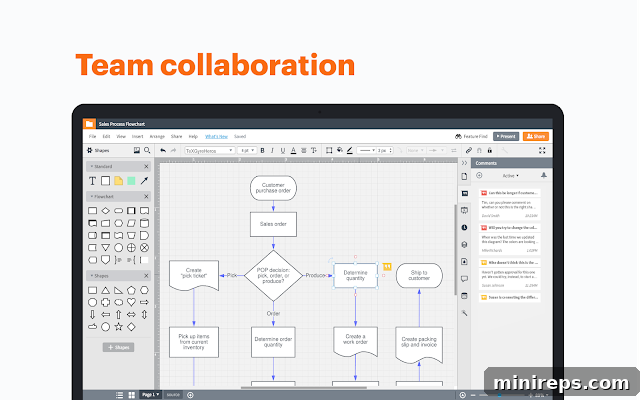
Lucidchart Diagrams stands out as an indispensable online diagramming tool that empowers teams to articulate and collaborate on complex ideas visually. In an age where information overload is common, data visualization accelerates comprehension, fosters innovation, and ensures wider adoption of concepts. Whether your team needs to map out intricate flowcharts, design user interfaces with wireframes, create organizational charts, develop network diagrams, or conduct strategic SWOT analyses, Lucidchart provides an intuitive, cloud-based platform for all. Its deep integration with Google Workspace allows for real-time collaboration directly within your Google Docs, Sheets, and Slides, transforming static documents into dynamic, interactive presentations. This visual approach streamlines project planning, problem-solving, and communication, making it easier for everyone in your organization to understand and contribute to initiatives.
Key features include a vast library of shapes and templates, drag-and-drop functionality, and robust version history. Teams can work together simultaneously on the same diagram, with changes visible instantly, fostering a highly collaborative environment. Presenting ideas becomes more impactful, and feedback loops are significantly shortened. For any business striving to improve clarity, efficiency, and collective understanding across projects, Lucidchart is a game-changer, making it a top contender for enhancing your Google Workspace toolkit.
2. Kami: Advanced PDF and Document Annotation
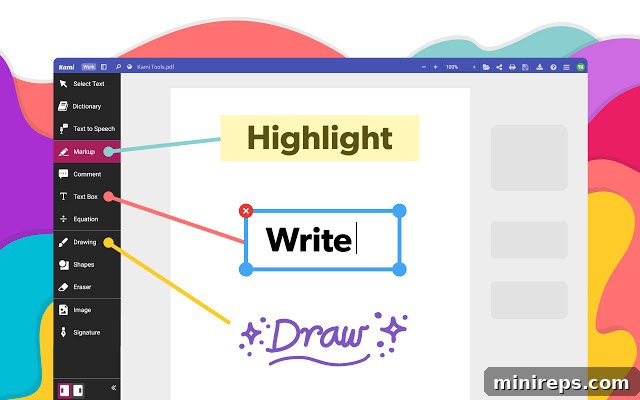
Kami revolutionizes how you interact with documents, particularly PDFs. This powerful add-on allows users to take virtually any existing document – including scanned PDFs, Word documents, or image files – and transform it into an interactive canvas. You can write, draw, type, highlight, underline, strike out text, add comments, and embed various annotations, making it an incredibly versatile tool for reviewing, editing, and collaborating on digital paperwork. Kami excels in its seamless integration with Google Drive, automatically syncing and saving your files, ensuring that your work is always up-to-date and accessible from anywhere.
For organizations seeking a more economical yet highly functional alternative to costly Adobe solutions, Kami offers compelling features. Its built-in Optical Character Recognition (OCR) technology is a significant advantage, converting scanned document images into editable, workable text, thus making previously inaccessible information searchable and modifiable. Furthermore, Kami facilitates easy file conversion, allowing you to save documents in PDF format or export them to other types. This capability is invaluable for educators, legal professionals, administrative staff, and anyone who regularly deals with a high volume of documents, helping to create a truly paperless and efficient office environment within the Google Workspace ecosystem.
3. Yet Another Mail Merge (YAMM): Personalized Email Campaigns at Scale
Yet Another Mail Merge (YAMM) stands out as the premier mail merge tool for anyone leveraging Gmail and Google Sheets. It transforms the way businesses conduct email outreach by enabling the sending of highly personalized mass emails with exceptional deliverability, all directly from your familiar Gmail account. YAMM allows you to craft individual messages for hundreds or even thousands of recipients simultaneously, using data from a Google Sheet as your mailing list and personalization source. This means each recipient receives an email tailored to them, significantly increasing engagement rates compared to generic bulk emails.
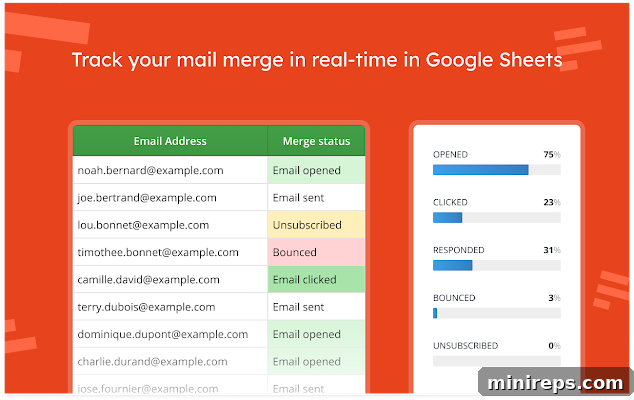
Beyond its powerful sending capabilities, YAMM provides invaluable real-time insights into your email campaigns. Automatically integrated with your Google Sheets, you can track critical metrics such as email opens, clicks on embedded links, direct responses, bounces, and unsubscribes. These analytics are crucial for optimizing future campaigns, understanding recipient behavior, and measuring the true impact of your outreach efforts. Whether for marketing newsletters, event invitations, sales prospecting, HR communications, or internal announcements, YAMM empowers your organization to achieve higher open and click rates, fostering stronger connections and more effective communication strategies directly within the Google Workspace environment.
4. DocHub: Comprehensive Document Management and eSignatures
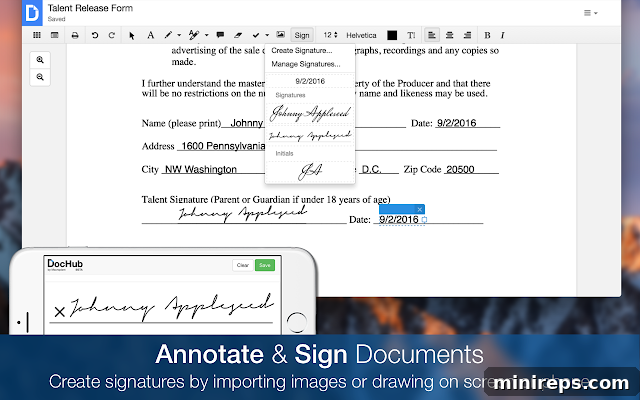
DocHub positions itself as an essential tool for modern document management, streamlining how individuals and organizations handle, sign, and distribute documents. Its Google Workspace Marketplace add-on provides robust capabilities to open and import documents effortlessly from various sources – directly from your computer, Gmail attachments, Google Drive, or any web page URL. The platform’s core strength lies in its ability to facilitate legally binding eSignatures, making the process of signing contracts, agreements, and forms incredibly efficient and secure. This eliminates the need for printing, signing, scanning, and re-uploading, saving significant time and resources.
Beyond eSignatures, DocHub offers a comprehensive suite of features including PDF editing, annotation tools, and the unique ability to send and receive faxes digitally. Users can create reusable templates for frequently used documents, allowing them to dispatch copies to multiple recipients for signing, saving, or filing with just a few clicks. This functionality is invaluable for sales teams closing deals, HR departments managing onboarding paperwork, legal professionals handling contracts, and administrative staff dealing with daily documentation. DocHub transforms Google Workspace into a powerful document lifecycle management system, enhancing compliance, reducing turnaround times, and boosting overall operational efficiency.
5. ZIP Extractor: Simplified File Management for Google Drive
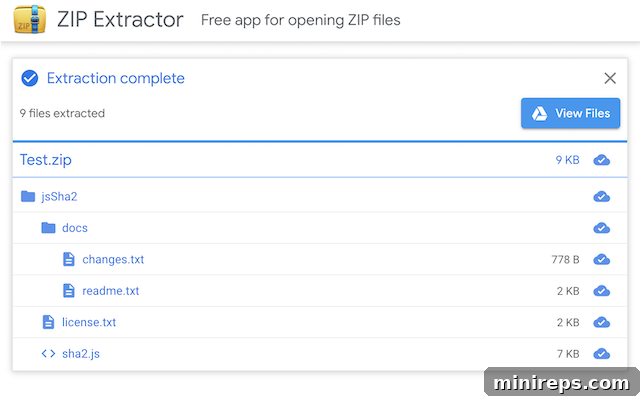
ZIP Extractor is an incredibly useful and free application designed to streamline the handling of compressed files directly within your Google Drive and on your computer. In a world where large files and collections of documents are frequently shared as ZIP archives, this add-on simplifies what could otherwise be a cumbersome process. It supports numerous file formats contained within ZIP files, including those that are password-protected, ensuring flexibility and security.
One of its most compelling features is the ability to preview and download individual files from inside a ZIP archive without needing to extract the entire package. This saves time, bandwidth, and local storage space, especially when you only need one or two items from a large compressed folder. The best part is its seamless integration with Google Drive: once files are extracted, ZIP Extractor intelligently saves them directly into your Google Drive, neatly organized. This eliminates the need to download the ZIP to your computer, extract it locally, and then manually re-upload the contents to Drive, preventing clutter on your local machine and ensuring all your important documents are cloud-accessible and properly filed. For anyone who regularly sends or receives compressed files, ZIP Extractor is an invaluable addition to their Google Workspace toolkit, making file management effortless and efficient.
Elevate Your Business with Google Workspace Add-Ons
The Google Workspace Marketplace offers a treasure trove of tools designed to propel your business forward. By integrating carefully selected add-ons like Lucidchart, Kami, Yet Another Mail Merge, DocHub, and ZIP Extractor, you can transform your daily workflows, enhance team collaboration, and unlock unprecedented levels of productivity. These solutions demonstrate how extending the functionality of your core Google applications can lead to significant operational efficiencies and a more dynamic, responsive work environment. Don’t let your team miss out on the competitive edge that these powerful integrations provide. Explore the marketplace today to find the perfect tools that align with your unique business needs and empower your journey toward greater success.