


In the rapidly expanding digital landscape, the specter of cybercrime looms larger than ever before. With businesses collectively losing over $1 trillion in 2020 globally due to malicious online activities, the methods employed by cybercriminals are becoming increasingly sophisticated and audacious. Navigating this complex environment without a clear understanding of potential attack vectors and defense mechanisms leaves organizations dangerously exposed to becoming the next casualty. From pervasive phishing attacks and endpoint security vulnerabilities to devastating ransomware campaigns and insidious insider threats, the array of risks is vast. Among these, the use of look-alike domains stands out as a deceptively simple yet remarkably effective strategy for perpetrating fraud and scams.
Look-alike domains, often at the heart of elaborate phishing schemes, represent a significant threat to both individual users and established businesses. These fraudulent web addresses are meticulously crafted to mimic legitimate ones, preying on human error and trust. Their objective is clear: to trick unsuspecting individuals into divulging sensitive information, downloading malware, or making fraudulent payments. This article aims to arm you with the knowledge necessary to identify, understand, and effectively protect yourself and your business against the pervasive threat of look-alike domains. We will delve into their nature, explore the cunning ways they are created, shed light on their potential impacts, and outline comprehensive strategies for robust defense.
Understanding the Threat: What are Look-Alike Domains?
To fully grasp the concept of a look-alike domain and its potential impact, it’s essential to revisit the fundamentals of what a domain truly is. At its core, a domain name serves as a human-friendly identifier for a website or server on the internet. Instead of remembering complex numerical IP addresses (like 192.0.2.1), we use memorable names such as “google.com.” This system, managed by the Domain Name System (DNS), translates these easy-to-recall domain names into the IP addresses computers need to locate resources online. Every single website on the internet possesses a unique domain, making the process of choosing and registering one a critical initial step for any new website or online business. However, this very system, designed for convenience, also presents a significant vulnerability that cybercriminals are eager to exploit.
As the name suggests, a look-alike domain is a web address that bears an uncanny resemblance to the legitimate domain of an authentic website. The similarities are often so close that, at first glance, the distinctions are almost imperceptible. Cybercriminals strategically purchase and register these subtly altered domains with a malicious intent: to intercept traffic meant for the genuine site, deceive users into believing they are on a trusted platform, and ultimately steal sensitive information like login credentials, credit card details, or confidential business data. This deceptive practice, also known as typosquatting or brand impersonation, leverages common human tendencies such as rushed browsing, minor typing errors, or a lack of careful scrutiny, turning them into potent tools for fraud.
Anatomy of Deception: How Cybercriminals Craft Look-Alike Domains
A domain name is typically composed of three primary parts: the subdomain, the second-level domain (SLD), and the top-level domain (TLD). Understanding these components is crucial to identifying how attackers manipulate them.
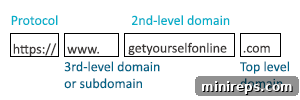
The subdomain typically precedes the main domain name and includes elements like “www.” or “mail.” It essentially designates a specific section or service within a larger domain. The top-level domain (TLD) is the segment found at the very end of a domain name, such as “.com,” “.org,” “.net,” or country-code TLDs like “.uk” or “.jp.” Finally, the second-level domain (SLD) is the unique name chosen by an organization (e.g., “google” in “google.com”), combined with the TLD, forming the core identity of the website.
When cybercriminals set out to create look-alike domains, they strategically target one or more of these parts for subtle alteration, aiming to confuse users. Here are some of the most common techniques they employ:
- Typosquatting: This technique relies on common typing errors. Attackers register domains that are misspellings of popular legitimate sites (e.g., “googel.com” instead of “google.com,” or “facebok.com” for “facebook.com”). Users prone to quick typing often fall victim to these subtle errors.
- Homoglyph Attacks (IDN Spoofing): Perhaps one of the most insidious methods, homoglyph attacks exploit the visual similarity between characters from different character sets. For instance, a Cyrillic ‘а’ can look identical to a Latin ‘a’. Attackers use these visually similar characters to create domains that appear identical to legitimate ones, even though the underlying characters are different. An example might be “apple.com” using a Cyrillic ‘a’ that appears as “аpple.com” to the naked eye.
- Subdomain Abuse: In some cases, criminals might not change the main domain but instead create a deceptive subdomain. For example, instead of mimicking “yourbank.com,” they might register “yourbank.updates.com” or “secure-login.yourbank.com.” While the core domain might seem legitimate, the addition of misleading subdomains is designed to trick users into thinking it’s an official portal.
- TLD Manipulation: Given over 1,600 different domain extensions available today, attackers frequently register a legitimate second-level domain with a different top-level domain. For instance, if your business uses “.com,” a criminal might register “yourcompany.org,” “yourcompany.net,” or even a country-specific TLD like “yourcompany.co.uk” to target users in a different region. The change from a familiar TLD to a less common one can often go unnoticed.
- Hyphenation and Keyword Insertion: Another common trick involves adding hyphens or extra keywords to a brand’s name. “your-company.com” instead of “yourcompany.com” or “yourcompany-support.com” are examples. These slight alterations can make the domain appear official, especially when paired with a convincing phishing email implying a support issue or a system update.
The fundamental reason these scams work so effectively is rooted in human psychology. When encountering a URL, our brains don’t typically parse every character meticulously. Instead, we perform a quick scan, looking for familiar patterns and keywords. If the domain name roughly matches what we expect, our brains are more likely to approve it, leading us to click through or interact with the site without a second thought. Considering that there are over 366.8 million domain names registered on the internet, the sheer volume provides ample opportunity for such deceptive tactics. Fortunately, implementing a combination of awareness and strategic precautions can significantly mitigate the risk of falling victim.
The Far-Reaching Consequences of Look-Alike Domain Attacks
The implications of falling victim to a look-alike domain scam can be devastating, extending far beyond initial financial losses. For individuals, it can mean compromised bank accounts, stolen identities, and severe personal data breaches. For businesses, the consequences are multifaceted, impacting financial stability, reputation, legal standing, and operational continuity. The average small business loses approximately 5% of its total revenue each year due to fraudulent activities, and look-alike domain schemes are a significant contributor to this statistic. Understanding these potential ramifications underscores the critical importance of robust defense strategies.
- Financial Losses: Direct theft of funds through fraudulent transactions, unauthorized access to bank accounts, or stolen credit card information. Beyond direct theft, businesses face significant costs associated with incident response, forensic investigations, system restoration, and increased insurance premiums.
- Reputation and Brand Damage: When customers fall victim to a scam involving a look-alike domain impersonating your brand, their trust in your legitimate business is severely eroded. This can lead to negative publicity, customer churn, decreased sales, and a long-term struggle to rebuild a tarnished brand image. Consumers often attribute the scam to the authentic brand, even if they were not directly at fault.
- Data Breaches and Confidentiality Risks: Look-alike domains are powerful tools for phishing sensitive data. This can include customer Personally Identifiable Information (PII), confidential business data, intellectual property, or employee credentials. Such breaches can lead to regulatory fines, legal action, and a severe compromise of competitive advantage.
- Legal and Regulatory Penalties: Depending on the nature of the data compromised and the jurisdictions involved, businesses can face hefty fines under data protection regulations like GDPR (General Data Protection Regulation) or CCPA (California Consumer Privacy Act). Legal battles with affected customers or other stakeholders can also incur substantial costs and damage.
- Operational Disruption: Dealing with a look-alike domain attack requires significant internal resources. IT teams may be diverted from core tasks to address the security incident, investigate the breach, notify affected parties, and implement remedial measures. This diversion can lead to operational downtime and reduced productivity.
Comprehensive Protection: Safeguarding Against Look-Alike Domain Fraud
Protecting against look-alike domains requires a multi-layered approach, encompassing vigilance for individual internet users and robust, proactive strategies for businesses. The goal is not just to react to attacks but to build a resilient defense that deters and mitigates threats before they cause significant harm.
For Individual Internet Users: Staying Alert
As an average internet user, your primary defense lies in heightened awareness and critical thinking. Simple habits can dramatically reduce your vulnerability:
- Vigilant URL Verification: Always double-check the URL of any website, especially before entering personal or financial information. Don’t just glance; scrutinize every character. Pay attention to the TLD (e.g., ensure it’s “.com” and not “.co” or “.net” if expecting a “.com”). Look for subtle misspellings, extra words, or unusual characters (like those used in homoglyph attacks). Hover your mouse over links in emails or messages before clicking to reveal the actual URL without navigating to it.
- Bookmark Legitimate Websites: Instead of typing URLs from memory or relying on search engine results for frequently visited sites (like banking portals or shopping sites), create and use bookmarks. This ensures you always navigate to the genuine address.
- Scrutinize Emails and Messages: Phishing attacks frequently deliver look-alike domain links. Be suspicious of unsolicited emails, especially those with urgent language, generic greetings, or requests for sensitive information. Check the sender’s email address for inconsistencies – often, the display name might look legitimate, but the actual email address is clearly fraudulent.
- Enable Multi-Factor Authentication (MFA): Even if your login credentials are stolen through a look-alike domain, MFA (e.g., a code sent to your phone) provides an essential second layer of security, significantly complicating unauthorized access.
- Utilize Browser and Antivirus Security Features: Most modern web browsers include built-in phishing and malware protection that warns users about suspicious websites. Keep your browser and antivirus/antimalware software updated to benefit from the latest threat intelligence.
For Businesses and Website Owners: Proactive and Reactive Strategies
For businesses, a comprehensive strategy is essential to protect not only internal operations but also customer trust and brand reputation. Consumers often direct their anger at both the fraudulent website and the authentic brand when scammed, making a swift and decisive response paramount.
Proactive Domain Management and Brand Protection
- Defensive Domain Registration: One of the most effective proactive measures is to defensively register domain names that are common misspellings of your primary domain, variations with different TLDs (e.g., .net, .org, country codes), and even hyphenated versions. This preemptive step prevents cybercriminals from acquiring these similar domains in the first place, denying them a critical tool for impersonation. A reputable domain registrar can assist in identifying and acquiring these protective domains.
- Robust Brand Monitoring: Implement tools and services that actively monitor new domain registrations for names that are confusingly similar to your brand or trademarks. Early detection allows for quicker intervention and takedown procedures before significant harm occurs.
- Leverage Trademark Protection: Registering your brand name as a trademark provides legal standing to combat cybersquatting and domain impersonation. Trademark laws empower you to pursue legal action against those who register domains with malicious intent, using mechanisms like the Uniform Domain-Name Dispute-Resolution Policy (UDRP).
Enhancing Website Security Infrastructure
- Implement Premium SSL Certificates: Beyond basic encryption, premium SSL certificates provide enhanced validation, assuring users that they are indeed connecting to the legitimate organization. These certificates are up to 97% more secure than basic Domain Validated (DV) certificates, offering a stronger trust signal and protecting against Man-in-the-Middle attacks.
- Utilize Domain Locking and DNSSEC: Domain locking prevents unauthorized transfers or modifications of your domain name. DNS Security Extensions (DNSSEC) add a layer of authentication to DNS data, protecting against DNS spoofing and cache poisoning, ensuring that users are directed to your authentic website.
- Deploy Web Application Firewalls (WAFs): A WAF helps protect your web application from various attacks, including those that might exploit vulnerabilities often linked to look-alike domain schemes.
- Conduct Regular Security Audits: Periodically audit your website and online presence to identify and remediate potential vulnerabilities that attackers might exploit.
Employee Education and Awareness
Your employees are often the first line of defense. Investing in their education is crucial:
- Comprehensive Phishing Training: Regularly train employees on how to identify phishing emails, suspicious links, and look-alike domains. Use simulated phishing exercises to test their awareness and reinforce best practices.
- Establish Clear Reporting Protocols: Ensure employees know how to report suspicious emails or detected look-alike domains internally. A swift internal response can prevent widespread compromise.
Swift Incident Response and Takedown Procedures
Should an impersonating site be discovered, a rapid and decisive response is paramount:
- Develop a Robust Incident Response Plan: Have a clear plan in place for how to respond to a look-alike domain discovery, including steps for investigation, evidence collection, customer notification, and recovery.
- Understand Legal Avenues: For organizations in the United States, the Digital Millennium Copyright Act (DMCA) of 1998 provides a mechanism to request the takedown of sites infringing on your digital assets. Service providers typically have a few days to comply with such requests. Internationally, the UDRP offers a dispute resolution process for trademark holders to reclaim domain names registered in bad faith.
- Partner with Reliable Hosting and Registrar Services: Choose a web host that offers exceptional customer support and robust privacy protection. According to London-based web developer Alex Williams of Hosting Data, reputable web hosting providers should also assist in identifying and removing look-alike domains, provided you supply the necessary documentation and evidence. When selecting a service provider, prioritize those offering advanced security features such as domain locking, IP lock and logging, and comprehensive monitoring and enforcement services.
Transparent Customer Communication
- Educate Your Customer Base: Regularly inform your customers about how to identify official communications from your brand and alert them to potential look-alike domain scams. Provide examples of what to look for and what to avoid.
- Provide Clear Fraud Reporting Channels: Make it easy for customers to report suspicious emails or websites that claim to be your brand. This helps in early detection and faster response.
- Proactive Public Relations: If a look-alike domain attack occurs and gains traction, issue clear public statements to inform customers, apologize for the inconvenience, and outline the steps you are taking to resolve the issue and protect their data. This transparency can help mitigate reputation damage.
Securing Your Digital Future: A Continuous Commitment
The digital age, while offering unparalleled opportunities, also brings a persistent and evolving threat landscape. Cybercriminals will undeniably persist for as long as the internet exists, constantly refining their tactics. However, this reality does not mean businesses or individuals should passively accept vulnerability. By actively cultivating knowledge about the diverse scams and fraudulent activities that permeate the online world, you can establish robust defenses and proactive measures to stay better protected.
Implementing essential and often simple steps, such as diligently verifying website authenticity, investing in robust privacy protections, and deploying advanced security tools like premium SSL certificates, can make an enormous difference. These certificates, being significantly more secure than basic encryption-only DV websites, stand as a formidable barrier when hackers target your domain for their next malicious scheme. Ultimately, safeguarding your digital assets and reputation is an ongoing commitment—one that demands continuous vigilance, education, and investment in a secure online future.