

Unlock Peak Productivity: Mastering Smart File Management with Gemini in Google Drive
In today’s fast-paced digital world, professionals across all industries—from large enterprises to agile startups—face a universal challenge: managing an ever-growing deluge of information while constantly striving for more time in their day. The sheer volume of documents, emails, presentations, and media can quickly become overwhelming, hindering productivity and diverting focus from core strategic initiatives. This is precisely where Gemini in Google Drive emerges as a game-changer. As an integral part of your Google Workspace subscription, Gemini transforms your Google Drive into a proactive, intelligent personal assistant. It’s designed not just to help you store your files, but to deeply understand, manage, and interact with them, effectively giving you back precious hours in your day so you can dedicate your energy to what truly drives your business forward.
Gone are the days of endless scrolling, meticulous manual organization, or the tedious task of sifting through verbose documents to pinpoint critical information. Gemini leverages advanced artificial intelligence to streamline your workflow, offering intuitive ways to interact with your data and transforming complex information into actionable insights. This article delves into how Gemini in Google Drive can revolutionize your approach to file management, enhance collaboration, and supercharge your overall productivity within the Google Workspace ecosystem.
Unlocking Unprecedented Productivity: Gemini’s Core Capabilities in Google Drive
Gemini AI brings a new level of intelligence to file management, fundamentally changing how you interact with your digital workspace. By automating mundane tasks and surfacing vital information, it saves you significant time and energy. Let’s explore the transformative ways Gemini can help you achieve more in less time:
- Intelligent Summarization: Swiftly grasp the essence of lengthy videos, comprehensive documents, detailed PDFs, or even entire folders. Gemini condenses vast amounts of information into concise, digestible summaries, allowing you to quickly get up to speed without reviewing every detail.
- Conversational AI for Your Files: Engage in dynamic discussions directly with your stored content. Pose questions, explore concepts, and retrieve specific information from your documents, presentations, and spreadsheets as if you were chatting with a knowledgeable colleague.
- Rapid Insight Extraction: Instantly obtain quick, contextual insights about any project, topic, or dataset. This capability is invaluable for strategic planning, research, and making informed decisions on the fly.
- Automated Organization: Simplify the daunting task of organizing your Google Drive. Gemini can help you move, categorize, and create files and folders based on content, themes, or specified criteria, keeping your workspace neat and accessible.
- Content Generation and Enrichment: Generate tables, summaries, or even relevant images by leveraging existing files in your Drive or by pulling up-to-date data from the web, streamlining content creation and research processes.
- Effortless File Management and Recovery: Locate, delete, and recover files using simple, natural language prompts, eliminating the frustration of searching through complex directory structures.
These capabilities are not just conveniences; they represent a fundamental shift in how we manage digital assets, turning Google Drive into a truly intelligent partner in your daily operations. Let’s delve deeper into some of the most popular and impactful use cases.
Master Your Information: Summarize and Extract Key Insights from Documents, Videos, & More
In an era of information overload, the ability to quickly distill critical data from dense content is paramount. Gemini AI empowers you to cut through the noise, allowing you to access the most pertinent information much faster. Utilize Gemini to generate comprehensive summaries and pose specific questions about virtually any document or video content stored in your Google Drive. Whether you’re dealing with a multi-page research report, a 45-minute training session, a lengthy meeting transcript, or a detailed product specification, Gemini can instantly provide the core takeaways.
Imagine the significant time savings and efficiency gains when you no longer need to rewatch or reread every piece of content to extract the main points, action items, or critical details. For busy executives, this means quicker decision-making; for students and researchers, faster literature reviews; and for teams, streamlined meeting preparation and follow-ups. Gemini acts as your intelligent content analyst, ensuring you are always informed without being overwhelmed. It helps in preparing for presentations, catching up on project updates, or understanding complex topics by presenting the information in a concise, actionable format.

Example Prompts:
- “Summarize this video, focusing on key decisions made.“
- “List all action items and their assigned owners from this meeting recording.“
- “What are the core arguments and supporting evidence presented in this announcement video regarding the new product launch? “
- “Provide a concise overview of this research paper’s methodology and findings.“
- “Identify the five most frequently asked questions in this customer support training document.“
Engage in Dynamic Conversations with Your Files: Your AI Collaborator
Sometimes, what you really need is not just a summary, but a dialogue – a way to explore ideas, clarify details, or connect disparate pieces of information. In the age of advanced AI, Gemini provides precisely this capability. With Gemini, your Google Drive transforms into an interactive knowledge base, allowing you to have focused, contextual conversations about your projects and files. It intelligently pulls context from relevant documents, specific folders, and even integrates past email communications (with your explicit permission) to provide deeply informed and coherent responses. This feature is akin to having an expert colleague who has reviewed all your relevant materials and is ready to discuss them with you.
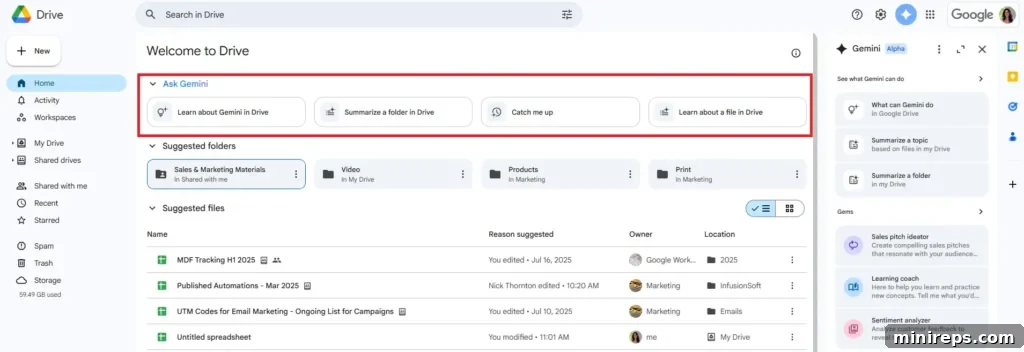
To initiate this powerful interaction, you can start with the suggested nudges conveniently located at the top of your Drive homepage. These prompts are continuously evolving to offer the most relevant starting points for your queries:
- Learn about Gemini in Drive
- Summarize a folder in Drive
- Learn about a file in Drive
For more tailored and highly relevant responses, you retain full control over the information Gemini references. After entering your initial prompt, you can easily click “Add sources” to select specific files, or simply drag and drop documents directly into the side panel. This mechanism ensures transparency and allows you to guide Gemini towards the most pertinent data, guaranteeing that the conversation is driven by the information you deem most critical. This granular control makes Gemini an incredibly versatile tool for nuanced research, complex project analysis, and brainstorming sessions where deep contextual understanding is key.
Example Prompts:
- “What emerging trends are mentioned across all reports in the ‘Q3 Market Analysis’ folder, and how do they impact our product strategy?“
- “Compare the proposed budget in ‘Project X Proposal.docx’ with the actual spending outlined in ‘Project X Financials.xlsx’.“
- “Explain the main technical challenges discussed in ‘Development Meeting Notes.pdf’ and suggest potential solutions based on ‘Engineering Best Practices.pptx’.“
Revolutionizing PDF Interaction: From Static to Dynamic with Gemini
PDFs have long been a cornerstone of digital documentation, yet they are notoriously difficult to interact with. Editing, extracting specific data, or simply navigating through complex, multi-page PDFs has traditionally been a source of frustration. Gemini in Google Drive fundamentally alters this experience. With Gemini, you can interact with any type of PDF, regardless of its origin or complexity—whether it’s a scanned image document, a computer-generated report, a text-heavy legal brief, or a file densely packed with tables and charts.
Gemini extends its full suite of AI capabilities to PDFs, transforming them from static files into dynamic, queryable resources. You can:
- Summarize Lengthy Documents: Quickly obtain the core arguments, key findings, or essential sections from extensive reports, manuals, or research papers.
- Ask Detailed Questions: Query the PDF content directly to retrieve specific facts, figures, or explanations, bypassing the need for manual searching.
- Rewrite or Refine Content: Request Gemini to rephrase sections, simplify complex paragraphs, or adjust the tone of specific passages within the PDF content.
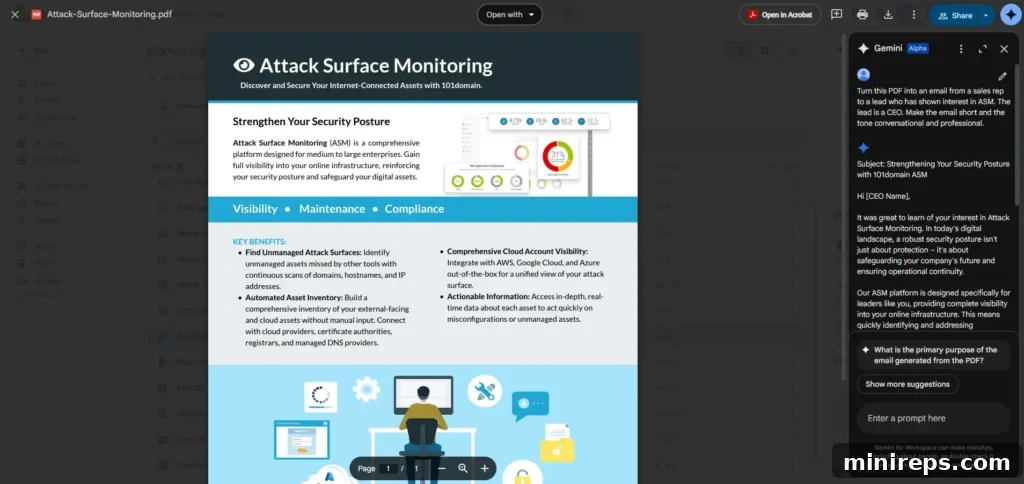
- Generate New Content: Create new content, such as a brief email, a marketing blurb, or a comparative analysis, based on the information extracted from your PDF.
- Combine Information for Comparison: Seamlessly merge and compare data or insights from multiple PDFs side-by-side, which is incredibly powerful for complex evaluations.
This comprehensive interaction with PDFs is especially useful for tasks such as in-depth research, vendor evaluations, screening numerous resumes, or reviewing legal contracts. Essentially, in any scenario where you need to quickly review, analyze, and leverage information from dense documents, Gemini makes a colossal difference, turning hours of manual work into mere minutes of AI-powered analysis.
Example Prompt:
- “Turn this PDF about our ASM product into a short, friendly email from a sales rep to a CEO. Keep it short, professional, and conversational, highlighting three key benefits for a C-level executive.“
- “Extract all financial figures from this Q3 earnings PDF and present them in a concise table format.“
- “Compare the terms and conditions outlined in ‘Vendor Contract A.pdf’ with ‘Vendor Contract B.pdf’ and list the major differences.“
Tip for Success: Be specific and iterative! Clear, detailed prompts produce significantly better, more actionable results. Don’t hesitate to refine your prompts based on initial responses. For frequently recurring tasks, you can also save reusable instructions by creating Gems (custom AI personas tailored to your specific tasks and preferences), further enhancing efficiency.
Beyond Core Files: Advanced Gemini Features for Enhanced Workflow
Gemini’s capabilities extend beyond direct file interaction, offering a suite of features designed to enhance your overall Google Workspace experience and eliminate workflow friction.
Seamless Web Search Integration: Stay Focused
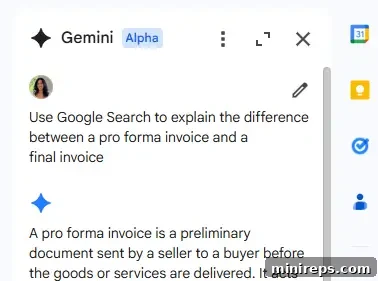
One of the most disruptive aspects of digital work is the constant need to switch contexts—bouncing between applications, browser tabs, and documents. Gemini in Google Drive minimizes this disruption by offering a built-in web search directly within its side panel. Instead of opening a new browser tab to find external information relevant to your current task, simply describe what you need, and Gemini will retrieve answers and data directly into your Drive interface. This feature is invaluable for enriching documents with external research, verifying facts, or exploring related concepts without ever leaving your workflow. It ensures you remain focused on the task at hand, with all necessary information aggregated in one intelligent hub.
Unifying Your Google Workspace Information: Cross-App Insights
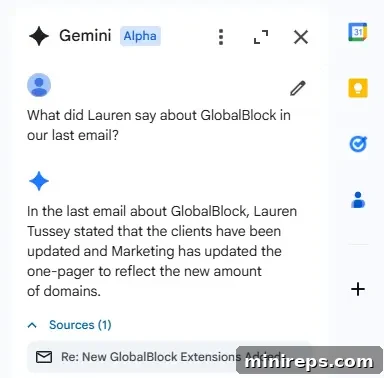
Gemini’s true power shines in its ability to transcend individual applications within the Google Workspace ecosystem. You can ask sophisticated questions that span across your various Google apps, pulling information from different sources to provide a holistic view. For example, you might ask, “What did Jamie say about the onboarding checklist in our last email, and is there a related document in Drive?” This capability eliminates information silos, allowing you to quickly connect the dots between communications in Gmail, project plans in Docs, data in Sheets, and presentations in Slides. It provides a unified intelligent search experience, ensuring no piece of information relevant to your query is overlooked, regardless of where it resides in your Workspace.
“Catch Me Up” – Staying Synchronized Effortlessly in Drive
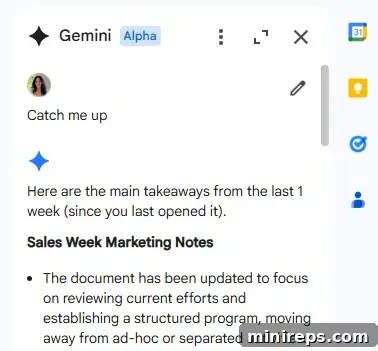
Collaboration thrives on timely updates and shared understanding. Gemini’s innovative Catch Me Up feature is designed to keep you perfectly synchronized with your team and projects. With a simple prompt, you can get quick, consolidated updates on everything that has changed across your Google Drive since you last accessed it. This includes recent document edits, new comments, pending suggestions, and any new activity on your Docs, Sheets, and Slides. “Catch Me Up” ensures you’re always in the loop, instantly aware of the latest developments without needing to manually review revision histories or chase colleagues for updates. It’s an indispensable tool for project managers, team leads, and anyone working in a dynamic, collaborative environment, significantly reducing the overhead of staying current.
Reclaim Your Time and Transform Your Workflow with Gemini in Google Drive
The integration of Gemini into Google Drive is more than just an upgrade; it’s a paradigm shift in how we interact with our digital workspace. It truly feels like having a highly capable personal assistant who possesses an intimate understanding of your files and the broader context of your work. Gemini doesn’t just store your data; it actively helps you manage, understand, and leverage it, providing you with the exact help and information you need, precisely when you need it. This powerful AI assistant liberates you from mundane, time-consuming tasks, allowing you to focus on strategic thinking, creative problem-solving, and the high-value activities that genuinely drive innovation and growth.
By harnessing Gemini’s intelligent summarization, conversational capabilities, enhanced PDF interaction, and seamless integration across Google Workspace, you can dramatically boost your productivity, make more informed decisions, and cultivate an exceptionally organized and efficient workflow. Stop wasting time searching and start spending more time doing. The future of smart file management is here, and it’s accessible within your Google Drive. Ready to experience this transformation? Open Google Drive today and begin exploring the intuitive and powerful features of Gemini for yourself. The potential for newfound efficiency and elevated productivity awaits.
Next up in this series, we’ll take a deep dive into using Gemini in Google Slides, exploring how this intelligent assistant can help you create compelling presentations with unprecedented ease and speed. Stay tuned!
Gemini is an integral part of
Google Workspace is a comprehensive suite of cloud-based productivity and collaboration tools designed to help individuals, teams, and businesses achieve more with fewer distractions. It unifies essential applications like Gmail, Calendar, Drive, Docs, Sheets, and Slides, now supercharged with Gemini AI, to foster seamless communication and efficient workflows. Discover how Google Workspace can elevate your team’s potential—try it yourself for free!