


Unlock Team Potential with Google Sheets
Every Google Workspace plan inherently includes powerful productivity tools, with Google Sheets leading the charge in data management and analysis for modern teams.

Google Sheets: The Spreadsheet Solution for Modern Business
In today’s fast-paced business environment, organizations demand tools that are not just functional, but truly transformative. To make critical, data-driven decisions quickly and efficiently, businesses need collaborative, intelligent, secure, and flexible solutions. Google Sheets stands out as a premier spreadsheet application, meticulously designed to meet and exceed the needs of agile teams and enterprises. Far more than just a grid for numbers, it’s a dynamic platform built on four fundamental pillars that empower teams to achieve more. These pillars collectively elevate Google Sheets above traditional spreadsheet software, making it an indispensable asset for any business striving for operational excellence and innovative growth. Let’s delve deeper into what makes Google Sheets an unparalleled tool for collective intelligence and productivity.
Pillar 1: Intelligent Data Insights
Data is the lifeblood of modern business, but extracting meaningful insights can often feel like a complex puzzle. Google Sheets democratizes data analysis through its integration of cutting-edge artificial intelligence, empowering every member of your team, regardless of their spreadsheet expertise. Whether you’re a seasoned data analyst or a complete novice, Sheets provides intuitive features that transform raw data into actionable intelligence.
One of its standout features is the formula accelerator, a smart tool that significantly cuts down on data entry time and mitigates errors. As you type, Google Sheets intelligently predicts and suggests formulas, helping users construct complex calculations with ease and accuracy. This predictive capability is a game-changer for speed and consistency.
However, the most revolutionary feature is undoubtedly the “Explore” button. Located at the bottom right of your sheet, “Explore” acts as your personal data analyst, providing instant insights and visualizations. Similar to its counterpart in Google Docs, this feature allows you to:
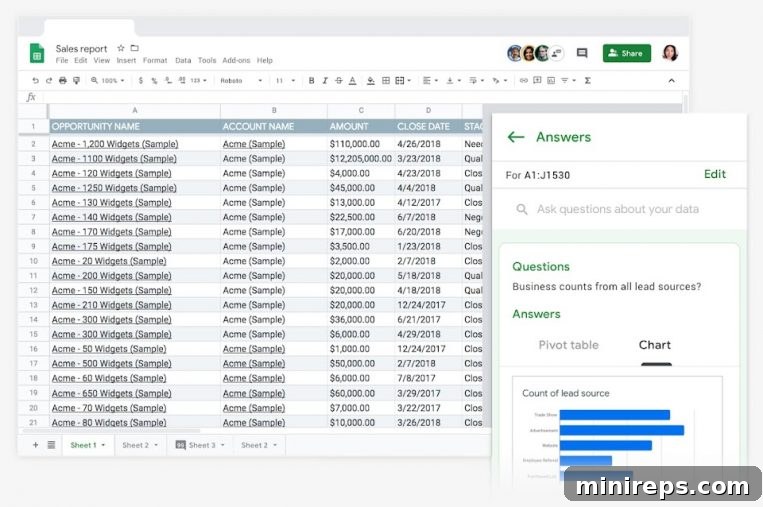
Ask Questions in Natural Language:
To uncover specific insights, simply click “Explore” and navigate to the “Answers” section. Here, you can type your questions in plain English, just as you would ask a colleague. For instance, “What’s the sum of sales by region?” or “Show me the average price by product category?” Sheets’ AI processes your query and provides instant answers, pivot tables, or relevant charts, making complex data interrogation accessible to everyone.
Instantly Generate Charts & Analysis:
Sheets’ intelligence goes beyond answering direct questions. It automatically identifies trends, patterns, and anomalies within your data and proposes relevant charts and analyses without any prompting. To get insights for specific data, simply select a range of cells and click “Explore.” The system will suggest various visualizations, from bar graphs to pie charts, and provide summaries that highlight key data points, transforming raw numbers into compelling stories.
Effortlessly Add Elements with Drag & Drop:
Once “Explore” has generated a chart, formula, or pivot table that meets your needs, adding it to your spreadsheet is incredibly simple. You can literally click and drag the element directly into your sheet. This intuitive drag-and-drop functionality streamlines report creation and dashboard building, allowing users to quickly integrate powerful analyses into their active worksheets without manual re-creation. This intelligence accelerates decision-making and fosters a more data-literate workforce.
Pillar 2: Seamless Cloud-Native Collaboration
As an integral part of the Google Workspace suite, Google Sheets is fundamentally a cloud-native application. This means it’s built from the ground up to operate entirely online, revolutionizing how teams collaborate and share information. Being cloud-native eliminates the need for software installations, ensuring that everyone in your organization always has access to the most up-to-date version of the application and their files, from anywhere in the world, at any time.
The core advantage of Google Sheets being cloud-native lies in its unparalleled collaboration capabilities. Multiple users can edit the same spreadsheet simultaneously, watching changes appear in real-time. You can see your colleagues’ cursors as they work, fostering a truly interactive and dynamic work environment. This real-time collaboration eliminates the chaos of sending email attachments, merging different versions, and dealing with outdated data. All changes are automatically saved to the cloud, erasing the anxiety of losing progress and ensuring that you always work on the most current file.
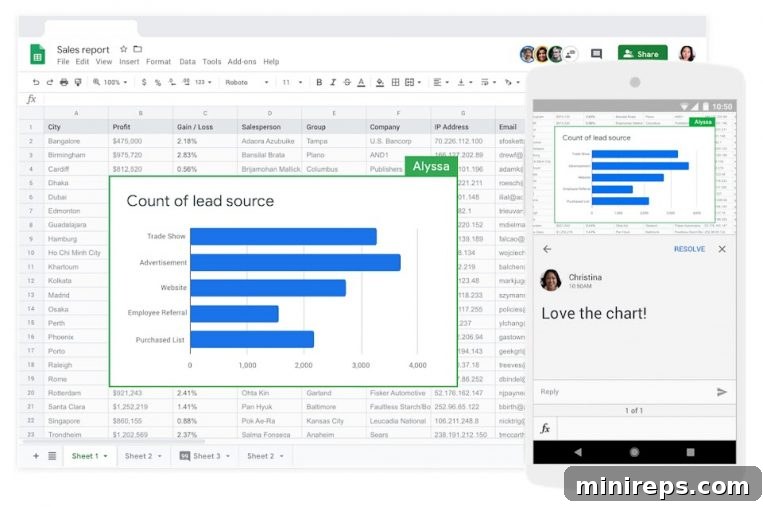
Furthermore, Google Sheets enhances teamwork through integrated features such as comment threads, allowing colleagues to discuss specific data points or sections directly within the document. You can tag collaborators to draw their attention to specific tasks or questions, and receive instant notifications for edits, comments, or suggestions. Crucially, the platform supports offline access; even when you don’t have an internet connection or Wi-Fi, you can continue working on your files, with all changes syncing automatically once you’re back online. This flexibility empowers remote teams and ensures productivity is never hindered by connectivity issues, making Google Sheets an indispensable tool for distributed workforces.
Pillar 3: Robust Security and Control
When dealing with sensitive company data, from financial records to customer information, the trustworthiness of your spreadsheet solution is paramount. Google Sheets is engineered on the foundation of Google’s world-class, advanced security infrastructure, ensuring your information is continuously protected against threats. This infrastructure includes global data centers, advanced encryption for data both in transit and at rest, and sophisticated threat detection systems that work 24/7 to safeguard your assets.
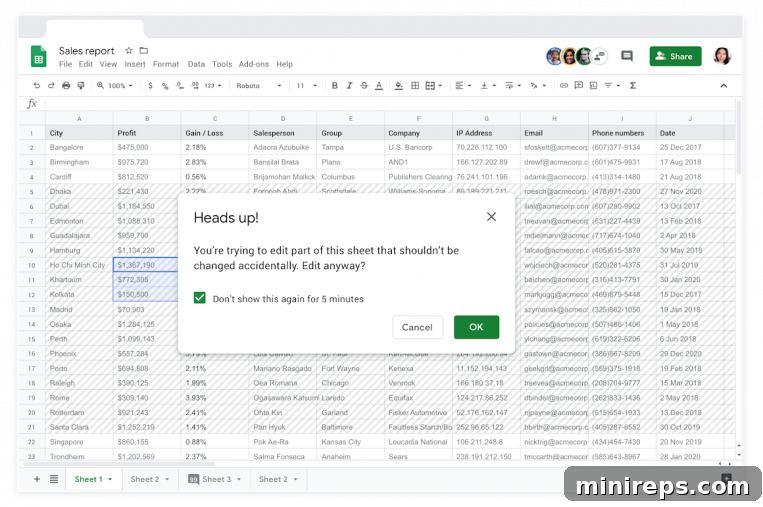
Beyond Google’s inherent security, Sheets provides granular control over who can access and interact with your data. You can customize security settings to precisely match your organizational policies and compliance requirements. This includes the ability to manage permissions at a very detailed level – specifying who can view, edit, comment, or even just see certain parts of a spreadsheet. For highly sensitive documents, you can set expiration dates on sharing links, automatically revoking access after a specified period.
To further prevent unauthorized dissemination of critical information, Google Sheets allows you to disable the ability for users to download, copy, or print your spreadsheets. This crucial feature helps protect intellectual property and confidential data from leaving your controlled environment. For organizations requiring the highest level of data protection and regulatory compliance, Google Workspace Enterprise plans offer advanced security controls such as Data Loss Prevention (DLP). DLP actively identifies and blocks sensitive information from being shared inappropriately, whether internally or externally, providing an essential layer of defense against data breaches and ensuring adherence to privacy regulations. With Google Sheets, you can collaborate confidently, knowing your data is in safe hands.
Pillar 4: Extensive Compatibility and Integration
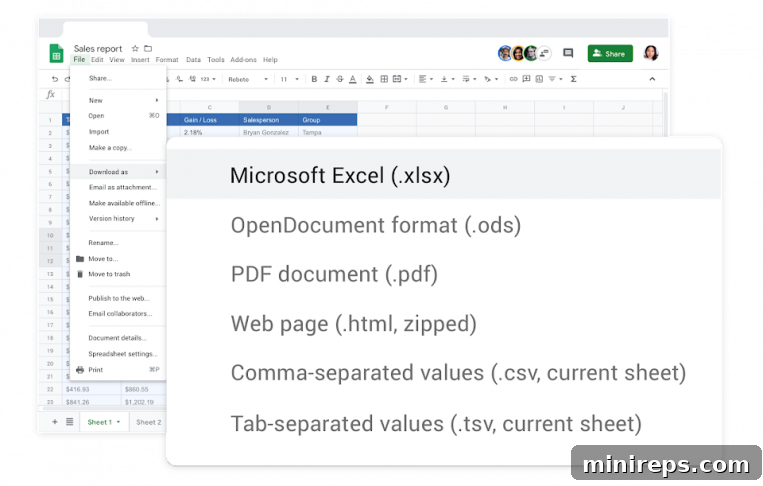
The transition to a new platform can often be a source of concern for businesses, especially when it involves core applications like spreadsheets. However, with Google Sheets, there’s no need to fret about compatibility issues or a steep learning curve. Google Sheets is designed for maximum compatibility with external systems, most notably Microsoft Excel, making the move seamless and friction-free. You can open, edit, and save Excel files (.xlsx, .xls) directly within Google Sheets, largely preserving formatting and formulas. This interoperability ensures that your team can work across both platforms without disruption, utilizing many of the same keyboard shortcuts they are already accustomed to.
Beyond simple file compatibility, Google Sheets truly shines in its ability to integrate with a vast ecosystem of tools and services. Its robust set of APIs (Application Programming Interfaces) allows developers to create custom solutions, automate workflows, and pull data from virtually any business system – from CRM platforms to accounting software – directly into your sheets. This extensibility transforms Sheets into a powerful hub for data aggregation and process automation, streamlining operations and reducing manual effort across your organization.
For organizations dealing with massive datasets and requiring advanced analytics, Google Sheets offers deep connections to powerful data warehousing and business intelligence tools. A prime example is its seamless integration with BigQuery, Google Cloud’s fully managed, serverless data warehouse. This connection allows users to query vast amounts of data stored in BigQuery directly from Sheets, enabling powerful real-time reporting, in-depth analysis, and the creation of dynamic dashboards without needing to export or import large files. Furthermore, Sheets’ compatibility extends to various data connectors and add-ons, allowing you to connect to databases, visualize data with third-party tools, and build sophisticated analytical models. This extensive compatibility ensures Google Sheets can seamlessly fit into and enhance any existing tech stack, empowering your team to do more with their data than ever before.
Google Sheets is a fundamental component of
Google Workspace is a comprehensive suite of cloud-based productivity and collaboration tools engineered to help individuals, teams, and entire businesses thrive. By centralizing communication, document creation, and data analysis, Google Workspace minimizes distractions and maximizes output. Experience firsthand how Google Sheets, alongside other powerful applications, can transform your team’s workflow and drive smarter decisions. Elevate your business efficiency and foster seamless collaboration.