


In the modern professional landscape, meetings are an undeniable part of daily operations, yet they frequently suffer from a reputation for inefficiency, unproductivity, and being a significant drain on valuable time. Many lament the “meeting that could have been an email.” However, the right approach to virtual meetings, particularly through platforms like Google Meet, can fundamentally transform this narrative. By fostering enhanced team dynamics, boosting engagement, and streamlining the path to consensus, video meetings are increasingly becoming a catalyst for true productivity.
To genuinely revolutionize how your team collaborates and achieves its objectives, it’s imperative to re-evaluate and optimize your employees’ meeting experiences. Google Workspace meeting solutions are built upon three foundational pillars: unparalleled simple access, intelligent smart collaboration, and robust scalable administration. A prime example of this commitment to smart collaboration is Google Meet’s AI-Powered Live Captioning – a feature that has just become even more versatile and intelligent, significantly enhancing inclusivity and understanding across diverse teams.
Google Meet’s Global Reach: Live Captioning Expands to Four New Languages
In a significant step towards global inclusivity and improved accessibility, Google recently announced a major expansion of live captioning support within Google Meet. This update introduces real-time captions in four crucial new languages, extending its benefits to a much broader international audience. Users can now utilize live captions in French and German, alongside Portuguese for speakers in Brazil, and Spanish for users in Spain and across Latin America. This monumental enhancement broadens the platform’s utility from its previous English-only captioning, making Google Meet an even more powerful tool for global communication and collaboration.
The timing of these new language additions couldn’t be more opportune. As revealed by Google Workspace Analytics, the shift towards remote and hybrid work models is not just a temporary trend. By 2021, up to 30% of employees were already working from home multiple days a week, a figure that has likely grown and solidified since. Google Meet offers an ideal solution for modern businesses navigating distributed workforces, multiple office locations spread across different geographies, or those committed to offering flexible work-from-home options. This expansion in live captioning capabilities directly addresses the needs of such diverse and dynamic teams, fostering a more connected, understanding, and productive work environment irrespective of physical location or native tongue.
What are Live Captions and Why They Matter for Modern Collaboration?
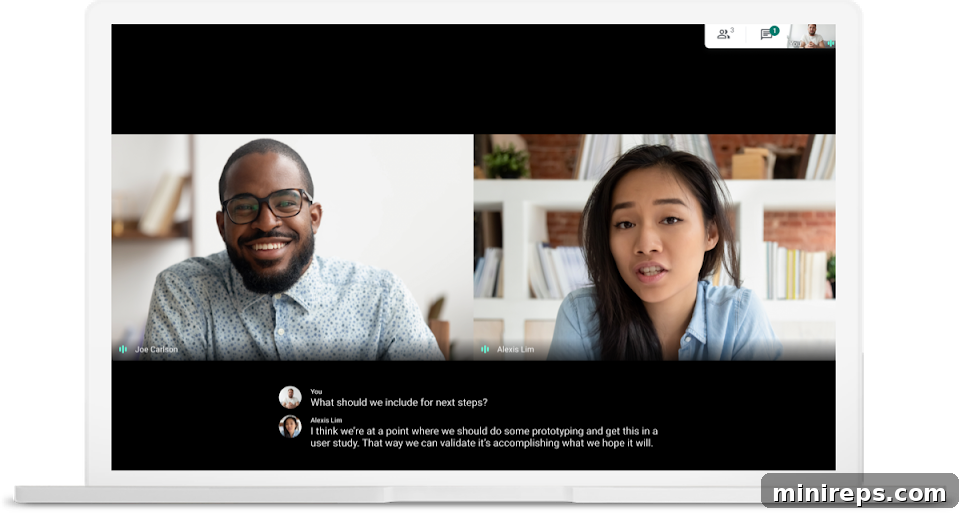
Live captioning in Google Meet harnesses Google’s cutting-edge speech-to-text technology to provide real-time transcriptions of spoken words during video calls. This intelligent feature goes beyond simple transcription; it’s a dynamic tool designed to significantly enhance communication and engagement for all participants.
The implications of this technology for modern teams are profound, touching upon several critical areas of collaboration:
- Enhanced Accessibility and Inclusivity: For participants who are deaf or hard of hearing, live captions are a game-changer, providing essential real-time access to conversations that might otherwise be inaccessible. This ensures full participation and compliance with accessibility standards, fostering an inclusive environment where everyone can contribute equally.
- Bridging Language Barriers: In today’s globalized workplace, teams are often multilingual. Live captions in multiple languages allow non-native speakers to follow discussions more easily, grasp complex terminology, and prevent misunderstandings that can arise from language differences. It reduces cognitive load, allowing participants to focus on content rather than struggling to interpret every word.
- Improved Engagement and Focus: Even for native speakers, live captions can be incredibly beneficial. They help participants stay engaged, particularly during long meetings, by providing a visual aid that reinforces auditory information. This is particularly useful for taking notes on important subject matter or for quick reference, ensuring key points are not missed.
- Clarity in Challenging Environments: Whether dealing with poor audio quality, strong accents, or noisy backgrounds (e.g., working from a cafe or a busy home environment), live captions provide a clear, textual backup of the spoken word. This significantly reduces the chances of miscommunication and ensures that all information is conveyed accurately.
- Boosted Productivity and Decision-Making: By reducing misinterpretations and enhancing understanding across the board, live captions contribute to more efficient meetings. Teams can drive consensus faster, make quicker decisions, and move forward with clarity, ultimately boosting overall productivity. It minimizes the need for follow-up clarifications, saving valuable time.
By empowering individuals with diverse needs and backgrounds, Google Meet’s Live Captions elevate the standard of virtual collaboration, making meetings more productive, equitable, and effective for every team member.
How to Turn Live Captioning On or Off in Google Meet
Accessing Google Meet’s powerful live captioning feature is straightforward, designed for ease of use. Follow these simple steps to manage captions during your video calls:
- On your computer, open your web browser and navigate to Google Meet.
- Join an ongoing video call or start a new one.
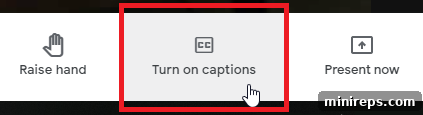
- At the bottom of your meeting screen, locate and click the Turn on captions button to activate the feature. To disable them, simply click the Turn off captions button.
How to Change the Language for Live Captions
With the recent expansion, switching between supported languages for live captions is just as intuitive:
- While in a video call, look for the Menu icon (often represented by three vertical dots) at the bottom of the screen and click it.
- From the dropdown menu, select Captions.
- A list of available languages will appear. Choose your desired language (e.g., French, German, Portuguese, Spanish) and then click Apply to confirm your selection.
Important Considerations for Google Meet Live Captions:
- Persistent Settings: Once you activate live captions, they will remain enabled for all your subsequent video calls until you manually choose to turn them off. This ensures continuity and saves time from re-enabling them repeatedly.
- Default Language: Similarly, the language you select for captions will be set as your default preference. It will persist across meetings until you decide to change it to another supported language.
- Display Visibility: If your call controls temporarily obscure the live captions at the bottom of the screen, simply wait a few moments for the control bar to hide automatically, and the captions will become fully visible again.
- Recording Limitations: It’s crucial to note that if you record a video call in Google Meet, the live captions are not included in the recording. They will not appear when you playback the recorded session. This is designed to focus on the live interaction and the dynamic nature of real-time transcription.
Elevate Your Team’s Productivity with Google Workspace

Unlock the full potential of your team with Google Workspace, the integrated suite of collaboration and productivity applications from Google. This comprehensive platform includes powerful tools like Gmail, Drive, Docs, Sheets, and Slides, all seamlessly integrated to enhance workflow and communication. At its core, Google Workspace features Google Meet, ensuring that your virtual meetings are not just held, but are genuinely productive, inclusive, and efficient. Empower your business with the tools it needs to thrive in a dynamic, connected world.