


Artificial intelligence is rapidly redefining the landscape of business operations, and Google Gemini stands at the forefront of this transformation. As an advanced generative AI tool integrated into Google Workspace, Gemini empowers teams to accelerate workflows, enhance productivity, and foster smarter collaboration across the suite of applications they rely on daily. Whether you’re drafting critical emails, performing complex data analysis, or preparing impactful presentations, Gemini serves as an intelligent, collaborative assistant, streamlining every stage of your project.
This comprehensive guide delves into the practical applications of Google Gemini across key Google Workspace applications – Gmail, Docs, Slides, Sheets, Meet, Drive, and Vids. We will meticulously explore how a company can leverage these AI capabilities to manage and execute an entire new product launch, from initial ideation and strategic planning to market entry and post-launch analysis. Discover how Gemini can revolutionize your product development and deployment strategy, making it faster, more efficient, and ultimately, more successful.
Revolutionize Your Product Launch with Gemini in Google Workspace
Case Study: Engagement Nest’s CRM Product Launch
To illustrate the transformative power of Gemini, let’s follow the journey of Engagement Nest, an innovative company preparing to launch a groundbreaking new cloud-based CRM system. This cutting-edge CRM is specifically designed to equip retailers with advanced tools to significantly enhance their sales strategies, optimize marketing campaigns, and deliver superior customer support experiences. The launch of such a vital product requires meticulous planning, coordinated execution, and efficient resource utilization across various departments.
Over the coming weeks, Engagement Nest’s dedicated sales and marketing teams face a series of critical tasks essential for a successful market debut:
- Crafting targeted outreach emails to prospective clients and key industry stakeholders.
- Developing engaging blog posts and content marketing materials to generate interest and educate the market.
- Building persuasive sales presentations and pitch decks for client meetings and webinars.
- Implementing robust systems to track and manage potential sales leads effectively.
- Hosting seamless and impactful virtual product demonstrations for diverse audiences.
- Efficiently managing a vast array of project files, documents, and creative assets.
- Producing a high-quality explainer video to concisely communicate product value.
Traditionally, executing these tasks would demand extensive manual effort, significant time investment, and cross-departmental coordination that could often lead to delays. However, with the intelligent assistance of Gemini integrated into Google Workspace, the Engagement Nest team is poised to navigate the complex journey from initial product concept to a full-scale go-to-market strategy with unprecedented speed, efficiency, and ease. Gemini acts as an indispensable partner, allowing the team to focus on strategic thinking and creative execution rather than getting bogged down by routine tasks.
Streamlining Outreach: Drafting Emails with Gemini in Gmail
Every successful product launch begins with strategic outreach. The sales team at Engagement Nest needs to connect with a diverse audience, including potential customers, valuable industry partners, and influential figures in the retail tech space. Manually composing tailored emails for each segment is a time-consuming and often repetitive process. This is where Gemini in Gmail becomes an invaluable asset, transforming email creation into an efficient and highly personalized endeavor.
With Gemini, sales representatives can:
- **Instantly Generate Emails:** Leverage simple, natural language prompts to create first drafts of emails. Gemini understands context and can generate relevant, professional copy from scratch, saving hours of initial writing time.
- **Customize Tone and Wording:** Easily adapt the message’s tone and complexity to suit various audiences. Whether the goal is a formal proposal, a friendly introduction, or an urgent follow-up, Gemini provides options to refine the language for maximum impact.
- **Summarize Lengthy Email Threads:** Quickly get up to speed on ongoing conversations by asking Gemini to summarize complex or extended email threads. This feature ensures no critical detail is missed, improving responsiveness and comprehension.
Example Prompt:
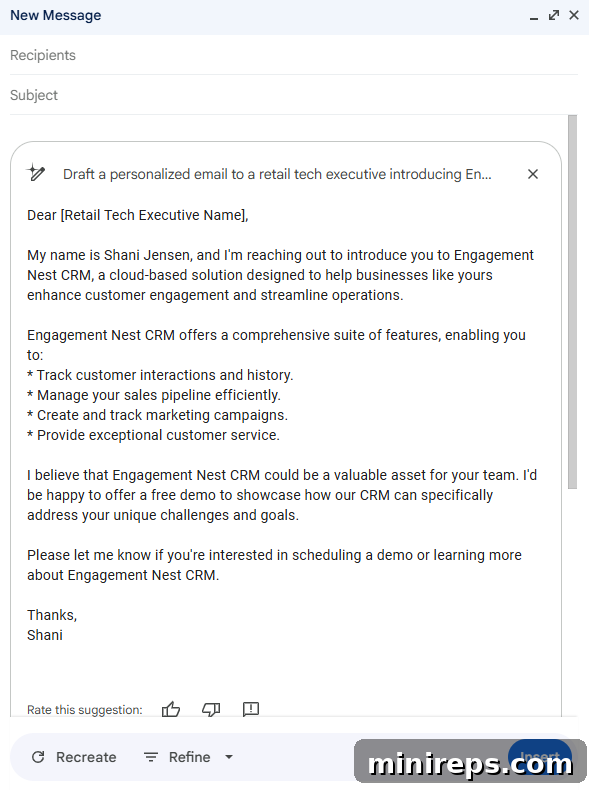
Draft a personalized email to a retail tech executive introducing Engagement Nest CRM and offering a free demo for their team. Emphasize how our CRM specifically addresses common challenges faced by modern retailers in sales, marketing, and customer support.
Tip: To achieve the best results, always include pertinent information about your product, its unique selling propositions, and the specific recipient’s likely interests directly within your prompt. The more detail you provide, the more tailored Gemini’s output will be.
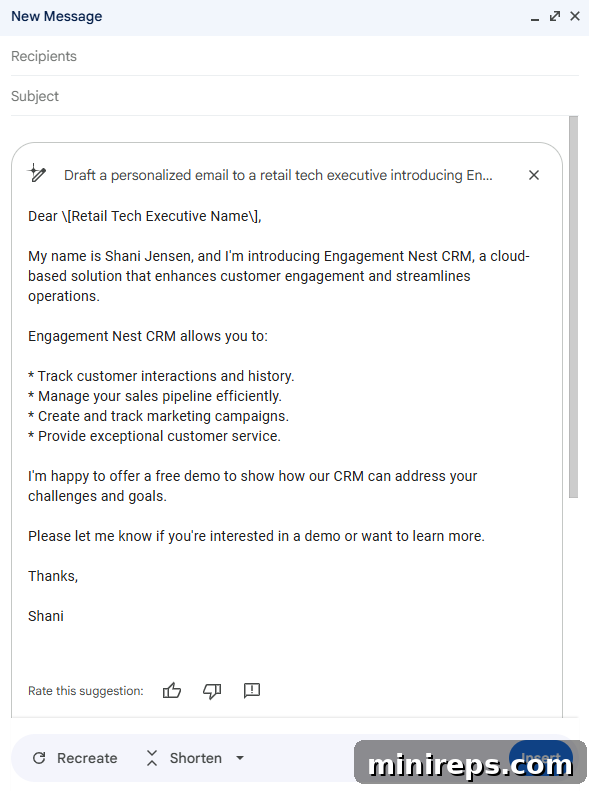
While Gemini’s initial draft provides a robust foundation, it may not always be perfect on the first attempt. The real power lies in its iterative refinement capabilities. Users can effortlessly fine-tune the generated message using Gmail’s built-in AI tools such as ‘Formalize’ to elevate the professional tone, ‘Elaborate’ to expand on key points, or ‘Shorten’ to make the message more concise. If a completely fresh perspective is desired, simply selecting ‘Recreate’ will generate an entirely new version. Furthermore, users can easily edit their original prompt, guiding Gemini in a new direction to better match their precise communication goals. This iterative process ensures that every email sent is polished, professional, and perfectly aligned with the launch strategy.
Content Creation Accelerated: Crafting Blog Posts with Gemini in Google Docs
Beyond direct outreach, blog posts are an indispensable component of any successful product launch strategy. They serve as powerful tools for driving organic traffic, establishing thought leadership, and nurturing potential leads by providing valuable information and insights. During a new product launch, the marketing team often faces intense pressure to produce high-quality, engaging content rapidly. With the “Help me write” feature in Google Docs, Gemini empowers the marketing team to generate comprehensive first drafts of blog posts in mere seconds, drastically reducing the content creation timeline.
Example Prompt:
Write a blog post introducing Engagement Nest CRM. The post should highlight its key features, such as advanced customer segmentation, automated marketing workflows, and integrated sales analytics. Explain how these features specifically benefit retail businesses by improving customer retention, increasing average transaction value, and streamlining operational efficiency. Adopt an engaging and informative tone for a business audience.
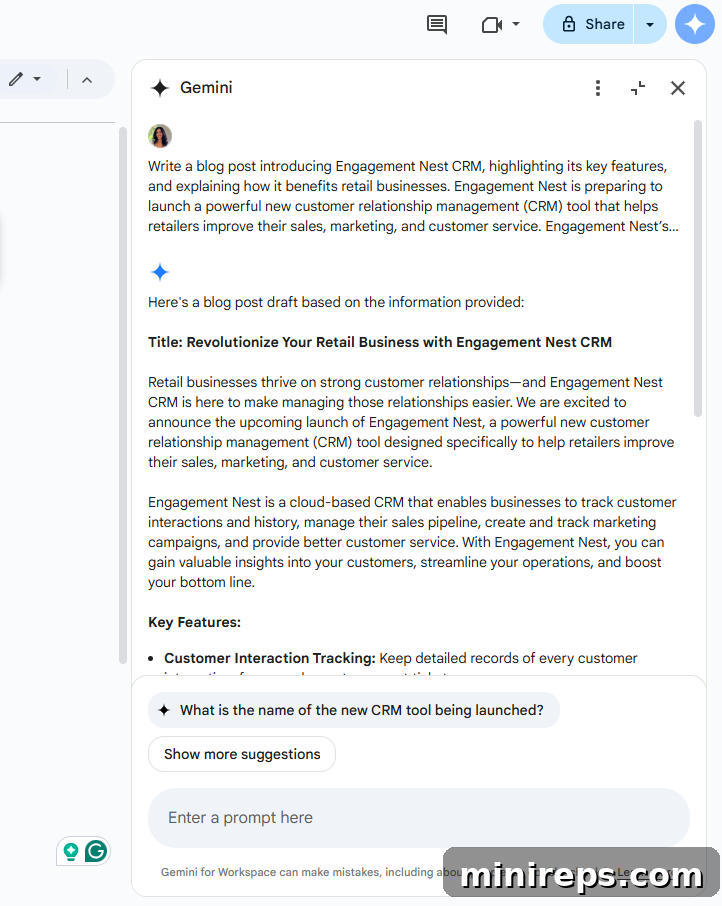
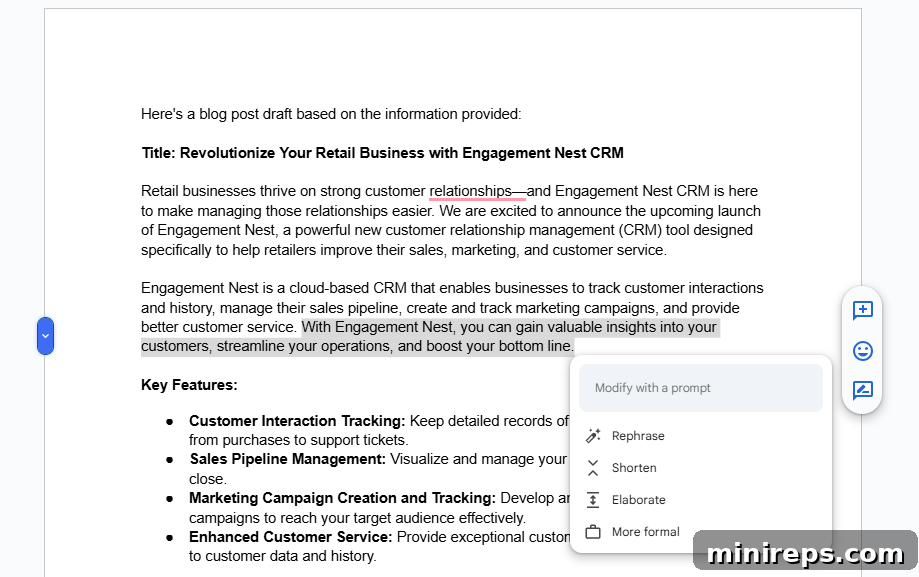
Once Gemini has generated the initial content, the marketing team can move into a robust editing and refinement phase. Google Docs, enhanced by Gemini’s capabilities, offers a suite of tools for perfecting the draft:
- **Comprehensive Proofreading:** Utilize the ‘Proofread’ function to meticulously check for grammatical errors, spelling mistakes, awkward sentence structures, and inconsistencies in tone, ensuring professional and error-free copy.
- **Seamless Integration:** Instantly insert the generated content directly into your Google Doc, allowing for immediate editing and formatting within the familiar environment.
- **Brand Tone Adjustment:** Easily modify the overall tone of the article to precisely match your company’s brand voice, whether it’s authoritative, friendly, innovative, or educational.
- **Dynamic Section Management:** Expand specific sections that require more detail or succinctly shrink paragraphs to improve readability and conciseness, adapting the content length to your editorial guidelines.
- **Clarity and Impact:** Rephrase words and sentences for improved clarity, greater impact, and enhanced engagement, ensuring your message resonates effectively with the target audience.
Regardless of the type of content you’re creating — be it a blog post, a press release, or an internal memo — the key to unlocking Gemini’s full potential lies in providing a clear, precise, and detailed prompt. A well-constructed prompt acts as a blueprint, guiding the AI to generate highly relevant and accurate results, thereby significantly accelerating the content creation process and ensuring high-quality output aligned with your marketing objectives.
Visualizing Success: Designing Presentations with Gemini in Google Slides
Once the sales team has successfully secured meetings with prospective clients, the next crucial step is to deliver a compelling and visually engaging pitch. A professionally designed presentation deck that clearly articulates the product’s unique value proposition is vital for converting interest into sales. Gemini in Google Slides transforms the arduous process of presentation design into an intuitive and creative experience, allowing sales professionals to focus more on their pitch and less on design intricacies.
Leveraging Gemini, sales teams can:
- **Generate Custom AI Visuals:** Break free from generic stock images by using AI to create bespoke visuals tailored specifically to your presentation’s narrative. This ensures every slide is unique and resonates deeply with your audience.
- **Summarize Product Features:** Automatically condense complex product features and benefits into concise, impactful key talking points, making it easier for presenters to deliver clear and memorable messages.
- **Refine Messaging:** Polish and adapt messaging for optimal clarity and impact across different audience types, ensuring that the presentation speaks directly to the specific needs and pain points of each prospect.
Example Prompt:
Create an image of a business person overwhelmed with work, sitting at a desk overflowing with papers and multiple open laptops, looking stressed but determined.
The beauty of Gemini’s image generation capabilities lies in its flexibility. You can easily edit the original prompt to generate entirely new images, allowing for continuous refinement until you achieve the perfect visual. Beyond generating core images, Gemini also allows you to apply various visual styles to bring your narrative to life. You can transform your generated image into ‘Photography’ for a realistic look, a ‘Sketch’ for an artistic touch, ‘Vector Art’ for clean lines and scalability, or ‘Watercolor’ for a softer, more artistic aesthetic, among many other options. This stylistic versatility ensures that your visuals not only convey information but also evoke the desired emotional response and perfectly align with your brand’s aesthetic.

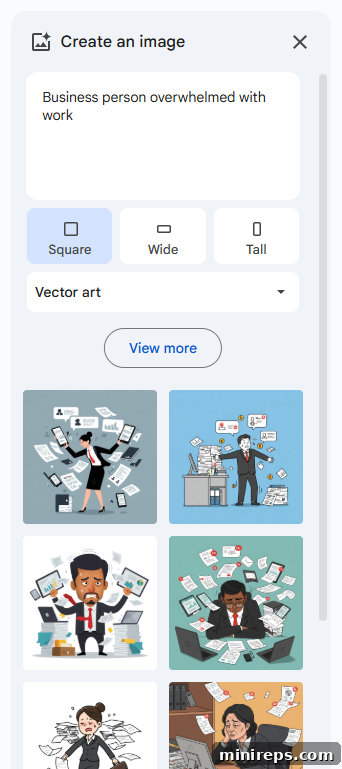
By entrusting Gemini with the creative groundwork of visual and content structuring, the sales team gains a significant advantage. They have more time to meticulously perfect their pitch delivery, rehearse key talking points, and truly connect with their audience, knowing that their presentation’s aesthetics and core messaging are already expertly crafted and optimized for impact. This not only boosts confidence but also dramatically increases the chances of closing deals and achieving launch targets.
Intelligent Data Management: Organizing Performance Data with Gemini in Google Sheets
During a critical phase like a product launch, diligently tracking and analyzing performance metrics is absolutely paramount. Without clear data insights, it’s impossible to gauge success, identify areas for improvement, and make informed strategic adjustments. Gemini in Google Sheets transforms raw ideas and rough requirements into structured, actionable data representations. Even if you’re starting with just a vague concept of what you need to track, Gemini can generate sophisticated templates and tables, providing an immediate framework for organizing your essential metrics.
Example Prompt:
Help me create a table to measure leads generated, conversion rates by source, and revenue from a new product launch. Include columns for date, lead source, number of leads, number of conversions, conversion rate percentage, average deal size, and total revenue. Add a column for marketing campaign associated with each lead source.
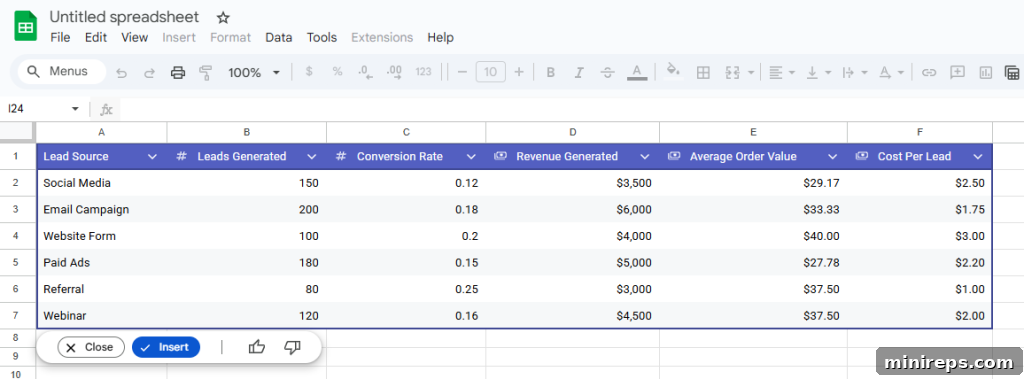
Once Gemini generates a table, you can quickly assess if it aligns with your specific tracking needs. If the structure and columns meet your requirements, simply insert it into your spreadsheet with a single click. However, if the initial output isn’t quite right, you have the flexibility to refine your prompt and generate a new version. It’s important to note a key best practice here: when iterating on table generation, be aware that generating a new version will typically overwrite or replace the current output within the Gemini interface. Therefore, for preserving previous iterations or integrating results into complex existing spreadsheets, it is highly recommended to start with a blank spreadsheet for Gemini’s output and then copy the desired results into your main working sheet. This ensures you maintain control over your data and allows for seamless integration without losing valuable progress. By facilitating rapid data structuring, Gemini empowers teams to spend less time on setup and more time on critical analysis, ensuring the product launch is guided by data-driven insights.
Enhancing Engagement: Running Virtual Demos with Gemini in Google Meet
In today’s globalized and often remote business environment, live product demonstrations are undeniably critical for driving engagement, answering real-time questions, and ultimately, closing deals. Google Meet, supercharged with Gemini’s AI capabilities, transforms standard virtual meetings into highly interactive, professional, and personalized experiences. This allows the Sales team to leave a lasting impression and facilitate clearer communication, regardless of geographical barriers.
With Gemini in Meet, the Sales team can significantly elevate their virtual interactions:
- **Generate Personalized Backgrounds:** Create custom virtual backgrounds tailored to the specific industry or company of your prospects. This adds a professional touch, demonstrates attention to detail, and fosters a more relevant and engaging environment for the demo.
- **Real-time Caption Translation:** Break down language barriers with real-time caption translation. This invaluable feature enables seamless communication with international prospects, ensuring that every participant understands the discussion and feels included.
- **Automatic Meeting Summaries:** Eliminate the tedious task of manual note-taking. Gemini can automatically capture and summarize key discussion points, action items, and decisions directly into a Google Doc, ensuring that no critical information is lost and follow-ups are efficient.
Example Prompt:
Create a Google Meet background tailored to sales calls with an aviation company. The background should subtly feature aircraft elements and professional office decor, conveying innovation and reliability.

These sophisticated AI-powered tools collectively serve to dramatically improve communication quality and efficiency. Personalized backgrounds help build immediate rapport and credibility with clients, creating a more professional and customized experience. Real-time translation ensures inclusivity and eliminates misunderstandings, especially crucial in diverse markets. Furthermore, by automating manual tasks like note-taking, Gemini enables sales professionals to stay fully present and engaged in the conversation, actively listening and responding to client needs without the distraction of documentation. This ensures that no action item is ever missed, accelerating follow-up processes and significantly boosting the overall effectiveness of virtual product demonstrations.
Intelligent Organization: Managing Files & Summarizing Documents with Gemini in Google Drive
In the whirlwind of a product launch, maintaining meticulous organization and adhering to strict deadlines are not just good practices; they are absolutely essential for success. The sheer volume of emails, pitch decks, marketing plans, and technical documents can quickly become overwhelming. Gemini in Google Drive, with its AI-powered search and document summarization capabilities, acts as a powerful intelligence layer, saving every team member invaluable time that would otherwise be spent searching through countless files or sifting through lengthy documents.
Gemini significantly enhances document management and retrieval by assisting with:
- **Contextual File Search:** Move beyond simple keyword searches. Gemini can find files not just by their name or typical metadata, but by understanding the actual content within them, even if you only remember a concept or a specific detail mentioned inside.
- **Concise Document Summarization:** Instantly distill long, complex documents into their main objectives, key takeaways, and critical information. This allows stakeholders to grasp the essence of a report, proposal, or plan without having to read every word.
- **Intelligent File Comparison:** Efficiently compare multiple versions of documents or different related files, highlighting the key differences and changes. This is invaluable for tracking progress, reviewing revisions, and ensuring alignment across various drafts.
Example Prompt:
Summarize the latest strategic marketing plan for the Engagement Nest CRM launch. Focus on the core objectives, target audience segments, key messaging, and primary channels identified for promotion.
Tip: To ensure Gemini generates the most relevant and precise results, you can tag specific files directly within your prompt using the ‘@’ symbol. This allows Gemini to focus its analysis on the exact documents you need summarized or compared, leading to highly accurate and actionable insights.
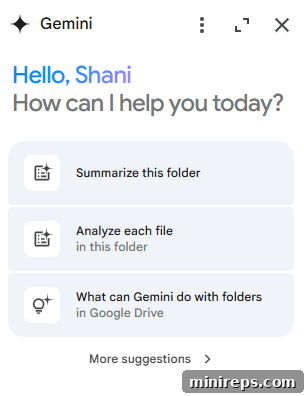
By intelligently organizing and summarizing information, Gemini dramatically reduces the time employees spend on administrative tasks and information retrieval. This efficiency gain means teams can dedicate more resources to strategic thinking, creative problem-solving, and direct client engagement, ultimately contributing to a smoother, more organized, and ultimately more successful product launch. The ability to quickly access and understand critical information fosters better decision-making and enhances overall team collaboration.
Captivating Audiences: Creating Explainer Videos with Gemini in Google Vids
As the product launch project nears completion, the marketing team faces the crucial task of creating compelling video content. A high-quality product video is essential for effective communication across various platforms, including the company website, social media channels, and email marketing campaigns. Traditionally, video production can be a complex, costly, and time-consuming endeavor, often requiring specialized skills and extensive resources. However, with Gemini integrated into Google Vids, the process of creating professional-grade explainer videos becomes remarkably accessible and efficient, democratizing video creation for everyone.
With Gemini in Vids, marketing teams can:
- **Generate Script and Storyboard:** Initiate the video creation process by generating a complete script and an accompanying storyboard from a single, descriptive prompt. This eliminates the initial hurdles of conceptualization and content structuring.
- **Integrate Company Branding:** Seamlessly apply your company’s established branding elements, including logos, specific fonts, and color palettes, ensuring brand consistency and professional appearance across all video content.
- **Leverage AI-Powered Features:** Enhance videos with advanced AI voiceovers in various tones and languages, dynamic animations to highlight key features, and smooth transitions to maintain viewer engagement throughout the narrative.
Example Prompt:
Create a 90-second explainer video introducing Engagement Nest CRM and its key benefits for retail businesses. The video should adopt a friendly and engaging tone, utilizing modern visuals and a clear call to action to schedule a demo.
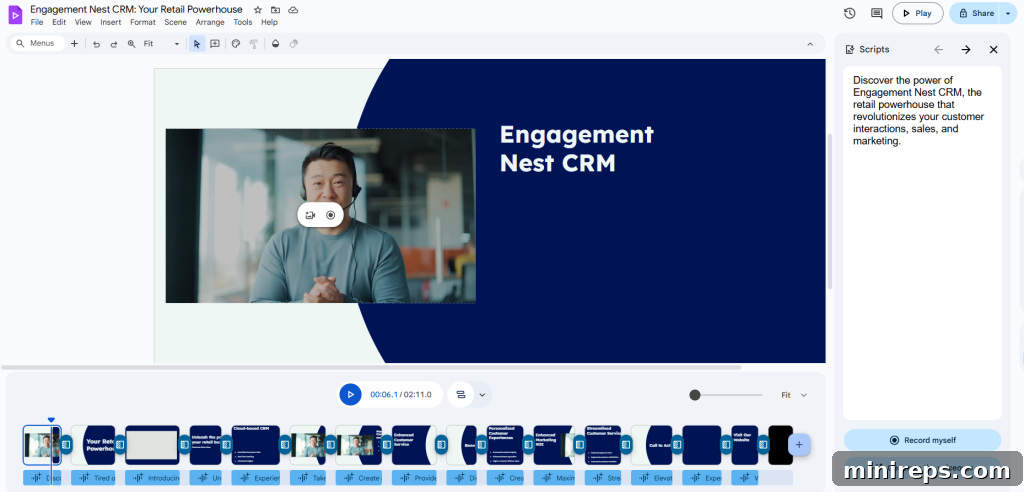
The combination of pre-designed templates and intuitive built-in AI tools in Google Vids makes video creation straightforward and accessible, whether you are a seasoned marketing professional with extensive experience or someone with absolutely no prior design or video editing background. Gemini provides the essential foundation — the script, storyboard, and initial visual framework — allowing users to focus on customization. All that’s left is to personalize placeholder content, select preferred visual styles, and make final refinements before confidently publishing the video across all relevant marketing channels. This dramatically accelerates the production timeline for high-quality video assets, ensuring that Engagement Nest can effectively communicate the value of its new CRM to a broad audience, capturing attention and driving interest pre and post-launch.
Embracing the Future of Work with Gemini
The journey of launching a new product is intricate, demanding meticulous planning, seamless execution, and continuous adaptation across multiple teams and disciplines. In this complex landscape, artificial intelligence, particularly Google Gemini within Google Workspace, emerges as a game-changer. From the foundational tasks of drafting personalized emails and crafting engaging blog posts to the more intricate processes of building dynamic presentations, analyzing critical performance data, facilitating efficient virtual meetings, and even producing professional-grade explainer videos, Gemini acts as a unifying intelligence. It streamlines workflows, minimizes manual effort, and significantly amplifies the creative potential of every team member.
Gemini empowers teams to move with unparalleled speed, ensuring that project timelines are met and market opportunities are seized without delay. It fosters superior organization by intelligently managing information, summarizing key documents, and providing contextual search capabilities, making vital data readily accessible. Moreover, Gemini sparks creativity, allowing individuals to explore new ideas and visualize concepts that might otherwise be constrained by time or technical limitations. By offloading repetitive and time-consuming tasks to AI, teams can dedicate their valuable human intellect to strategic thinking, innovation, and direct engagement with customers, ultimately driving more impactful and successful product launches. The integration of Gemini into daily operations doesn’t just enhance individual productivity; it reshapes the very fabric of collaborative work, making the impossible possible and setting a new standard for efficiency and creativity in the modern workplace.
This article has provided a comprehensive overview of how Gemini can be leveraged across various Google Workspace applications throughout a product launch. In the next installment of this insightful blog series, we will take an even deeper dive into the specific functionalities and advanced strategies for utilizing Gemini effectively in Gmail. Stay tuned for more expert tips and detailed insights on how to maximize the immense potential of AI within your Google Workspace environment!
Gemini AI is an integral part of
Google Workspace offers a powerful and integrated suite of productivity and collaboration tools meticulously designed to help individuals, teams, and businesses achieve more with enhanced focus and fewer distractions. Experience the future of work for yourself—start your free trial today!