

Forms and Surveys for Teams: Unleashing the Power of Google Forms
In today’s fast-paced business environment, gathering insights from customers and streamlining internal processes is more critical than ever. Whether you’re seeking customer satisfaction feedback, conducting market research, organizing an event, or simply polling your team for quick decisions, efficient and professional survey tools are indispensable. Fortunately, every Google Workspace plan includes a robust solution designed to meet these needs and more.

Discover how Google Forms, an integral part of the Google Workspace suite, empowers businesses and teams to create, distribute, and analyze surveys and forms with unparalleled ease and effectiveness. From intuitive design to intelligent data analysis, Google Forms is your go-to solution for all your feedback and data collection requirements.
Revolutionize Your Feedback Collection: Why Google Forms Stands Out
Understanding your customers and team is paramount for growth and innovation. But how do you effectively solicit feedback that truly matters? While numerous survey tools like SurveyMonkey or Typeform exist, offering various features and price points, many come with steep learning curves, restrictive free tiers, or intrusive branding on your surveys unless you opt for expensive upgrades. This often leaves businesses searching for a more integrated, cost-effective, and user-friendly alternative.
Enter Google Forms, a powerful yet accessible application included at no additional cost with your Google Workspace subscription. It’s not just another form builder; it’s a comprehensive solution for crafting professional-looking surveys and questionnaires that seamlessly integrate into your existing Google ecosystem. Google Forms eliminates the complexities and hidden costs often associated with third-party survey platforms, providing a streamlined experience for both creators and respondents. Whether you’re gathering critical customer insights, conducting market research, or facilitating internal team communication, Google Forms offers a robust and reliable platform to capture diverse data types efficiently and securely.
Effortless Form Creation: As Simple as Crafting a Document
The journey to collecting valuable data begins with creating a compelling form. Many advanced survey tools, while feature-rich, can be daunting to learn, requiring significant time investment before you can even launch your first survey. Others often brand your surveys with their own logo or affiliation, diminishing your professional image unless you commit to a premium, paid version.
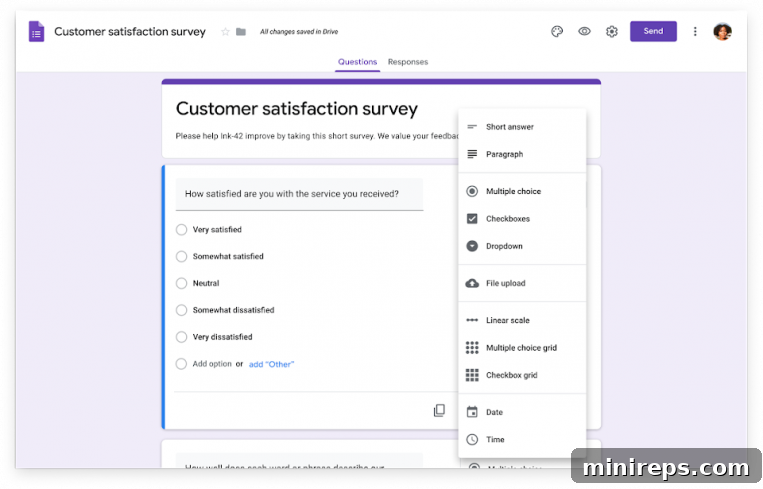
Google Forms transforms this process, making it remarkably easy to design and deploy professional-looking surveys that reflect your brand, not someone else’s. The intuitive interface allows you to create a form with the same ease you would create a document in Google Docs. You can select from a wide array of question types, including multiple choice, checkboxes, dropdowns, short answer, paragraph, linear scale, multiple-choice grid, and even date and time selections, catering to virtually any data collection need. The drag-and-drop functionality empowers you to effortlessly reorder questions at any time, ensuring a logical flow for your respondents. Furthermore, customizing values and setting validation rules is straightforward, allowing you to tailor each question precisely. This user-friendly design ensures that even those new to form building can quickly create effective and engaging surveys without needing advanced technical skills or spending hours on tutorials.
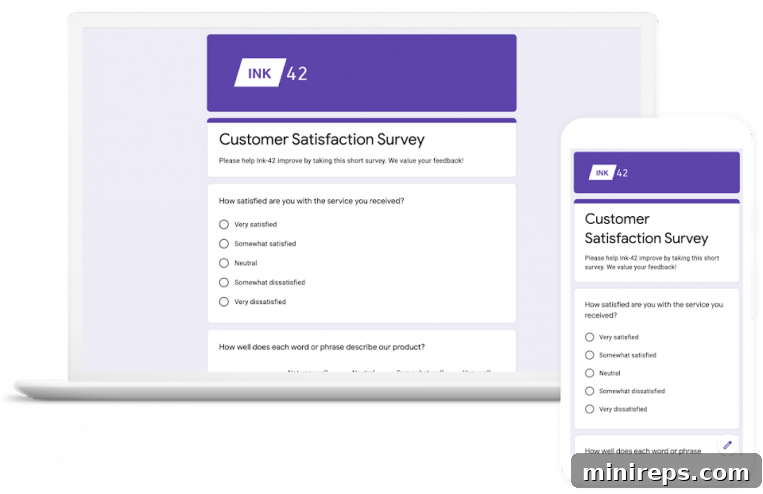
Beyond basic functionality, Google Forms offers extensive customization options. You can choose from pre-designed themes, personalize colors to match your brand identity, and even add your company logo, ensuring a consistent and professional appearance. This level of customization, combined with its ease of use, positions Google Forms as an ideal solution for businesses of all sizes looking to collect data efficiently and professionally.
Engage Respondents and Unlock Deeper Insights with Intelligent Forms
Creating a survey is only half the battle; ensuring respondents complete it accurately and provide meaningful data is the other. Google Forms excels at creating a compelling and interactive survey experience, helping you connect more effectively with your customers and gain truly valuable insights.
To enhance engagement, Google Forms allows you to enrich your surveys with visual elements such as images and videos. This can make your questionnaires more appealing, clarify complex questions, or simply provide a more dynamic and enjoyable experience for respondents. Beyond aesthetics, Google Forms leverages the power of Google AI to make your forms smarter and more efficient. Intelligent features like data validation rules ensure that information submitted is accurate and correctly formatted – for example, guaranteeing email addresses are valid, dates are correct, or numerical inputs fall within a specified range. This proactive data cleaning saves you significant time in post-collection processing and ensures higher data quality.
Furthermore, Google Forms incorporates advanced logic with features like section branching. This allows you to guide respondents through a personalized path based on their previous answers. For instance, if a customer indicates dissatisfaction with a product, the form can automatically direct them to a section for detailed feedback on improvements, bypassing irrelevant questions. This dynamic questioning not only streamlines the survey for respondents but also helps you gather more targeted and relevant information, ultimately leading to deeper, actionable insights. By adapting to individual responses, Google Forms reduces survey fatigue and encourages higher completion rates, making every interaction more meaningful.
Collaborative Analysis: Turn Data into Decisions with Automatic Summaries
Collecting data is just the first step; the real value lies in analyzing it to inform strategic decisions. Google Forms, as an integral part of the Google Workspace collaboration suite, offers robust tools for both individual and team-based analysis, making data interpretation efficient and insightful.
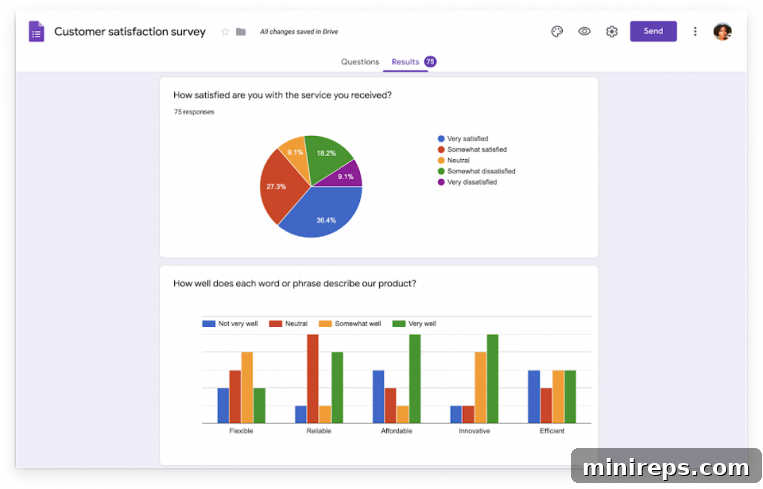
One of the standout features is the automatic summaries generated for your responses. As soon as responses start coming in, Google Forms compiles them into easy-to-understand charts and graphs, providing immediate visual insights into your data. You can watch responses appear in real-time, allowing you to monitor trends and engagement as they happen, eliminating the wait for manual compilation.
But the power doesn’t stop there. Google Forms seamlessly integrates with Google Sheets, a core component of Google Workspace. With just a click, all your form responses can be instantly exported and continuously updated in a Google Sheet. This transforms your raw data into a dynamic spreadsheet, unlocking advanced analytical possibilities. In Google Sheets, you and your team can perform deeper analysis using pivot tables, custom formulas, filters, and advanced charting options. The real-time collaboration capabilities of Google Sheets mean that multiple team members can view, analyze, and discuss results simultaneously without the confusion of managing various file versions. This collaborative environment fosters quicker insights and facilitates consensus-driven decision-making. Whether you need a quick overview or a deep dive into complex data patterns, Google Forms, coupled with Google Sheets, provides the tools to convert raw feedback into actionable intelligence, empowering your team to make data-driven decisions swiftly and effectively.
Flexible Sharing Options: Reach Your Audience Everywhere
Once your form is perfectly crafted and ready to collect data, reaching your target audience efficiently is key. True to the collaborative nature of all Google Workspace applications, sharing your Google Forms is incredibly simple and versatile, ensuring your surveys can reach anyone, anywhere.
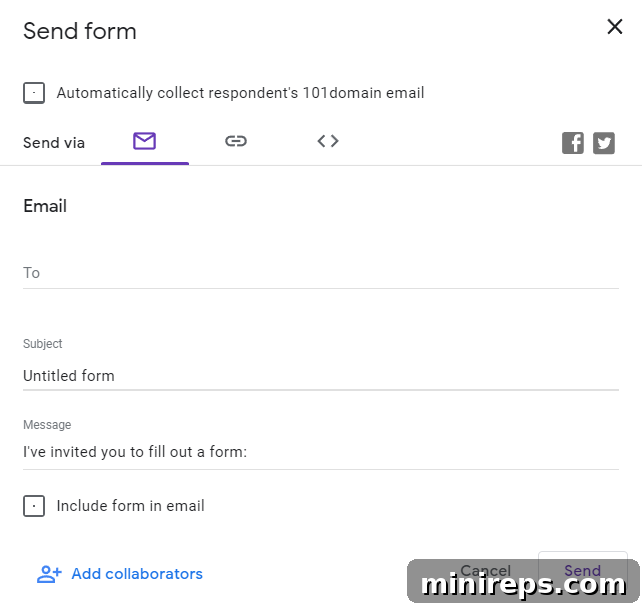
You have multiple convenient options for distribution. The most straightforward method is sharing a direct link to your survey. This link can be easily distributed via social media, instant messaging apps, or any digital communication channel, making it ideal for reaching a broad or specific audience with minimal effort. For more targeted outreach, you can send your form directly via email. This method allows you to send invitations to specific contacts or mailing lists, often integrating seamlessly with Gmail for a personalized touch.
For those who wish to embed their forms directly into their digital presence, Google Forms provides the option to embed the survey directly onto your website or blog. This creates a seamless experience for visitors, allowing them to complete the form without leaving your site, which can significantly improve completion rates and user engagement. Whether you need to gather feedback from a small internal team, a specific list of clients, or a vast public audience, Google Forms offers the flexibility and tools to ensure your survey reaches its intended recipients, maximizing your data collection efforts.
Beyond these core functionalities, Google Forms offers practical advantages for various use cases. It’s perfect for event registrations, quizzes, job applications, lead generation, and simple order forms. Its robust security features, inherited from Google Workspace, ensure your data is protected and private. With Google Forms, you’re not just getting a survey tool; you’re gaining a versatile, secure, and collaborative platform that empowers your team to make smarter decisions faster.
Google Forms is a cornerstone of the comprehensive
Google Workspace is an integrated suite of productivity and collaboration tools designed to help individuals, teams, and businesses achieve more with seamless efficiency and fewer distractions. From communication to creation and data analysis, Workspace provides everything you need in one secure, cloud-based platform. Experience the full potential of integrated tools like Gmail, Calendar, Drive, Docs, Sheets, and Slides, all working together to streamline your workflow and foster dynamic collaboration. Ready to elevate your team’s productivity and data collection capabilities? Try it yourself—for free!