


In the modern workplace, effective data collection is paramount for informed decision-making, streamlined operations, and continuous improvement. While often overlooked, robust survey and form tools are the backbone of this process. Traditionally, businesses might have relied on specialized third-party services, but with Google Forms, a powerful and intuitive application included in the comprehensive Google Workspace productivity suite, the need for separate subscriptions to tools like SurveyMonkey or Typeform is elegantly eliminated. Google Forms provides a seamless, integrated platform to effortlessly gather, organize, and analyze information, all within your familiar workflow, making it an indispensable asset for teams of all sizes.
The landscape of data collection has been revolutionary transformed with the integration of Gemini AI directly into Google Forms. This groundbreaking enhancement ushers in an era of unprecedented ease and speed for creating surveys, quizzes, feedback forms, and more. Whether you’re embarking on the ambitious task of building a complex form from scratch, grappling with the challenge of extracting meaningful insights from hundreds of responses, or simply experiencing creative block on what questions to pose next, Gemini AI stands ready as your intelligent co-pilot. It intelligently guides you through every stage of the form creation and analysis journey, turning what was once a laborious process into an efficient and insightful experience.
So, how precisely does Gemini AI elevate the functionality of Google Forms? Much like its application across other Google Workspace tools, Gemini leverages its three foundational strengths: the ability to create innovative content, summarize vast amounts of information into digestible insights, and brainstorm fresh ideas. These core capabilities are not merely abstract concepts; they are brought to life through practical, user-friendly features within Google Forms, empowering users to design, deploy, and derive value from their forms with remarkable efficiency. Let’s delve deeper into each of these transformative aspects and explore how they redefine form management.
RELATED ARTICLE: Google’s Gemini AI is not just a chatbot – discover its full potential
Create Something from Nothing: Effortless Form Generation with AI
One of the most significant challenges in form design is often the blank page. The daunting task of structuring questions, defining logical flows, and ensuring comprehensiveness can be time-consuming. However, with the revolutionary “Help me create” feature powered by Gemini in Google Forms, users can now draft entire forms with remarkable ease using just a single, descriptive prompt. This intelligent capability allows you to articulate the purpose of your form, and Gemini will instantly generate a structured draft, saving countless hours of manual effort. What’s more, you can even reference existing content from your Google Docs, Sheets, Slides, or even PDFs, providing Gemini with rich context to create highly relevant and tailored questions. The result is a fully functional form that you can either deploy immediately or customize further to perfectly align with your specific requirements and branding.
Example Use Case: Designing a Customer Project Inquiry Form
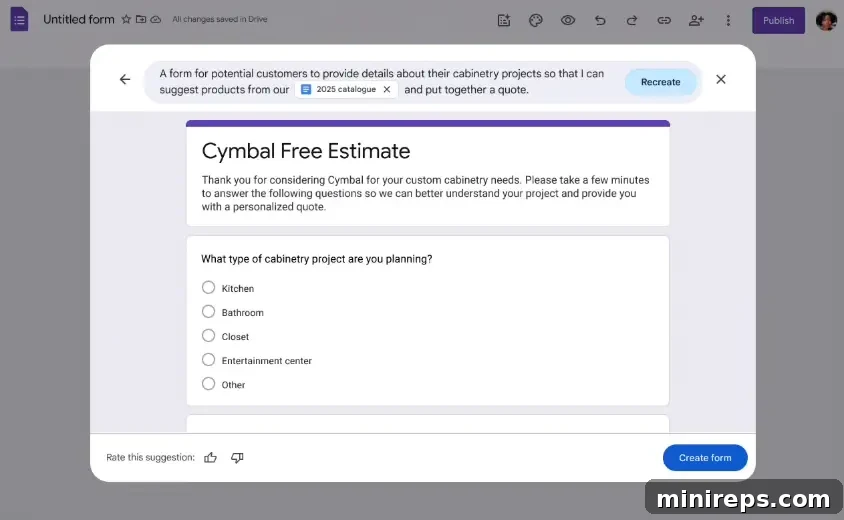
Imagine you are a custom cabinetry business looking to gather detailed information from prospective clients about their upcoming projects. Instead of meticulously crafting each question manually, you can simply provide Gemini with a prompt like: “Create a form for potential customers to provide details about their cabinetry projects so I can suggest products from our 2025 catalogue.” In a matter of seconds, Gemini analyzes your request and drafts a new form. This form isn’t just a generic template; it’s intelligently structured with relevant questions covering project scope, material preferences, budget considerations, timeline, and contact information, all derived from the essence of your prompt. This transforms the initial setup phase from a laborious chore into a quick, guided process, allowing you to focus on refining the details rather than building from the ground up.
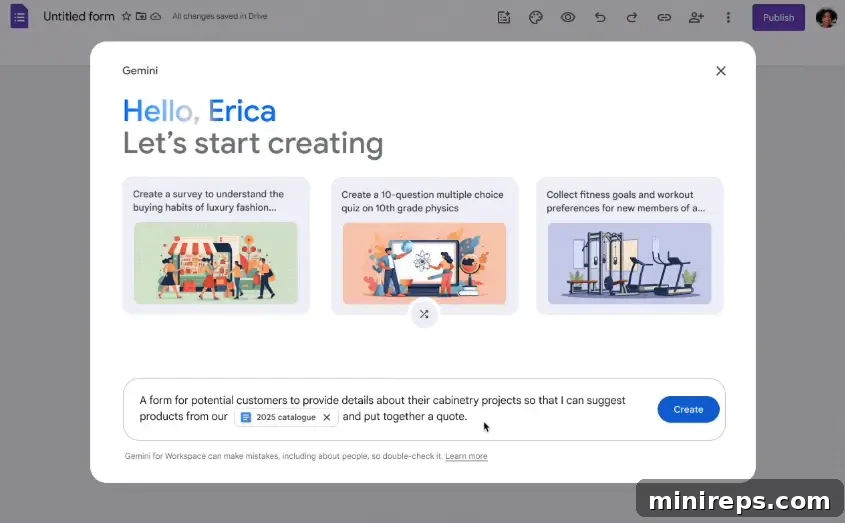
Image Source: Google Workspace Updates
Summarize Responses into Need-to-Know Insights: Intelligent Data Analysis
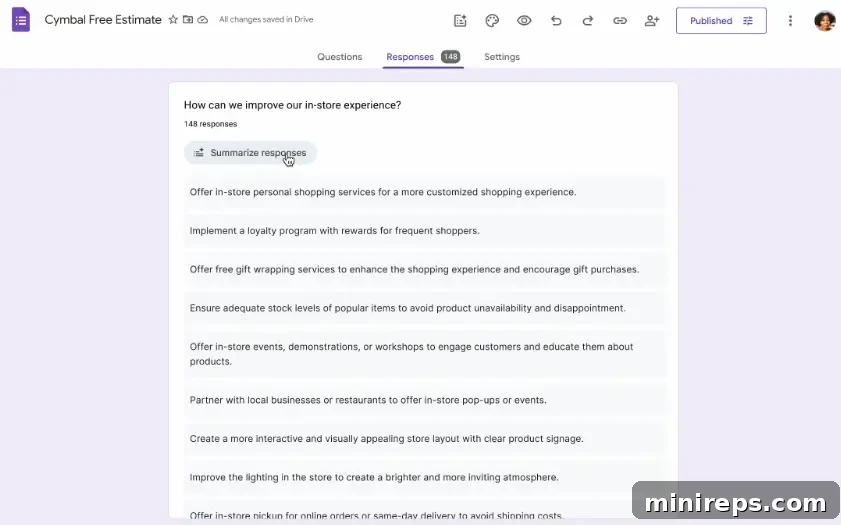
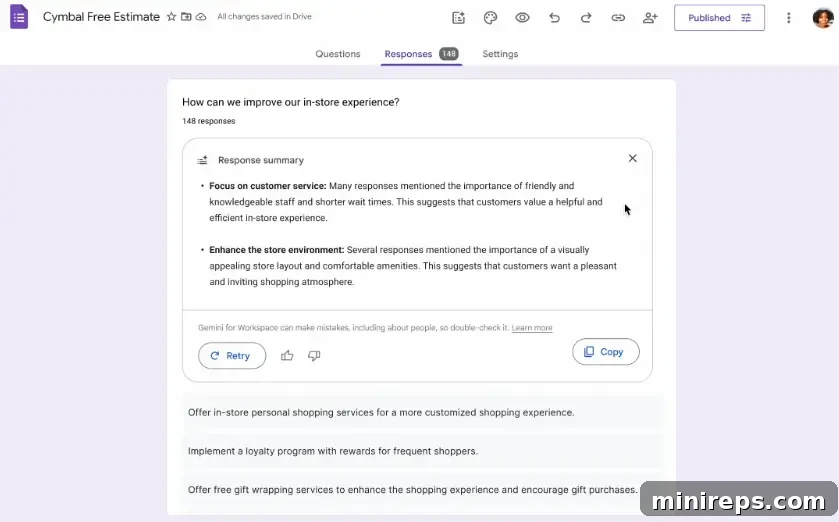
The true value of collected data often lies hidden within the volume of responses, especially when dealing with open-ended feedback. Manually sifting through dozens, hundreds, or even thousands of free-form answers can be an incredibly time-consuming and mentally exhausting task, easily derailing an entire workday. Fortunately, Gemini AI transforms this challenge into an opportunity by offering intelligent, AI-generated summaries of open-ended responses directly within Google Forms. Gemini meticulously reviews the form’s title, description, individual questions, and all submitted responses to synthesize key themes, prevalent sentiments, and overarching insights. This powerful feature allows users to grasp the core message and critical takeaways at a mere glance, turning raw data into actionable intelligence without the need for extensive manual review.
This summarization capability is particularly invaluable for questions that elicit text-heavy, qualitative answers. Consider scenarios such as comprehensive customer feedback surveys, regular team check-ins where employees share progress and concerns, or in-depth paragraph-style answers within assessments or research surveys. In these cases, Gemini’s AI-powered summaries cut through the noise, highlighting the most important points and recurring sentiments. This not only saves significant time but also helps identify critical issues, popular opinions, and emerging trends that might otherwise be missed or require a disproportionate amount of human effort to uncover. It democratizes data analysis, making it accessible and efficient for everyone.
Example Use Case: Analyzing Extensive Customer Feedback
Imagine your business has just concluded a major promotional event, and you’ve collected feedback from 150 customers who recently visited your store. A significant portion of this feedback is in the form of open-ended comments about their experience. Instead of an employee spending hours reading and categorizing every single free-form response, Gemini swiftly goes to work. It automatically flags the most common themes – perhaps many customers mentioned “friendly staff” or “long checkout lines” – and discerns overall sentiment, indicating whether the feedback is predominantly positive, negative, or mixed. This immediate, high-level summary empowers you to understand critical areas for improvement or success stories to amplify, enabling your team to act quickly and strategically based on real-time customer sentiment.
Brainstorm Questions with AI Suggestions: Overcoming Writer’s Block in Form Design
Even after determining the purpose of a form, one of the most persistent hurdles in its creation is often formulating the right set of questions – comprehensive enough to gather all necessary data, yet concise and clear for respondents. This is where Gemini AI steps in as an invaluable brainstorming partner. Gemini intelligently analyzes the questions already present in your form, understanding the context and intent, and then proactively suggests highly relevant additions. The most remarkable aspect of this feature is its sheer simplicity: you don’t even need to craft a specific prompt for Gemini to work its magic. It’s an intuitive, on-demand assistant that anticipates your needs.
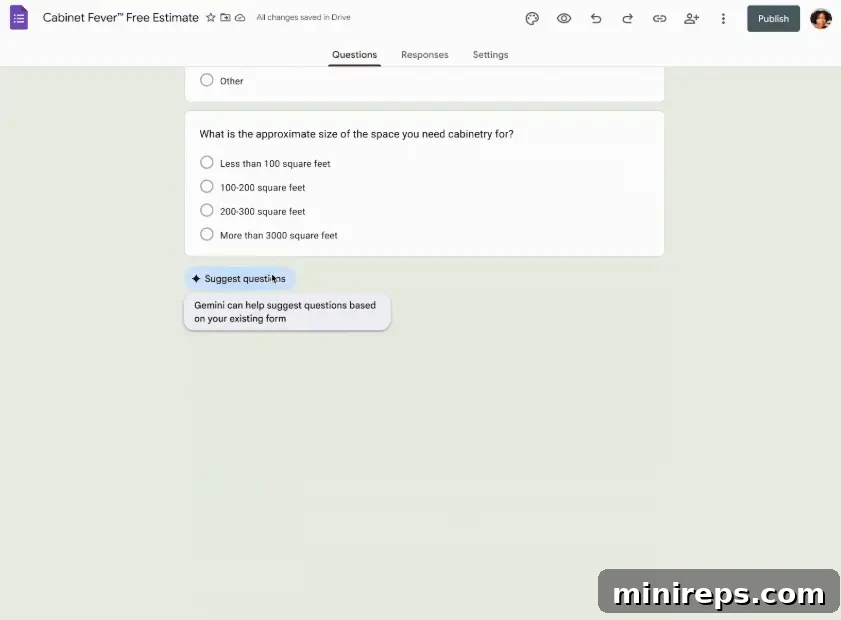
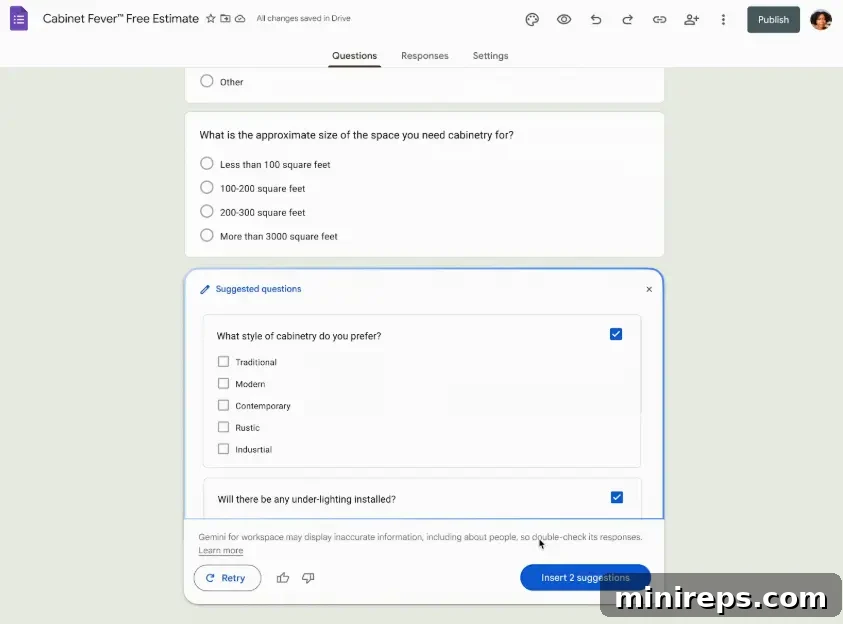
The process is incredibly straightforward. Once you’ve added just your first two questions to a new or existing form, a helpful “Suggest questions” button will seamlessly appear at the bottom of the form interface. A single click unleashes Gemini’s intelligence, and it will immediately offer 2–4 pertinent questions, often complete with suggested answer options. These suggestions are thoughtfully designed to complement your existing questions, ensuring a more thorough and logically flowing form. You have full flexibility to insert these suggested questions directly into your form, modify them to better suit your tone or specific needs, or simply use them as a springboard for your own ideas. This dynamic assistance significantly accelerates the question-building process and helps ensure no critical data points are overlooked.
Example Use Case: Completing a Free Estimate Request Form
Consider a scenario where you are finalizing a “Free Estimate” request form for your services. You’ve already included a few basic questions about the customer’s project, but you’re unsure what other details would be helpful to gather without making the form too long. Instead of struggling to come up with more ideas, you click the “Suggest questions” button. Gemini examines your existing questions and, understanding the context of an estimate request, intelligently suggests highly relevant follow-up questions such as:
“Would you prefer phone or email as your primary communication method?” (This helps streamline follow-up)
“Do you have a secondary point of contact?” (Ensuring smooth communication even if the primary contact is unavailable)
These suggestions not only save you time but also prompt you to consider aspects of the customer interaction you might have otherwise forgotten, leading to a more complete and effective data collection process.
Other Google Form Features We Love: Enhancing Productivity and Security
Beyond the transformative power of Gemini AI, Google Forms continues to evolve with a suite of features designed to make data collection more efficient, secure, and brand-consistent. These tools further solidify Google Forms’ position as a leading solution for diverse organizational needs.
View Form Responses as Structured Tables in Sheets
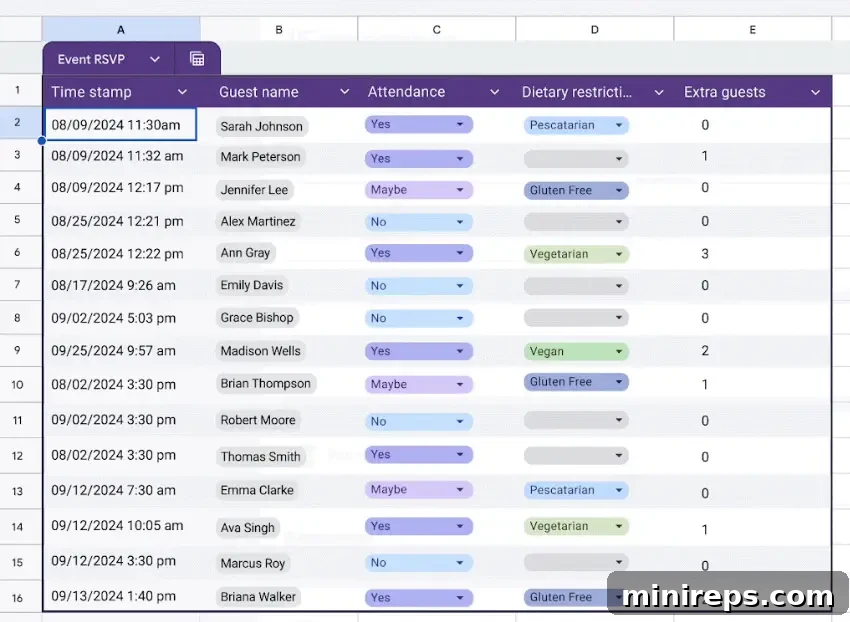
Google Forms has always integrated seamlessly with Google Sheets, but this connection has been significantly enhanced. Now, when your form is linked to a Sheet, responses are automatically formatted as impeccably structured tables. This improvement is crucial for anyone involved in data analysis, making it inherently easier to sort, filter, and share critical data with collaborators. The clean, organized format facilitates the creation of pivot tables, charts, and other advanced analyses, directly within Sheets, or even for integration into visualization tools like Looker Studio, ensuring that your raw data quickly translates into actionable intelligence.
Protect Sensitive Content with Data Loss Prevention (DLP)
In an age where data security and privacy are paramount, Data Loss Prevention (DLP) in Google Forms is a vital feature for organizations handling sensitive information. DLP helps to significantly minimize the risk of accidental or intentional data breaches by intelligently blocking sensitive question or answer content from being shared externally. This is particularly critical for data types like confidential financial information, personally identifiable information (PII), or protected health information. Based on pre-set administrative rules, the system automatically detects and prevents the transmission of such sensitive data outside of predefined boundaries, ensuring compliance with regulatory standards and safeguarding your organization’s most critical assets.
Keep Branding Consistent with Custom Themes
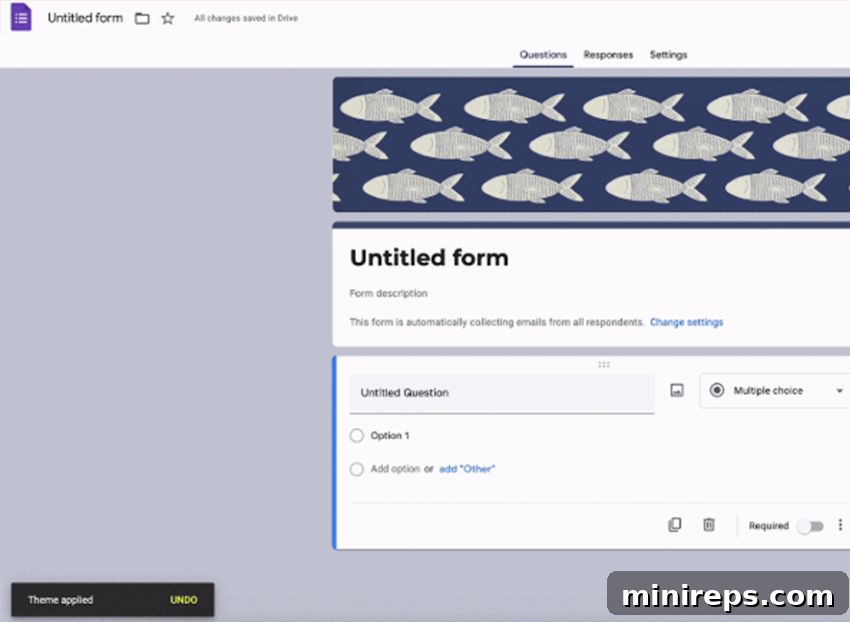
Maintaining a consistent brand identity across all external and internal communications is essential for professionalism and building trust. Google Forms now makes it easier than ever to ensure your forms reflect your organization’s brand without requiring graphic design expertise. Admins can establish comprehensive brand kits, encompassing elements like company logos, header images, specific brand colors, and approved fonts. Once created, these brand kits are readily available for anyone within your organization to apply, enabling the creation of polished, professional, and visually consistent forms with minimal effort. This feature empowers every team member to produce on-brand content, reinforcing your company’s identity in every interaction.
Gemini in Google Forms: Your Gateway to Unlocking Deeper Insights and Efficiency
The integration of Gemini AI into Google Forms fundamentally transforms how individuals and organizations approach data collection and analysis. Whether you are crafting intricate customer satisfaction surveys, coordinating internal team events, or soliciting valuable feedback from your employees, Gemini in Google Forms streamlines every facet of the process without ever compromising on quality or depth. From intelligently drafting entire forms based on a simple prompt, to providing concise, actionable summaries of open-ended responses, and even proactively suggesting relevant questions to complete your survey, Gemini empowers you to work faster and think more strategically about your data initiatives. It acts as an intelligent assistant, removing common bottlenecks and elevating the entire form experience.
Furthermore, as a native component of the Google Workspace ecosystem, Gemini’s capabilities within Forms are seamlessly integrated with other productivity tools. This ensures a cohesive and frictionless experience, allowing you to create smarter, more effective forms in less time, minimizing the need to switch between disparate applications. This synergy not only boosts individual productivity but also enhances collaborative efforts across teams. By automating the more tedious aspects of form creation and analysis, Gemini frees up valuable human capital to focus on interpreting insights, making data-driven decisions, and innovating. It’s not just a feature; it’s a strategic advantage, making Google Forms an even more indispensable tool for modern organizations.
Stay tuned for the next installment in our illuminating Gemini series, where we will take a closer look at the powerful capabilities of Gemini in Google Calendar. Discover how this advanced AI can help you reclaim your schedule, optimize meeting management, and enhance your overall time efficiency, further solidifying Google Workspace’s role as the ultimate productivity suite.
Gemini is a part of the powerful
Google Workspace is a comprehensive collection of cloud-native productivity and collaboration tools meticulously designed to help individuals, teams, and businesses achieve more with fewer distractions. Experience the future of work for yourself—try it free today!