
Updated: March 12, 2025
Elevate Team Communication: Unlocking the Power of Google Meet for Enhanced Collaboration
Most Google Workspace plans include a comprehensive suite of tools designed to boost productivity and foster seamless collaboration, with Google Meet standing out as a cornerstone for effective team communication.

Why Google Meet Outshines Competitors for Modern Teams
In today’s dynamic work environment, whether your team is fully remote, back in the office, or embracing a hybrid model, robust and reliable video conferencing is non-negotiable. Face-to-face interaction, even virtual, is crucial for fostering collaboration, sparking innovation, and maintaining high levels of productivity. While many platforms exist, Google Meet consistently emerges as a top choice for businesses worldwide. Its blend of intuitive design, robust security, and seamless integration with the broader Google Workspace ecosystem offers unparalleled advantages. Here are five compelling reasons why Google Meet is becoming the preferred solution for enhancing team communication:
1. Instant Access: No Plug-ins, Logins, or Downloads Required
One of the most significant friction points in virtual meetings is the prerequisite of software installations, plugins, or account registrations. Google Meet eliminates this barrier entirely. The Google Meet interface is designed for simplicity, making secure meeting participation effortless for everyone.
This means you don’t have to worry about whether your teammates, clients, or external partners have the correct applications installed or compatible operating systems. All it takes is a shared link. Participants can join directly from their web browser, instantly connecting to the meeting without any pre-work. This ease of access ensures that valuable meeting time isn’t wasted on technical troubleshooting, allowing teams to dive straight into productive discussions.
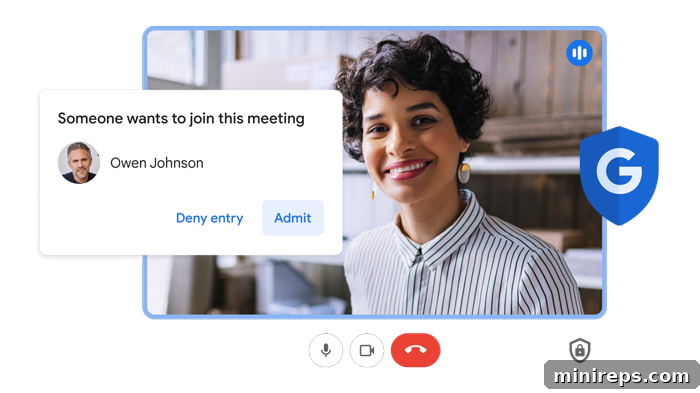
Beyond convenience, Google’s secure-by-design infrastructure keeps your meetings safe and private. Every meeting is protected by default, employing strong encryption measures. If someone outside your organization attempts to join, you receive an immediate notification, giving anyone in the meeting the power to admit or deny their entry. This proactive security approach ensures that only authorized individuals participate, safeguarding sensitive information and maintaining confidentiality, a critical aspect for any business.
2. Dynamic Content Sharing: Screen Sharing and Recording Capabilities
|
Effective collaboration often hinges on shared visual context. Google Meet’s robust screen sharing feature ensures that everyone is literally “on the same page.” Whether you’re presenting a new marketing strategy, reviewing design mock-ups, demonstrating software, or collaboratively editing a document, sharing your screen is intuitive and high-quality. This functionality eliminates ambiguity and fosters a clearer understanding among participants, driving more focused discussions and faster decision-making.
Furthermore, for Google Workspace Business Standard plans and above, meeting recordings transform ephemeral discussions into valuable, evergreen assets. Recordings are automatically saved to Google Drive, making them incredibly easy to access, organize, and share. This feature is invaluable for team members who couldn’t attend, allowing them to catch up at their convenience. It’s also a powerful tool for revisiting critical discussions, ensuring compliance, or documenting decisions. Beyond simple review, these recordings can serve as a foundation for building an internal knowledge base, creating training materials for new employees, or even filming product demonstrations. They provide a verifiable record of what was discussed, agreed upon, and decided, enhancing accountability and transparency across the team. |

3. Breaking Down Barriers: Live Captions and Translations
In an increasingly globalized and diverse workforce, effective communication extends beyond spoken words. Google Meet’s AI-powered live captioning feature transforms spoken conversations into real-time text, displayed on-screen. This is a game-changer for accessibility, ensuring that individuals with hearing impairments can fully participate and follow along without missing critical information. Moreover, in noisy environments or when participants have varying audio quality, live captions provide a reliable backup, enhancing comprehension for everyone.
But Google Meet goes a step further with its impressive live translation capabilities. Available in numerous languages, this feature allows participants to see captions translated into their preferred language in real-time. Imagine conducting a meeting with team members across continents, each receiving the dialogue in their native tongue – this eliminates language barriers, fosters true inclusion, and significantly broadens the scope of potential collaboration. It reduces misinterpretations, speeds up cross-cultural project delivery, and ensures that diverse voices are heard and understood, enriching the overall meeting experience and enhancing global team cohesion.

4. Professional Presence: Customizable Video Layouts and Backgrounds
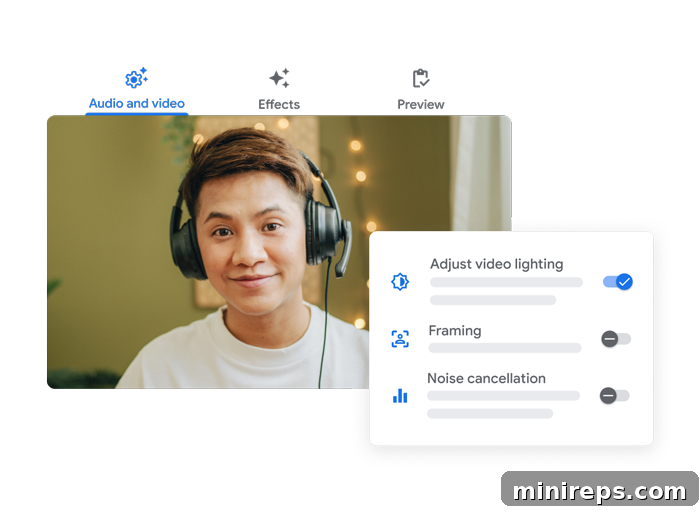
The visual and auditory quality of a virtual meeting greatly impacts its effectiveness and perceived professionalism. Google Meet is packed with helpful features designed to optimize your appearance and sound, regardless of your physical environment. Features like low-light mode automatically detect and adjust for poor lighting conditions, brightening your video image to ensure you always look clear and professional. This is especially useful for team members working from home or in varied environments.
Complementing this, AI noise cancellation intelligently filters out distracting background noises – from a barking dog to a busy coffee shop – allowing your voice to come through crisp and clear. This significantly improves the audio experience for all participants, enabling more focused and productive conversations.
Google Meet also offers various custom video layouts, allowing you to choose the view that best suits your meeting dynamics, whether it’s focusing on the presenter, seeing all participants in a tiled gallery, or highlighting a few key speakers. Furthermore, the ability to blur or replace backgrounds is invaluable for maintaining privacy and professionalism. Whether you’re working from a home office with personal items in the background or a busy public space, these features minimize visual distractions, allowing you to present a polished image and keep the focus entirely on the discussion at hand. These customizable options empower users to control their virtual presence and enhance the overall meeting quality.
5. Intelligent Efficiency: Gemini “Take Notes for Me”
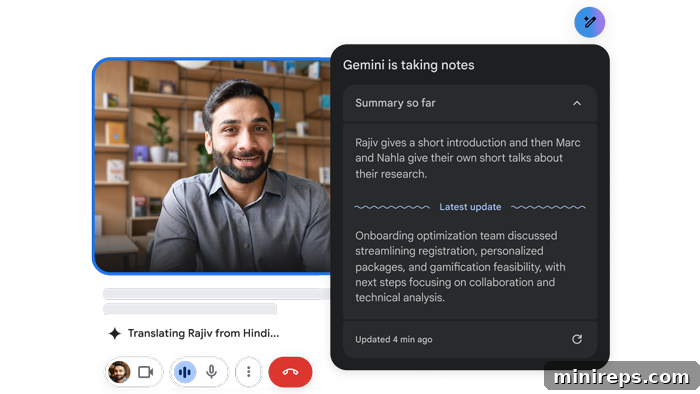
The introduction of Gemini AI’s “Take Notes for Me” feature within Google Meet marks a significant leap forward in meeting productivity. This innovative AI capability eliminates the traditional scramble to jot down important details, allowing every participant to fully immerse themselves in the discussion without the distraction of manual note-taking. Gemini automatically generates comprehensive meeting notes, intelligently capturing key discussion points, identifying actionable items, and providing concise summaries of the conversation.
This means attendees can focus their full attention on active listening, contributing to the discussion, and engaging with their colleagues, knowing that all critical information is being accurately recorded. For meeting organizers and team leaders, this feature ensures that no important decision or follow-up task is overlooked. Automatically generated summaries are invaluable for circulating post-meeting recaps, aligning team members, and holding individuals accountable for assigned action items. Gemini’s note-taking capabilities not only save significant time but also enhance the quality and impact of every virtual meeting, transforming them into more focused, productive, and actionable sessions.
Beyond Meetings: Google Meet’s Integration with Google Workspace
While Google Meet excels as a standalone video conferencing solution, its true power is unleashed through its deep and seamless integration with the entire Google Workspace ecosystem. This interconnectedness creates a unified and highly efficient workflow that extends beyond the meeting itself. For example:
- Calendar Integration: Schedule meetings directly from Google Calendar, automatically adding Meet links and inviting participants.
- Drive Integration: Meeting recordings are saved directly to Google Drive, making them easy to find, share, and organize alongside other project documents.
- Docs, Sheets, & Slides Integration: Present directly from these applications during a Meet call, or collaborate on them in real-time with screen sharing, enhancing co-creation.
- Gmail Integration: Join meetings directly from email invitations, and easily initiate calls with contacts from your inbox.
This comprehensive integration ensures that your team’s communication tools are always aligned with their productivity tools, minimizing context switching and maximizing efficiency. Whether you’re brainstorming in a Google Doc and then instantly hopping on a Meet call to discuss, or reviewing a presentation saved in Drive during a live session, Google Workspace makes these transitions effortless. This interconnected approach significantly enhances team communication by providing all the necessary tools in one cohesive platform.
Conclusion: Empower Your Team with Google Meet
In the modern business landscape, effective team communication is the bedrock of success. Google Meet provides a comprehensive, secure, and user-friendly platform that addresses the diverse needs of contemporary teams. From its effortless access and robust security features to advanced capabilities like real-time captions, AI-powered note-taking, and crystal-clear audio/video, Google Meet is designed to make every interaction more productive and inclusive.
By choosing Google Meet, especially as part of Google Workspace, organizations empower their teams with a tool that not only facilitates virtual meetings but genuinely enhances collaboration, boosts productivity, and fosters stronger connections, regardless of geographical distance. It’s more than just a video conferencing tool; it’s a strategic asset for modern team communication, ensuring your business stays connected, productive, and ahead of the curve.
Google Meet is an integral part of
Google Workspace is a powerful suite of productivity and collaboration tools that helps individuals, teams, and businesses achieve more with fewer distractions. Experience the difference for yourself – unlock seamless communication and enhanced productivity today!