


Demystifying the Internet: Essential Tech Terms for Professionals
In today’s digital landscape, a solid understanding of basic internet terminology is no longer just for tech enthusiasts; it’s a fundamental requirement for every working professional. Have you ever paused to consider what the various letters in a website URL signify, or how the intricate system of the Internet and DNS records truly operates? The web might seem like a complex maze, but at its core, it’s built on a set of logical principles and components.
This comprehensive guide introduces 11 Essential Internet Tech Terms That Every Working Professional Should Know. We’ll break down the fundamental components of a URL and explain the seamless process by which users access websites across the globe. By the end, you’ll not only navigate the web with greater confidence but also appreciate the sophisticated infrastructure that makes our digital lives possible.
1. URL: The Digital Address of the Web
URL stands for “Uniform Resource Locator,” and its name perfectly describes its function: it’s a standardized, universal method for addressing web resources. Think of a URL as the complete street address for any piece of content or website on the internet. It provides precise instructions to your browser, guiding it to the exact server where a website is hosted, giving us access to the vast ocean of information and entertainment we rely on daily.
For instance, https://www.youtube.com is the URL that directs you to the world-renowned video-sharing platform, a popular destination for everything from educational tutorials to captivating documentaries and hilarious clips. Yet, many users are unaware that this seemingly simple address is composed of four distinct parts, each playing a crucial role in its functionality:
- Protocol: Identifies the communication method (e.g.,
https://) - Subdomain: Specifies a particular section or hostname within the domain (e.g.,
www.) - Domain Name (Term): The unique, memorable name of the website (e.g.,
youtube) - Top-Level Domain (TLD): The highest level in the hierarchical Domain Name System (e.g.,
.com)
Understanding these individual components is the first step toward truly grasping how the internet functions and how websites are organized and accessed.
2. Protocol: HTTP vs. HTTPS – The Foundation of Secure Communication
The “protocol” in a URL, such as HTTP or HTTPS, dictates how information is exchanged between your web browser and the website’s server. This is a critical element, especially in an age where data security is paramount.
HTTP, or “HyperText Transfer Protocol,” is the original system for transmitting web pages. While effective, it sends data in plain text, making it vulnerable to interception. This means any information you send—passwords, personal details, or financial data—could potentially be read by malicious actors if they intercept the connection.
The “S” in HTTPS stands for “Secure,” transforming HTTP into “HyperText Transfer Protocol Secure.” This vital addition signifies that the website has implemented an SSL (Secure Sockets Layer) certificate, or its successor, TLS (Transport Layer Security). An SSL/TLS certificate performs a critical function: it encrypts all data transmitted between your browser and the server.
When you visit an HTTPS site, the SSL/TLS certificate establishes an encrypted connection before any data is sent. This encryption scrambles your information, making it virtually unreadable to anyone who might intercept it. Without SSL/TLS security, sensitive information like credit card details, login credentials, or personal health information submitted to a website could easily be compromised. As your unencrypted data travels across the internet to the unprotected server, hackers could intercept and misuse it. Furthermore, major search engines like Google prioritize HTTPS sites, penalizing HTTP sites in rankings, thus making HTTPS crucial for both security and SEO.
3. Domain Name (Term): Your Website’s Memorable Identity
The “term” within a URL refers to the unique, memorable text string that forms the core identity of a website. It’s the part you typically remember and type into your browser, often representing a company’s brand, a blog’s topic, or a product’s name. In our ongoing example, “youtube” is the distinctive term for the URL https://www.youtube.com, instantly recognizable worldwide.
Choosing an effective domain name is a crucial aspect of establishing an online presence. A good domain name is:
- Memorable: Easy for users to recall and type.
- Relevant: Reflects the content, brand, or purpose of the website.
- Concise: Shorter names are often easier to remember and less prone to typos.
FUN FACT: The value of a domain name is heavily influenced by its brevity and memorability. Highly coveted, short, and brandable domain names can fetch astronomical prices. For instance, internet.com reportedly sold for an astonishing $18 million in 2009! Individuals who specialize in buying and selling these valuable digital assets, anticipating future demand and profit, are known as “domainers” or “domain investors.”
Beyond simple memorability, a well-chosen domain name plays a significant role in branding, marketing efforts, and ultimately, the success of an online venture. It’s often the first point of contact for potential customers and can convey professionalism and trustworthiness.
4. Domain Extensions: Top-Level Domains (TLDs) and Second-Level Domains (SLDs)
Domain extensions, sometimes simply called “domains,” are the suffixes that appear after the last (or second to last) dot in a URL. These extensions are organized hierarchically within the Domain Name System. The most ubiquitous top-level domain (TLD) is undoubtedly “.com,” widely recognized and trusted globally. However, the internet offers a vast array of worthwhile TLDs beyond .com, with literally thousands available when you account for both Top-Level Domains and Second-Level Domains.
There are several categories of TLDs:
- Generic Top-Level Domains (gTLDs): These are generic extensions like .com (commercial), .org (organization), .net (network), .edu (education), and .gov (government). In recent years, many new gTLDs have been introduced, such as .app, .blog, .store, and .tech, allowing for more specific and descriptive website addresses.
- Country Code Top-Level Domains (ccTLDs): These are two-letter domains specifically designated for countries or sovereign states, like .uk for the United Kingdom, .de for Germany, .jp for Japan, or .ae for the United Arab Emirates. Businesses often use ccTLDs to target specific geographic markets and signal local presence.
Some domain registrars, like 101domain, boast an impressive catalog of nearly 2,000 domain extensions, providing businesses and individuals with immense flexibility in choosing an online identity.
Furthermore, you might encounter domains with two levels of extension, particularly common with ccTLDs, known as Second-Level Domains (SLDs). For instance, if you’ve ever visited a UK-based website, you’ve likely seen “.co.uk.” In this structure, “.co” is the second-level domain, typically indicating a commercial entity, while “.uk” is the top-level domain. This layered system allows for more specific categorization within a given TLD.
FUN FACT: Interestingly, a handful of TLDs initially branded and adopted as generic top-level domains are, in reality, country code top-level domains. A prime example is the popular .ai domain, which has gained significant traction in the artificial intelligence sector. However, .ai is actually the ccTLD for Anguilla, a British overseas territory in the Caribbean. This showcases how perceived meaning can sometimes overshadow the original geographical designation.
5. Subdomain: Segmenting Your Website for Better Organization
A subdomain is exactly what its name suggests: a “sub” division of your main domain. While a primary domain name combines a memorable term (e.g., “youtube”) with a domain extension (e.g., “.com”) to form a unique web address (e.g., youtube.com), subdomains allow you to create distinct sections or functionalities within that main domain.
By default, most websites are accessible with the “www” subdomain (e.g., www.youtube.com). However, subdomains offer much greater utility. They are incredibly useful for organizing different parts of a large website or for hosting specific applications that relate to your main domain without requiring a completely separate domain purchase. For example:
blog.yourwebsite.comcould host your company blog.shop.yourwebsite.commight be dedicated to your e-commerce store.support.yourwebsite.comcould direct users to your customer service or FAQ section.dev.yourwebsite.comis often used by developers for testing new features before deploying them to the main site.
You have the flexibility to create and manage these additional subdomains through your domain’s DNS settings, which are typically accessible via your domain registrar (such as 101domain). This article will delve deeper into editing these crucial DNS records in the following sections, explaining how they direct traffic to these specific parts of your online presence.
6. DNS: The Internet’s Phonebook – Domain Name System
At the heart of how we navigate the internet lies the Domain Name System, or DNS. Often referred to as the “phonebook of the Internet,” DNS is a decentralized naming system that translates human-readable domain names into machine-readable Internet Protocol (IP) addresses. Without DNS, you would have to remember a series of numbers like 173.194.39.78 instead of typing www.google.com into your browser.
The primary function of DNS is to store and manage all relevant information about a domain name, including:
- The domain’s owner.
- Where the website content is hosted.
- Details about its email servers.
- Any subdomains created on the root domain.
When you type a URL into your browser, a DNS query is initiated. This query travels through a network of DNS servers to find the corresponding IP address for that domain. Once the IP address is located, your browser can then connect to the specific server hosting the website, retrieving and displaying the content you want to see. This entire process, from typing a URL to seeing a webpage, happens in milliseconds, thanks to the efficiency of the DNS. We’ll explore several specific record types found within hosting and DNS in the upcoming sections.
7. Nameservers: The Gatekeepers of Your Domain’s Information
To fully grasp the functionality of the DNS, it’s essential to understand nameservers. Nameservers are the specialized servers that hold the authoritative DNS records for a domain. They are, in essence, the physical directories that tell the internet where to find all the files and resources associated with your website. When a DNS query is made, it eventually reaches the nameservers configured for that particular domain to retrieve the necessary information.
Think of nameservers as the main directories for your domain. They point to where your website is hosted and stored. Below is an example of what nameserver entries might look like for a domain hosted at 101domain.com. You typically configure at least two nameservers for redundancy.
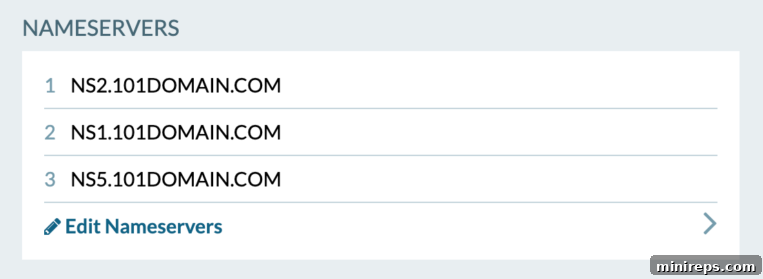
You’ll notice that domains often have multiple nameservers listed (e.g., ns1.example.com, ns2.example.com). This “redundancy” is a critical design feature for reliability and fault tolerance. In the event that one nameserver experiences an outage or goes offline, the next nameserver in the list automatically takes over, ensuring continuous operation. This backup system dramatically decreases the likelihood of your website experiencing downtime, providing a more reliable and consistent experience for your visitors.
8. A Records: Directing Traffic to Your Website’s IP Address
A Records, also known as Address Records, are fundamental to the operation of domains and websites. An A Record is a type of DNS record that maps a domain name to an IPv4 address, which is the numerical label assigned to every device connected to a computer network. Essentially, the “A” in A Record stands for “Address,” and it tells the internet exactly where your website’s content is physically located.
When a user types your domain name into a browser, the DNS system queries for your A Record. The A Record then provides the IP address of the server that hosts your website. Your browser uses this IP address to connect to the server and retrieve your website’s files. You will typically need to add or edit an A Record if you are hosting your website with a company different from the one where you purchased your domain name, or if you are migrating your website to a new hosting provider.
Here is a typical example of an A Record entry:

In this example of an A Record, you’ll observe a column labeled “TTL.” TTL stands for “Time To Live,” and it’s a crucial setting that dictates how long other DNS servers and internet resolvers should cache a domain’s DNS record before discarding it and querying for a new one. A shorter TTL means changes to your DNS records will propagate faster across the internet, which is useful during website migrations. Conversely, a longer TTL reduces the load on DNS servers but means updates take longer to reflect globally. In the example above, a TTL setting might indicate that other servers will check the nameserver every 6 hours (21600 seconds) to see if any DNS records have been updated, balancing responsiveness with network efficiency.
9. MX DNS Records: Ensuring Your Emails Reach Their Destination
Mail Exchange (MX) records are a specific type of DNS record essential for directing email. These records are responsible for communicating which mail servers are authorized to accept incoming mail for your domain and where to route those emails. In simpler terms, MX records are the postal codes for your domain’s email system, ensuring that messages sent to your address, like [email protected], are delivered to the correct inbox.
The proper configuration of MX records is absolutely critical for the functionality of your domain’s email. If your MX records are not correctly pointed to the appropriate mail server(s), you will not be able to receive or send emails from your domain-specific addresses. This can lead to significant communication breakdowns for businesses and individuals alike. MX records typically include a preference value (or priority) which indicates the order in which mail servers should be tried, allowing for fallback options if the primary server is unavailable.
Here’s an example of typical MX Records configured for a service like G Suite (now Google Workspace), Google’s comprehensive suite of business tools including email:

Each entry specifies a mail server hostname and its priority, guiding incoming email traffic efficiently and reliably.
10. CNAME DNS Records: Creating Domain Aliases
CNAME records, short for Canonical Name records, are used to create aliases or alternate names for a specific domain or subdomain. Instead of pointing directly to an IP address (like an A Record), a CNAME record points to another domain name. This is particularly useful for handling variations of your URL, ensuring that users land on the same website regardless of how they type it.
For instance, whether a user types youtube.com or www.youtube.com into their browser, both should ultimately direct them to the same website on the same server. This seamless redirection is typically achieved using a CNAME record. You would configure this by first creating an A Record for your primary domain (e.g., youtube.com) that points to its specific IP address. Then, you would add a CNAME record for the alias (e.g., www.youtube.com) that points to your primary domain (youtube.com).
The primary advantage of using CNAME records for aliases is maintainability. If the IP address of your website’s server changes, you only need to update the A Record for your primary domain. All CNAME records pointing to that primary domain will automatically inherit the new IP address, saving you the effort of updating multiple records individually. CNAME records are also commonly used to point subdomains to external services, such as a blog hosted on a third-party platform (e.g., blog.yourdomain.com pointing to a platform’s URL).
See an example of a CNAME record below:

11. TXT DNS Records: Verifying Domain Ownership and Enhancing Security
TXT records are another versatile component of the DNS, designed to hold arbitrary plain text data. Unlike A, MX, or CNAME records, TXT records do not directly impact the fundamental functioning of your domain, such as website accessibility or email delivery. Instead, they serve as a flexible mechanism for providing various types of information to external services, often crucial for verification, security, and authentication purposes.
A TXT Record essentially tells other services information about your domain, including how it is set up and what (if any) other services it utilizes. Common uses for TXT records include:
- Domain Ownership Verification: Services like Google Workspace (formerly Google Apps), Microsoft Office 365, and various website builders require you to add a specific TXT record to prove that you own your domain. Since only the legitimate domain owner or administrator can update the DNS records, this is a widely accepted and secure form of verification.
- Email Authentication (SPF, DKIM, DMARC): TXT records are critical for implementing email authentication protocols like SPF (Sender Policy Framework), DKIM (DomainKeys Identified Mail), and DMARC (Domain-based Message Authentication, Reporting, and Conformance). These records help prevent email spoofing and phishing by allowing receiving mail servers to verify that an incoming email genuinely originated from your domain, thereby improving email deliverability and protecting your brand reputation.
- Site Verification: Some search engines and webmaster tools also use TXT records for site verification purposes.
Here’s an example of a TXT record, often containing a verification string or an SPF policy:

The text string within the record provides the necessary information for the requesting service to perform its function, whether it’s verifying ownership or validating an email sender.
Helpful Tips for Remembering DNS Records
Navigating the various DNS record types can feel overwhelming at first, but with a few mnemonic devices, you can easily recall their primary functions:
- Nameserver: Think of it as the “name” of the server that hosts your site’s entire DNS zone file.
- A Record: The “A” in A Record stands for “Address” – specifically, the IP Address for where a domain or subdomain is hosted. It’s the direct mapping.
- MX Record: “Mail Exchange” record. MX is the only one that starts with an “M” and is solely focused on directing email traffic.
- CNAME: “See Name” – think, “Hey computer, when you see ‘www.youtube.com,’ instead see name ‘youtube.com.'” It’s an alias pointing to another domain name.
- TXT Record: Often used for verification and text-based information, much like receiving an SMS text message for verification purposes.
Acquiring a foundational understanding of these terms and their specific applications is vital for demystifying the often-intimidating jargon used in the domain and web hosting industry. At its core, the intricate process by which domains and websites operate is not overly complicated once you grasp these basic building blocks. With this newfound knowledge of URLs and DNS records, you can gain a deeper appreciation for the seamless and sophisticated mechanisms that facilitate how sites are accessed and experienced across the vast expanse of the Internet.
Ready for more tech talk and deeper insights? Watch Our Expert Webinar and Expand Your Knowledge!

Need some inspiration for your next online venture? Discover our most popular and versatile domain extensions today:
.BANKdomain
.LAWdomain
.AEROdomain
.IOdomain
.AEdomain
.CNdomain