
“Header From” spoofing is a sophisticated and highly effective email impersonation tactic frequently employed by cybercriminals to deceive recipients. In essence, it involves a malicious actor forging the visible “From” address of an email to make it appear as if it originated from a legitimate and trusted sender within an organization. While the email seemingly comes from a recognizable source, the true origin is a different, often cleverly disguised or deceptive, domain controlled by the attacker. This technique exploits a fundamental aspect of email communication: the average user’s reliance on the displayed “From” name and address, making it difficult to discern the fraudulent nature of the message without deeper inspection. It’s a cornerstone of many phishing and Business Email Compromise (BEC) attacks, designed to bypass initial scrutiny and leverage human trust.
This deceptive practice thrives because most email clients primarily show the “Header From” address, which attackers can easily manipulate. The underlying, technical “Envelope From” address, which reveals the email’s actual sending domain, remains hidden from the casual observer. This discrepancy is precisely what DMARC (Domain-based Message Authentication, Reporting, and Conformance) is designed to detect and combat, providing a critical layer of defense against such widespread impersonation threats. To truly grasp the mechanics of this prevalent cybersecurity threat and its implications, let’s delve into a detailed hypothetical scenario.
Unpacking the “Header From” Spoofing Attack
“Header From” spoofing is a multi-stage process meticulously engineered to bypass standard email security measures and exploit human psychology. It’s a prevalent method in the arsenal of cybercriminals for launching successful phishing campaigns and Business Email Compromise (BEC) scams. Understanding each phase of this attack is crucial for developing robust defense strategies.
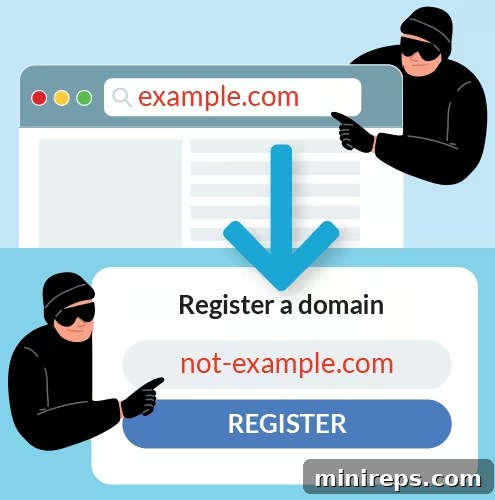
STEP 1
Register a Lookalike Domain: The initial move for an attacker is to register a domain that bears a striking resemblance to the legitimate target domain. This is often achieved through typosquatting or brand-impersonation tactics, such as registering googlee.com (with an extra ‘e’), g0ogle.com (using a zero instead of an ‘o’), or similar subtle variations. The goal is to create a domain that, at a quick glance, appears authentic, leveraging the recipient’s hurried reading habits or lack of attention to detail. This deceptive domain will serve as the actual sender of the fraudulent emails, providing a plausible, yet false, origin point.

STEP 2
Set Up a Valid SPF Record: To circumvent basic email security filters and prevent their messages from being immediately flagged as spam or rejected, the attacker meticulously sets up a valid Sender Policy Framework (SPF) record for their newly registered decoy domain. SPF is an email authentication method designed to prevent sender address forgery. By correctly configuring this record, the attacker authorizes their sending server (e.g., an email server they control) to send emails on behalf of the lookalike domain. This crucial step allows the spoofed email to pass initial server-level authentication checks for the *envelope sender*, significantly increasing its chances of reaching the intended recipient’s inbox and appearing legitimate to less advanced security systems.

STEP 3
Forge the “Header From” Address: This is the core of the spoofing technique. The attacker modifies the visible “Header From” address, which is what email clients typically display to the user. Instead of showing the actual sending address (e.g., `[email protected]`), they manipulate it to display an employee’s real name and email address from the target company (e.g., “Bob Smith HR” <`[email protected]`> or even just “Bob Smith”). This deceptive presentation creates a powerful illusion of legitimacy, as the email now appears to originate from a known and trusted individual within the recipient’s organization or a legitimate business they interact with. The visible “From” address is completely decoupled from the actual “Envelope From” address, which remains hidden.
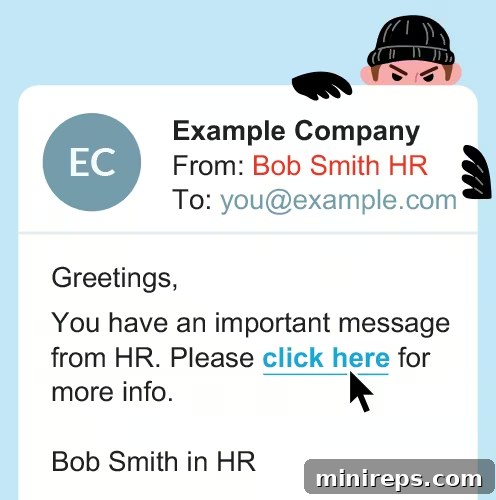
STEP 4
Send the Impersonating Email: With the lookalike domain set up and the “Header From” address forged, the attacker dispatches the fraudulent email to an unsuspecting target. This could be an employee, a customer, or a business partner of the legitimate organization. The content of these emails is usually designed to create a sense of urgency, fear, or a compelling reason to act. Common themes include fake invoice requests, urgent HR notifications, password reset links, or critical business updates. Because the email has passed initial SPF checks (for the lookalike domain) and presents a visually convincing sender, it often bypasses basic spam filters and lands directly in the recipient’s primary inbox, increasing the likelihood of interaction.
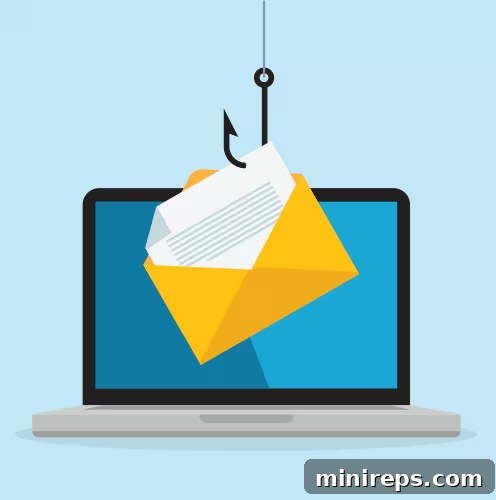
STEP 5
Extract Information: Upon receiving the email, the target, believing it to be authentic due to the forged “Header From” address, responds to the attacker’s malicious request. This interaction could involve clicking on a phishing link leading to a fake login page, divulging sensitive personal or financial information, transferring funds, or downloading malware-laden attachments. Once the user complies, the attacker collects the requested sensitive information, data, or resources. The consequences can be severe, ranging from immediate financial losses for individuals and businesses to extensive data breaches, compromised accounts, and significant reputational damage for the impersonated organization.

NOTE
It’s critical to understand the technical distinction that makes this attack possible. While the visible “Header From” address (e.g., `[email protected]`) is expertly forged for the recipient’s view, the hidden “Envelope From” address (also known as the `Return-Path` or `Mail From` address) still accurately reflects the decoy domain (e.g., `[email protected]`). Most end-users cannot easily see this discrepancy in their email client. However, advanced email security protocols like DMARC (Domain-based Message Authentication, Reporting, and Conformance) are specifically designed to detect and act upon this exact misalignment, providing a crucial layer of defense against such sophisticated spoofing attempts.
DMARC: Your Shield Against “Header From” Spoofing
Domain-based Message Authentication, Reporting, and Conformance (DMARC) is an indispensable email authentication protocol that serves as a powerful defense against “Header From” spoofing and other forms of email impersonation. DMARC works by establishing a critical link between the visible “Header From” domain and the underlying domains used in other authentication checks, specifically SPF (Sender Policy Framework) and DKIM (DomainKeys Identified Mail). It ensures that the domain displayed to the end-user (the “Header From”) aligns with the domain verified by either SPF or DKIM. This “domain alignment” is the cornerstone of DMARC’s effectiveness.
Here’s a brief overview of the foundational protocols DMARC relies on:
- SPF (Sender Policy Framework): SPF allows domain owners to publish a list of authorized mail servers that are permitted to send email on behalf of their domain. When an email server receives a message, it can check the SPF record of the sending domain to verify if the originating IP address is on the approved list. This primarily checks the “Envelope From” domain.
- DKIM (DomainKeys Identified Mail): DKIM provides an cryptographic signature that validates the sender and ensures the email content hasn’t been tampered with in transit. The sender’s server signs outgoing emails with a private key, and the receiving server uses a public key (published in the sender’s DNS) to verify the signature. DKIM checks the domain associated with the digital signature.
DMARC brings SPF and DKIM together by mandating that the “Header From” domain must align with either the SPF-verified “Envelope From” domain or the DKIM-signed domain. When this alignment fails, DMARC instructs receiving mail servers on how to handle the non-compliant email, based on the domain owner’s predefined DMARC policy. This policy dictates whether the email should be allowed to pass, quarantined (sent to spam), or outright rejected.
| Policy | p=none | p=quarantine | p=reject |
|---|---|---|---|
| User Risk | ❌ High Risk | ⚠️ Medium Risk | ✅ Protected |
| Mechanism | This policy lets the email through without specific action. When DMARC detects a domain mismatch, it simply monitors the issue and sends reports to the domain owner without blocking delivery. This is primarily a monitoring mode. | This policy moves the spoofing email to the recipient’s spam or junk folder. Upon detecting alignment failure, DMARC instructs the email server to treat the message with suspicion, reducing its visibility to the end-user. | This policy completely blocks the spoofing email. Once DMARC detects the misalignment, the email server immediately rejects the message, preventing it from ever reaching the recipient’s inbox. A bounce-back error is typically sent to the attacker. |
| Outcome | The email’s final location is unpredictable; it could end up in the user’s inbox, spam folder, or be filtered by other systems. The user is exposed to risk. | The email is relegated to the spam folder, reducing immediate threat but still requiring user vigilance. Spoofing attempts are less likely to succeed. | You and the attacker both know the spoofing attempt was unsuccessful. The target user never sees the email, providing the highest level of protection against “Header From” spoofing. |
Ultimately, a p=none policy leaves the user highly vulnerable and the organization exposed to significant risk because it lacks any mechanism to prevent malicious emails from reaching their target. In contrast, transitioning to a p=quarantine policy offers a transitional safeguard by directing suspicious emails to spam. The ultimate goal, a p=reject policy, provides the strongest defense, effectively safeguarding users by ensuring that spoofed emails are entirely blocked and never delivered, thus protecting your brand and your recipients from email impersonation.
The Challenge of DMARC Implementation and Strict Enforcement
While the benefits of a strict DMARC policy like `p=reject` are undeniable for robust email security, the journey to achieving full DMARC enforcement can be remarkably complex and daunting for many organizations. The initial step typically involves deploying a `p=none` policy, which is a crucial monitoring phase. This policy allows you to passively collect DMARC reports, providing invaluable data on all entities sending email on behalf of your domain—both legitimate and illegitimate.
The core challenge lies in meticulously analyzing these granular reports. Organizations often use numerous third-party services that send emails on their behalf, including marketing automation platforms, CRM systems, HR portals, payment processors, and cloud-based communication tools. Each of these legitimate senders must be correctly identified, configured with proper SPF and DKIM records, and validated for DMARC alignment. Misidentifying or overlooking even a single authorized sender, or failing to properly configure their authentication, can lead to a significant problem: your own legitimate emails getting blocked or sent to spam once you switch to a stricter policy like `p=quarantine` or `p=reject`. This risk of disrupting vital business communications often makes organizations hesitant to move beyond `p=none`.
The process of interpreting complex DMARC XML reports, identifying all your legitimate sending sources, and systematically moving from a monitoring policy (`p=none`) to a quarantine (`p=quarantine`) and then to a rejection policy (`p=reject`) requires specialized knowledge, dedicated resources, and a deep understanding of email authentication protocols. Without the right tools and expertise, this entire endeavor is manual, incredibly time-consuming, and highly prone to errors, placing a heavy burden on IT and security teams. This complexity often leads to prolonged stays in `p=none` mode, leaving organizations vulnerable to the very spoofing attacks DMARC is designed to prevent.
The Solution: A Smarter, Streamlined Approach to DMARC Management
This is precisely where a dedicated DMARC management platform becomes not just beneficial, but absolutely essential for any organization serious about email security and brand protection. Instead of manually sifting through verbose and often cryptic DMARC aggregate and forensic reports, and risking operational disruptions due to misconfigurations, a sophisticated product like OnDMARC simplifies and automates the entire process. Such platforms transform raw data into clear, actionable insights, providing an intuitive view of your entire email ecosystem.
OnDMARC and similar solutions offer comprehensive dashboards that clearly show you who is sending emails on behalf of your domain, instantly highlighting whether these senders are correctly authenticated via SPF and DKIM, and if they are achieving DMARC alignment. This visibility is paramount for quickly distinguishing between legitimate email traffic and malicious spoofing attempts. With features designed for effortless implementation and continuous monitoring, these platforms guide you step-by-step from an initial `p=none` monitoring policy all the way to a robust `p=reject` enforcement, ensuring your transition is both safe and effective.
Key benefits of leveraging a DMARC management platform include:
- Automated Report Analysis: Eliminating the need for manual parsing of complex XML reports.
- Simplified Sender Identification: Easily discover all legitimate email sources and identify unauthorized senders.
- Guided Configuration: Tools and recommendations to correct SPF and DKIM authentication issues for legitimate services.
- Real-time Threat Detection: Continuous monitoring for malicious activity and immediate alerts for spoofing attempts.
- Enhanced Deliverability: Proper DMARC configuration often improves the deliverability of legitimate emails.
- Brand and Customer Protection: Proactively prevent impersonation, phishing, and BEC attacks that can damage your brand reputation and compromise your customers.
By automating the inherent complexities of DMARC implementation and maintenance, a platform like OnDMARC empowers organizations of all sizes to achieve full domain protection with confidence. It ensures your domain is resilient against “Header From” spoofing attacks, fortifying your cybersecurity posture, securing your brand’s integrity, and safeguarding your customers from a constantly evolving array of email-borne threats. Moving to `p=reject` becomes a controlled, informed process, rather than a risky leap.
Need Expert Assistance with Your DMARC Setup?
Navigating the intricacies of DMARC implementation can be a significant undertaking. Eliminate the guesswork and ensure optimal email security by leveraging professional support. Learn more about 101domain’s Managed DMARC Services. Let our experienced team handle the heavy lifting for you, from initial policy setup and ongoing monitoring to detailed reporting and troubleshooting. With our managed services, you can rest easy knowing your email domains are expertly secured against spoofing and impersonation, allowing you to focus on your core business objectives without worrying about complex email authentication protocols.