


The recent global shifts have profoundly impacted how businesses operate, compelling a rapid transformation in workplace dynamics. With the imperative to prioritize health and safety, organizations worldwide swiftly pivoted to remote work models, a transition that brought both challenges and unprecedented opportunities. Establishing normalcy in this new era means ensuring continuous team-wide collaboration, maintaining high productivity, and fostering strong connections with clients, all while team members work from diverse locations. For many, this has meant a deep dive into exploring new digital mediums and advanced techniques to sustain business continuity and growth amidst unforeseen changes.
At the heart of this transformation lies the critical need for secure and reliable conferencing tools. These platforms have become the backbone of modern business communication, facilitating everything from daily stand-ups to crucial client presentations. Navigating the myriad of options available can be daunting, but two names consistently rise to the forefront: Google Meet and Zoom. Both have emerged as frontrunners in the video conferencing landscape, each with its unique strengths and weaknesses. But which one truly stands out as the superior tool for businesses aiming for efficiency, security, and seamless integration? This comprehensive comparison delves into the technical specifications, user accessibility, and paramount security aspects of Google Meet and Zoom, offering a clear perspective to help your business make an informed decision.
Google Meet vs. Zoom: Technical Specifications Unpacked
Understanding the core technical capabilities of any video conferencing platform is crucial for businesses. It’s not just about getting people connected, but ensuring the tools can scale with your needs, offer robust features, and integrate seamlessly into your existing workflows. Let’s break down the key technical specifications for Google Meet and Zoom to see how they measure up.
Google Meet
- Included with Google Workspace account: Google Meet is not a standalone product; it’s an integral part of the comprehensive Google Workspace suite. This integration offers unparalleled synergy with other Google applications like Gmail, Calendar, Drive, and Docs, streamlining workflows and enhancing overall productivity without additional subscriptions.
- Up to 500 participants: Google Meet supports large-scale meetings, allowing up to 500 attendees to join a single session. This capacity is ideal for significant corporate events, large training sessions, webinars, or company-wide announcements, ensuring all relevant stakeholders can participate simultaneously.
- Allows call-ins for free: Participants can join meetings via phone call without incurring additional charges, a feature that significantly enhances accessibility for individuals without internet access or those on the go. This is particularly beneficial for global teams or reaching clients in various geographical locations.
- Up to 24-hour limit: For most paid Google Workspace accounts, meetings can extend for an impressive 24 hours. This extended duration caters to intensive workshops, multi-timezone collaborations, or long-form events, providing ample time without interruption.
- 24/7 support by phone, email, and online: Google Workspace customers benefit from round-the-clock technical support across multiple channels. This dedicated support ensures that any technical issues or queries can be resolved swiftly, minimizing downtime and disruption to business operations.
- Active speaker view: This intelligent feature automatically highlights the current speaker, making it easy to follow conversations in larger meetings and ensuring focus remains on the individual contributing to the discussion.
- Auto, tiled (4 video feeds), spotlight (full screen), and sidebar: Google Meet offers diverse layout options to suit different meeting styles. The tiled view is excellent for collaborative discussions, spotlight for presentations, and sidebar for mixed interactions, providing flexibility in how participants view the meeting.
- Simultaneous screen share: Presenters can easily share their entire screen or specific applications, facilitating collaborative work, presentations, and demonstrations. This is essential for showcasing documents, software, or visual content to attendees.
- Instant or scheduled meetings: Google Meet allows for immediate ad-hoc meetings as well as planned sessions through Google Calendar integration. This flexibility supports both spontaneous discussions and well-organized corporate events.
- Group chat: A built-in chat function enables real-time text communication among participants, useful for sharing links, asking questions without interrupting the speaker, or discussing side topics privately.
- Meeting code or nickname: Meetings can be joined using a unique code or a memorable nickname, simplifying the process of connecting, especially for internal teams who can use consistent, easy-to-remember names.
- Host controls: Meeting hosts have comprehensive control over the session, including admitting participants, muting attendees, ending meetings, and managing screen sharing. These controls are vital for maintaining order and productivity.
- Breakout rooms: This feature allows hosts to divide participants into smaller groups for focused discussions or brainstorming sessions, then bring them back to the main meeting. It’s an invaluable tool for interactive workshops, training, and team-building exercises.
- Meeting recordings: Google Meet enables hosts to record meetings, which can then be saved to Google Drive. These recordings are indispensable for attendees who missed the meeting, for training purposes, or for future reference and compliance.
- Background noise cancellation: Utilizing advanced AI, Google Meet actively filters out distracting background noises, ensuring clearer audio for all participants and enhancing the professionalism of virtual meetings.
- Live streaming: For events requiring a broader audience reach beyond the 500-participant limit, Google Meet offers live streaming capabilities, allowing thousands to watch in real-time. This is perfect for public webinars, large corporate announcements, or educational broadcasts.
- Live captions and translated captions: Accessibility is significantly enhanced with live captioning, which transcribes speech in real-time. Moreover, translated captions break down language barriers, making meetings inclusive for diverse global teams and clients.
- Take notes for me: This AI-powered feature automates note-taking during meetings, capturing key points and action items, allowing participants to focus entirely on the discussion rather than manual transcription.
Zoom
- Free version available: Zoom offers a robust free tier, which has contributed significantly to its widespread adoption, especially among individual users and small groups. This allows users to experience the platform’s core functionalities before committing to a paid plan.
- Up to 1,000 participants: Zoom boasts an impressive capacity, supporting up to 1,000 participants in a single meeting with its enterprise plans. This makes it an attractive option for very large webinars, conferences, and mass communication events.
- Charges call-in fees (starting at $100/mo): While Zoom offers call-in options, these typically come with additional charges, often starting at around $100 per month for add-on plans. This can increase the overall cost for businesses that rely heavily on audio-only participants.
- Up to 24-hours limit / or 40 mins (free version): Paid Zoom accounts offer up to 24 hours for meetings, similar to Google Meet. However, the popular free version is restricted to a 40-minute limit for group meetings, which can be a significant constraint for professional use.
- Ticket support, phone support, dedicated customer success manager: Zoom provides various support tiers depending on the subscription level, including ticket-based support, phone support, and for enterprise clients, a dedicated customer success manager.
- Active speaker view: Similar to Google Meet, Zoom also dynamically highlights the person speaking, ensuring clear communication flow and helping participants easily identify who is talking.
- Fullscreen and gallery view (up to 25 video feeds): Zoom’s gallery view can display up to 25 video feeds simultaneously, allowing for a comprehensive overview of meeting participants. This is beneficial for interactive discussions where seeing everyone’s reactions is important.
- Simultaneous screen share: Zoom allows multiple participants to share their screens concurrently, which is excellent for collaborative editing or comparing documents side-by-side. This feature fosters highly interactive work sessions.
- Instant or scheduled meetings: Users can initiate immediate meetings or schedule them in advance through integration with popular calendar services like Outlook and Google Calendar, offering flexibility for various meeting needs.
- Private and group chat: Zoom includes both public group chat for all participants and private chat options, allowing for direct messages between individuals without disrupting the main conversation.
- Meeting ID or Vanity URL (yourcompany.zoom.us): Meetings can be joined using a unique numeric Meeting ID. Enterprise users also have the option for a Vanity URL (e.g., yourcompany.zoom.us), which provides a professional and branded entry point for meetings.
- Host controls: Zoom provides extensive host controls, including participant management (muting, removing), recording controls, and security settings, empowering hosts to manage their meetings effectively.
- Breakout rooms: Similar to Google Meet, Zoom offers breakout rooms for splitting large meetings into smaller, more manageable groups for focused discussions or project work, enhancing engagement and collaboration.
Our Takeaway: Analyzing the Tech Specs
Upon a detailed examination of the technical specifications, it becomes clear that both Google Meet and Zoom are robust platforms offering a wide array of features essential for modern business communication. They are remarkably well-matched in many critical areas, ensuring that fundamental conferencing needs are met across the board. Key features such as active speaker views, various video feed displays (gallery/tiled), comprehensive screen sharing capabilities, and user-friendly meeting scheduling and sharing mechanisms are readily available in both platforms. These are the cornerstones of effective virtual collaboration, enabling teams to connect, present, and interact seamlessly, regardless of whether participants are internal staff or external clients and partners.
However, the differences, though subtle, often lie in their underlying ecosystems and specific feature implementations. Google Meet, as an integral part of the Google Workspace account, provides a distinct advantage through its inherent simplicity and seamless integration. For businesses already reliant on Gmail, Google Calendar, Google Drive, and other Workspace applications, Google Meet offers a fluid, intuitive experience, eliminating the need to toggle between separate applications. This tight integration ensures that scheduling, document sharing, and collaboration tools are all housed within a unified environment, significantly boosting productivity and reducing friction. While Zoom does offer a free version and supports a higher participant count on its highest tiers, Google Meet excels in offering essential communication features for most business requirements, bolstered by the unparalleled benefits of the wider Google Workspace ecosystem. This means businesses get more than just a video conferencing tool; they gain an integrated suite designed for comprehensive digital collaboration, making it a compelling choice for streamlined operations and consistent user experience.
Google Meet vs. Zoom: Accessibility and User Experience
Beyond the raw technical specifications, the true test of any communication platform lies in its accessibility and how easily users can navigate and utilize its features. A powerful tool is only effective if it’s user-friendly for everyone, from tech-savvy employees to less experienced clients. To provide a thorough assessment of both platforms, we conducted extensive testing, leveraging Google Meet and Zoom in both professional and personal capacities since the onset of widespread remote work. Our findings shed light on the nuances of their user experience and overall accessibility, highlighting crucial aspects for businesses to consider.
1. User Experience: Navigating the Platforms
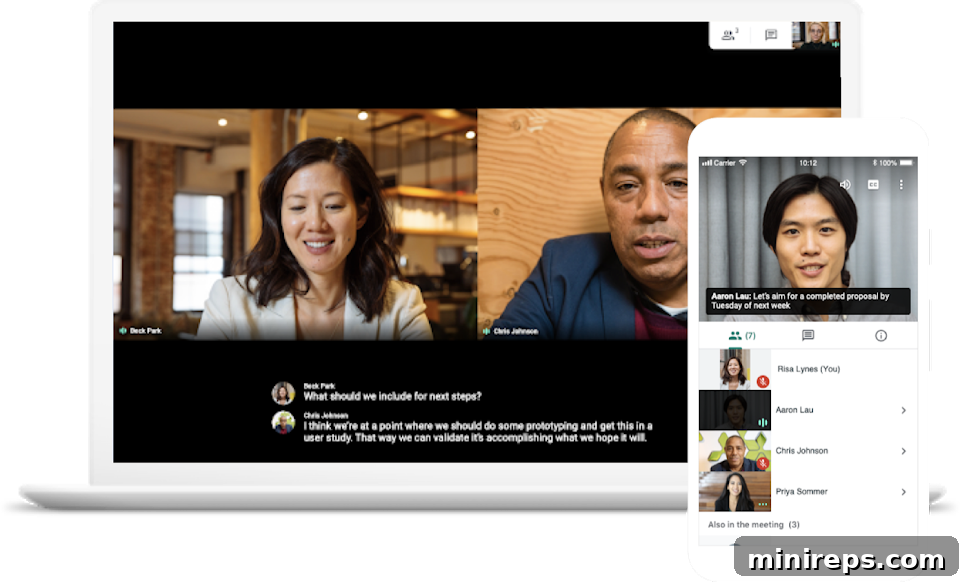
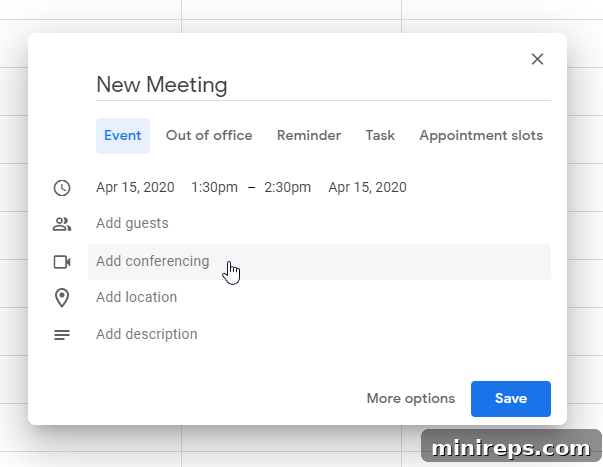
The initial user experience often dictates how quickly a new tool is adopted and integrated into daily workflows. Google Meet, in line with many Google products, presents a sleek, minimalist interface that belies its powerful capabilities. While initiating an instant video call on Google Meet is remarkably straightforward, the process for scheduling a meeting for a later time requires navigation through Google Calendar. For new users unfamiliar with the Google ecosystem, this might feel less intuitive than a single, integrated scheduling interface within the Meet application itself. The power of integration is undeniable for existing Google Workspace users, but for newcomers, there can be a slight learning curve.
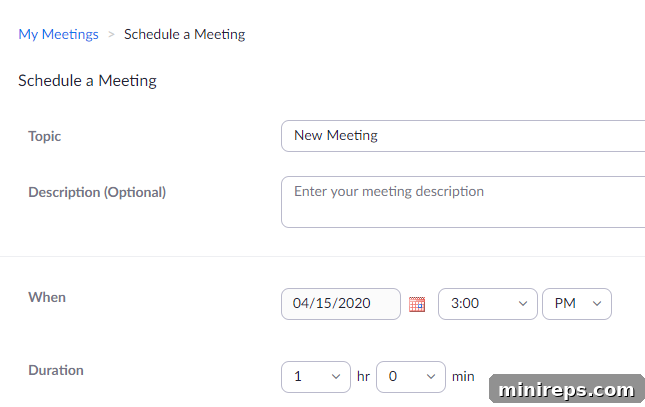
In contrast, Zoom has built its reputation on a straightforward, often more explicit, interface. Its design often prioritizes immediate functionality, making it relatively easy for new users to grasp how to start, join, and schedule meetings directly within the application. This directness can be a significant advantage for businesses onboarding a diverse user base, where simplicity is paramount. However, Google Workspace, which encompasses Google Meet, compensates for any perceived initial complexity with an extensive knowledge base, comprehensive tutorials, and the immense support of millions of active users who readily share insights and solutions online. This vast community and rich resource library ensure that any user, regardless of their familiarity with Google products, can quickly find answers and become proficient with the platform, mitigating potential initial hurdles and ultimately fostering a robust and supportive user environment.
Google Meet
Zoom

2. Outside Users: The Seamless Connection Factor
For businesses, connecting with individuals outside their immediate organization – clients, prospective hires, partners, or even public attendees for webinars – is a frequent and crucial requirement. The ease with which external users can join a meeting can significantly impact participation rates and overall client satisfaction. Google Meet distinguishes itself in this regard by offering a remarkably low barrier to entry. Once a meeting is set up, whether instantly or scheduled, the host simply shares a unique link. Participants can then join directly from their web browser, often without the need to download any specific software, create an account, or install plugins. This “click-and-join” simplicity ensures that teammates, clients, or shareholders can participate effortlessly, regardless of their technical proficiency or the devices they are using.
Zoom, conversely, often requires a more involved process for external users. While guests can join via a web browser, the platform generally encourages, and in some cases necessitates, the download of its dedicated desktop application or mobile app for the full experience and optimal functionality. This additional step can introduce friction, potentially deterring some participants, especially those who are less tech-savvy or who are joining from a device where installing new software is restricted or inconvenient. For a business conducting numerous external meetings or hosting large-scale public events, the frictionless joining experience offered by Google Meet can translate into higher attendance rates and a more professional, less cumbersome impression for external stakeholders, reinforcing positive interactions and efficient communication.
3. Adding a Little Fun and Personalization
While professionalism remains paramount in business communications, injecting a touch of personality and fun can foster a more engaging and positive environment, especially for internal team meetings or less formal client interactions. Both Google Meet and Zoom incorporate chat features that enhance interaction beyond verbal communication. Google Chat, seamlessly integrated into the Google Workspace ecosystem, goes a step further by allowing users to search for and utilize a vast library of emojis and GIFs. This capability can significantly lighten the mood, facilitate quick reactions, and add a layer of expressiveness to text-based communication, making virtual interactions feel more dynamic and human. Zoom also offers GIF functionality within its chat, and while emojis are available, the direct search and extensive library might not be as robust as Google Chat’s offering.
Furthermore, Zoom provides a popular feature that allows users to set virtual backgrounds, transforming any mundane setting into a professional office, a scenic landscape, or even a whimsical scene. This feature is not only fun but also practical, allowing users to maintain privacy by obscuring their real surroundings or to simply add a touch of branding or professionalism. Under the settings, users can select from default backgrounds or easily upload their own images, providing endless possibilities to personalize their appearance in meetings and make their Zoom meetings more interesting. While Google Meet has also introduced virtual background capabilities and noise cancellation, Zoom’s pioneering in this area has made it a distinct characteristic for many users. For businesses looking to encourage team morale or offer creative ways for employees to personalize their virtual presence, these features can be a delightful addition.

Google Meet vs. Zoom: The Critical Factor of Security
In the digital age, especially with the increased reliance on virtual communication, security is no longer a mere feature but a fundamental requirement. The integrity and confidentiality of business discussions, sensitive data, and client information depend entirely on the robustness of the chosen platform’s security measures. Zoom, despite its widespread adoption, has unfortunately faced significant scrutiny regarding its security posture. News outlets like Business Insider and numerous other publications extensively reported instances where researchers discovered and purchased over 500,000 Zoom account credentials on the dark web for a minimal cost. This alarming incident underscored potential vulnerabilities and raised serious questions about data protection. In response to these reports and a broader array of security concerns, many versions of Zoom were officially deemed off-limits for U.S. Defense Department personnel, including service members, contractors, and civilians, highlighting the severity of the perceived risks.
The surge in remote work during the recent pandemic also unfortunately provided opportunistic “script kiddies” and more sophisticated cybercriminals with increased free time and new avenues for exploitation. The phenomenon of “Zoom bombs,” where uninvited individuals crash virtual events and meetings, often with disruptive or malicious intent, became a widespread concern globally. These incidents ranged from relatively harmless pranks to more serious intrusions involving explicit content or harassment, directly impacting the professionalism and safety of virtual spaces. Beyond these disruptive attacks, the prevailing uncertainty surrounding COVID-19 was leveraged by malicious actors to deploy phishing emails and other forms of cybercrime, specifically targeting individuals and businesses reliant on new virtual communication methods. These events underscored a critical truth: a video conferencing platform must offer ironclad security to protect sensitive information, maintain business continuity, and preserve organizational reputation.
Google Meet, developed by a company with decades of experience in enterprise-grade security, takes a fundamentally different approach. It leverages Google’s robust global infrastructure and multi-layered security protections that are built-in by design. This includes strong encryption for data in transit and at rest, anti-hijacking measures, proactive threat detection, and adherence to stringent privacy and compliance standards. Google’s commitment to security is evident in its continuous investment in safeguarding user data across its entire ecosystem, including Google Workspace. For businesses handling confidential client discussions, proprietary information, or strategic planning, the peace of mind offered by a platform engineered with such comprehensive security features is invaluable. Choosing a conferencing partner like Google Meet means opting for a platform that has security embedded at its very core, protecting your communications from unwanted intrusions and cyber threats, and ensuring the integrity of your virtual interactions.

For an illustrative example of the kind of disruptive incidents businesses faced, watch the video shared by lisaandliz on Instagram.
Our Definitive Takeaway: The Clear Choice for Business
When evaluating video conferencing solutions for your business, you must ask yourself a fundamental question: “Would you feel comfortable conducting a crucial client meeting, or discussing sensitive company logistics with your internal staff, knowing there’s a possibility someone could compromise or ‘hack’ your video conference at any given moment?” For the vast majority of businesses and professionals, the resounding answer would, and should, be no. The implications of a security breach in a business meeting can be catastrophic, leading to data loss, reputational damage, financial penalties, and a profound erosion of trust among clients and employees alike.
In light of this critical consideration, the choice becomes clear. While Zoom has made strides in addressing its past security vulnerabilities, Google Meet, an integral application within the Google Workspace ecosystem (formerly G-Suite), has consistently demonstrated a superior and more inherently secure architecture. Google’s long-standing reputation for robust enterprise-grade security, its proactive approach to threat detection, and its commitment to data privacy offer an unparalleled level of confidence. Google Meet provides a secure, reliable, and highly integrated platform that is trusted by enterprises around the globe for its ability to protect confidential communications and facilitate seamless collaboration. By choosing Google Meet, you are not just selecting a video conferencing tool; you are investing in a comprehensive suite of productivity tools backed by Google’s formidable security infrastructure, ensuring your business communications are protected, productive, and professional. Make the confident choice for your business’s future.