


In today’s interconnected digital landscape, cybersecurity is no longer an exclusive concern for multinational corporations or tech giants. A rapidly escalating number of cyberattacks specifically target small and medium-sized businesses (SMBs), making robust website security an absolute necessity rather than a luxury. Recent reports highlight a disturbing trend, from the persistent rise in sophisticated DNS abuse to the proliferation of deceptive fake legal websites, all designed to exploit vulnerabilities and compromise sensitive information. Failing to safeguard your online presence can lead to severe financial repercussions, irreversible reputational damage, and a significant loss of customer trust.
Several factors contribute to small businesses becoming prime targets for cybercriminals. Firstly, many SMBs are often unaware of just how sensitive – and incredibly valuable – the data they collect and store can be. Even a seemingly innocuous list of customer names and email addresses can be a goldmine for hackers, leading to phishing campaigns, identity theft, or sale on the dark web. A successful breach of this nature not only results in direct financial losses but also erodes customer loyalty and severely damages a company’s standing in the market.
Secondly, a significant number of small business owners and their teams may lack the fundamental technical skills or dedicated IT resources required to implement and maintain enhanced security measures on their websites. This gap in expertise often leaves them vulnerable to common attack vectors. This comprehensive guide aims to bridge that knowledge gap by outlining five essential and actionable steps you can take today to significantly harden your website against potential attacks, effectively safeguarding your valuable data and ensuring business continuity.
Essential Steps for Fortifying Your Website’s Security
1. Leverage Robust Security Plugins for Enhanced Protection
One of the most accessible and highly effective strategies for reinforcing your website’s defenses is to integrate reputable third-party security plugins. The specific plugins available will depend on your chosen Content Management System (CMS) platform, such as WordPress, Joomla, or Drupal. However, many of these powerful tools offer a similar suite of critical functionalities designed to provide comprehensive protection. These often include features like a web application firewall (WAF) to block malicious traffic, malware scanning and removal, brute-force attack prevention, and enhanced login security.
For example, top-tier plugins can empower you to meticulously control user access by limiting login attempts, enforcing strong password policies, and even implementing two-factor authentication (2FA) for all administrative users. Furthermore, many plugins offer file integrity monitoring, which alerts you to any unauthorized changes to your core website files, and security logging, which provides valuable insights into attempted attacks and user activity. This level of granular control and real-time monitoring is especially crucial if your website serves as the central hub around which other vital business systems are built. Small businesses frequently integrate their website with accounting software, Customer Relationship Management (CRM) platforms, or merchant services for secure customer transactions. Such interconnected business services inherently rely on advanced, secure encryption methods and a hardened website infrastructure to ensure the privacy and integrity of sensitive financial and customer data.
2. Secure Your Site with HTTPS: A Non-Negotiable Standard
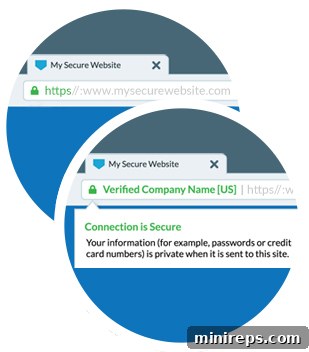
As you navigate the web, you’ve likely noticed a small, often green, padlock icon displayed prominently next to the website address in your browser’s URL bar. This seemingly minor detail signifies that the website is protected by HTTPS (Hypertext Transfer Protocol Secure), a highly secure evolution of the standard HTTP protocol used for exchanging information online. HTTPS encrypts all data transmitted between a user’s browser and your website, making it virtually impossible for unauthorized parties to intercept and read sensitive information such as login credentials, personal details, or credit card numbers.
To implement HTTPS, you will need to acquire and install an SSL/TLS (Secure Sockets Layer/Transport Layer Security) certificate. These digital certificates serve as a trust signal, verifying your website’s identity and assuring visitors that their connection is legitimate and secure. SSL certificates can be obtained from various trusted certificate authorities, with options ranging from free certificates like Let’s Encrypt to more advanced Organization Validated (OV) or Extended Validation (EV) certificates that offer higher levels of trust and verification, suitable for e-commerce or financial sites.
Beyond the fundamental security benefits, implementing HTTPS carries significant advantages for your website’s visibility and user experience. Major search engines, notably Google, prioritize secure websites in their search rankings, making HTTPS a crucial SEO factor. Furthermore, many internet users are now highly sensitized to security indicators. Google introduced a pivotal Chrome update in July 2018 that explicitly labels non-HTTPS websites as “Not Secure.” This stark warning can deter a significant portion of potential visitors, leading them to abandon your site and seek secure alternatives. In essence, HTTPS is no longer just a recommendation; it’s a fundamental requirement for building trust, ensuring data privacy, and maintaining a competitive online presence.
3. Consistently Update All Your Software: Your First Line of Defense
While the advice to keep software updated might seem rudimentary, its critical importance in maintaining robust cybersecurity cannot be overstated. Unfortunately, it’s a practice many individuals and businesses neglect, leaving significant security gaps wide open. Regularly updating all software components associated with your website is paramount. This includes your core CMS (e.g., WordPress, Joomla, Drupal), all themes, plugins, and any underlying server-side software or database systems. Software updates frequently contain vital security patches that address newly discovered vulnerabilities and exploits. Cybercriminals relentlessly scan for outdated software, knowing these unpatched weaknesses provide easy entry points for attacks.
This commitment to regular updates becomes even more critical if – as we discussed earlier – your website functions as an integral part of your broader business infrastructure. The increasing adoption of the “Software as a Service” (SaaS) model, with over 51% of companies now leveraging it for key operational software, brings considerable advantages, particularly in terms of security. SaaS providers are typically responsible for maintaining and updating their software, offloading this burden from individual businesses. However, for self-hosted websites or components, the responsibility rests squarely on your shoulders. Neglecting updates creates a persistent threat surface, making your site susceptible to known vulnerabilities that could easily be mitigated. Implement a clear update schedule, back up your site before applying major updates, and consider using a staging environment to test compatibility and prevent disruptions.
4. Fortify Your Access: Strong Passwords and Multi-Factor Authentication
While seemingly basic, the implementation of strong, unique passwords across all your website’s administrative panels, user accounts, and integrated services is a cornerstone of effective hack-proofing. Alarmingly, the most prevalent forms of cyberattack continue to be those that attempt to guess or brute-force login credentials. These opportunistic attacks can often be thwarted by simply adopting passwords that are sufficiently long, complex, and distinct, making them incredibly difficult to predict or crack through automated means. A robust password should combine uppercase and lowercase letters, numbers, and special characters, and crucially, avoid easily guessable information like birthdays, pet names, or common dictionary words.
To further bolster your defenses, consider deploying Two-Factor Authentication (2FA) or Multi-Factor Authentication (MFA) wherever possible. This adds an additional layer of security by requiring a second form of verification beyond just a password, such as a code sent to your mobile phone or generated by an authenticator app. Furthermore, if your website is primarily managed from a fixed location, you can introduce another powerful security measure: IP address restrictions. Many of the security plugins mentioned earlier offer the capability to limit website access to specific IP addresses. This means that even if a cybercriminal manages to obtain your password, they would be unable to log in from an unrecognized location, effectively locking them out. This approach is a key element in establishing a zero-trust security strategy, especially vital when working with a team or sensitive administrative interfaces. For those who frequently work remotely, alternative strategies for maintaining online safety while accessing business resources are equally important and should be carefully considered.
5. Backup, Backup, Backup: Your Ultimate Safety Net
When most people envision a cyberattack, they often imagine a hacker breaching their site to steal data. However, the threat landscape is far more diverse. A prevalent and particularly insidious form of attack involves “ransomware,” where cybercriminals encrypt your critical data and then demand a hefty payment, often in cryptocurrency, for its release. Without a reliable backup, businesses are left with a harrowing choice: pay the ransom with no guarantee of data recovery, or face potentially catastrophic data loss and operational paralysis.
The most robust and indispensable defense against ransomware and countless other data loss scenarios – including accidental deletion, server failure, or natural disasters – is a comprehensive and regularly maintained backup strategy. If you possess a current, verified copy of all your essential website data, including files, databases, and configurations, a ransomware attack or other data compromise becomes a significant inconvenience rather than a business-ending disaster. You simply restore your site from the clean backup, effectively neutralizing the attacker’s leverage.
Fortunately, implementing a reliable backup system is easier than ever. Numerous automated backup solutions are available, ranging from specialized plugins for your CMS to cloud-based services. Moreover, many of the best web hosting providers now offer automated daily or weekly backups of your entire website as a standard or premium feature. We strongly advise taking full advantage of these offerings. Automating your backups ensures consistency and eliminates the risk of human error or forgetfulness, providing continuous peace of mind. Remember to not only back up your data but also periodically test your restore process to ensure that your backups are viable and can be successfully deployed when needed.
Website Security: An Ongoing Commitment, Not a One-Time Fix
It is crucial to understand that safeguarding your website’s security is not a single, isolated task but an continuous, evolving process. The digital threat landscape is dynamic, with new vulnerabilities and attack methods emerging constantly. Therefore, proactive vigilance is key. You need to dedicate regular time to auditing your site’s security posture, reviewing logs, and staying informed about the latest cybersecurity threats relevant to your industry and platform.
By taking these five essential steps outlined in this guide, you have made a significant stride towards creating a more hacker-proof website. However, to maintain this high level of protection, you must integrate security reviews into your routine operations. Making a habit of regularly checking and updating your security measures should be among your top cybersecurity resolutions for 2020 and beyond. Remember, a secure website not only protects your business assets but also fortifies your customers’ trust in your brand.
Ready to enhance your digital defenses and explore comprehensive brand protection strategies? Contact our expert team today to discuss your specific security needs and how we can help you stay ahead of cyber threats.
Contact Us: +1.888.982.7940 | [email protected]