
Updated: May 7, 2025
Elevate Team Productivity with Google Calendar for Business
Every organization strives for seamless collaboration and optimal productivity. In today’s fast-paced business environment, an efficient scheduling system is not just a convenience—it’s a necessity. Google Calendar, a core component of every Google Workspace plan, stands out as a powerful solution designed to transform how teams manage their time, coordinate projects, and connect effectively. It’s more than just a digital planner; it’s an intelligent hub for all your team’s activities, ensuring everyone stays organized, informed, and on track.

With its deep integration across the Google Workspace suite, Google Calendar simplifies complex scheduling challenges, allowing your team to focus less on logistical hurdles and more on achieving strategic goals. From small startups to large enterprises, leveraging Google Calendar can be the key to unlocking new levels of efficiency and fostering a truly collaborative work culture.
Maximize Your Team’s Potential with Google Calendar
In the modern workplace, effective time management is the bedrock of productivity. Teams often grapple with the complexities of coordinating schedules, booking resources, and ensuring everyone is aligned. Google Calendar provides an intuitive and robust platform that empowers teams to streamline their operations. By integrating seamlessly with essential Google Workspace applications like Gmail, Drive, and Meet, it ensures that your team always has a clear understanding of upcoming tasks, meetings, and deadlines. This comprehensive visibility reduces miscommunication, eliminates scheduling conflicts, and creates a more harmonious and efficient working environment. Spend less time planning and more time executing with Google Calendar.
Effortless Event Creation and Management
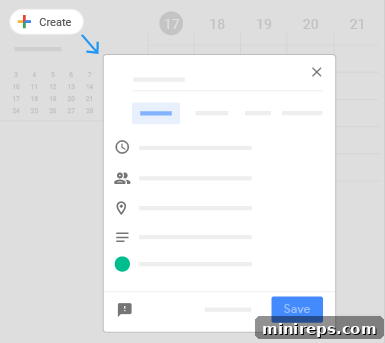
Creating and managing events in Google Calendar is designed to be quick, intuitive, and efficient. The platform offers a full suite of features that simplify every step of the process, ensuring that whether you’re scheduling a quick one-on-one, a complex team meeting, or a recurring project milestone, it can be done with minimal effort.
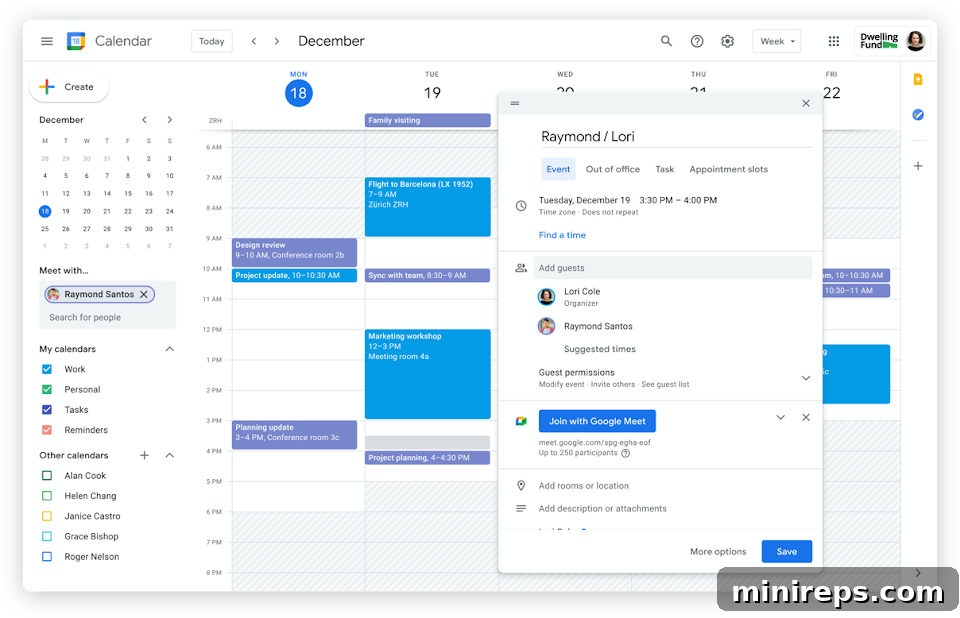
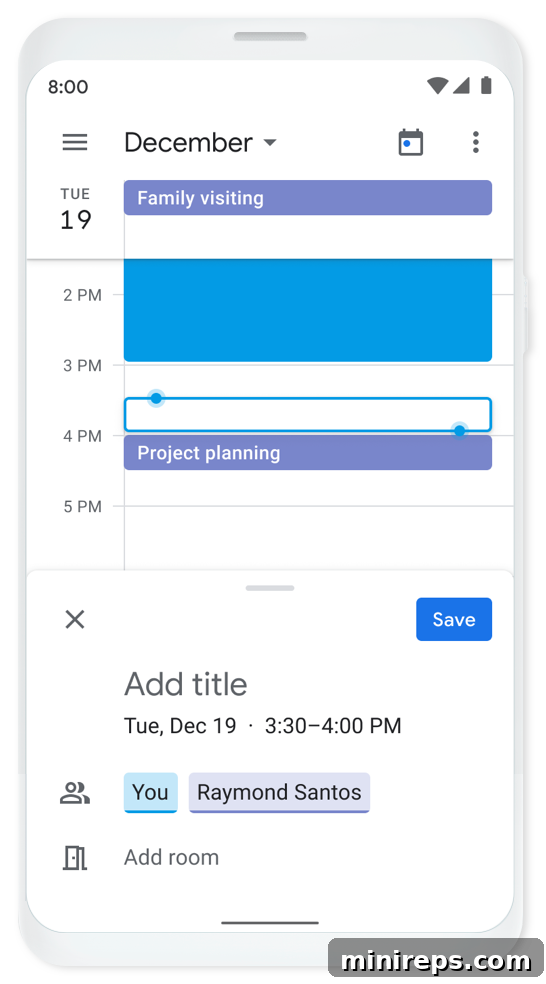
With just a few taps, you can create new events, meetings, or appointments. Google Calendar’s smart suggestions anticipate event titles, automatically suggest attendees based on your past interactions, and recommend locations, saving you valuable time. You can enrich your events with detailed descriptions, attach relevant documents from Google Drive, and even customize event colors to visually categorize your schedule. For teams, the ability to add events to different shared calendars ensures that all relevant stakeholders are immediately aware of new activities.
Furthermore, Google Calendar allows you to set granular visibility preferences, controlling what information others can see about specific events. This is crucial for maintaining privacy while still promoting transparency within a team. Robust notification options ensure that you and your attendees receive timely reminders through desktop notifications, email alerts, or mobile pings, preventing missed meetings and ensuring everyone arrives prepared and on time. You can even set multiple reminders for a single event, guaranteeing no one is ever left uninformed.
Supercharge Productivity with Gemini Integration
The integration of AI capabilities, specifically through Gemini in Google Workspace, takes your team’s meeting efficiency to an entirely new level. Google Calendar, combined with Gemini, ensures that the insights and decisions from your meetings are never lost and are always easily accessible.
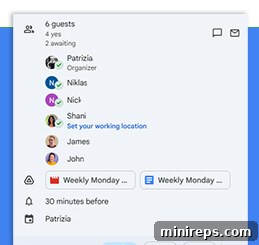
| After a meeting concludes, if notes were captured using the innovative Take Notes for Me feature, these detailed summaries, along with any meeting recordings, are automatically added to the corresponding calendar event. This content is also seamlessly saved to Google Drive and conveniently emailed to all attendees. This eliminates the tedious and often time-consuming task of manually organizing meeting assets. No more sifting through countless files or disparate platforms to revisit key discussions, action items, or critical decisions. Gemini’s integration transforms meeting follow-ups from a chore into an automated, streamlined process, allowing your team to instantly recall important information and maintain momentum on projects. |
This intelligent automation significantly boosts post-meeting productivity. Team members can quickly review discussion points, understand assigned tasks, and access relevant documents without delay. It ensures accountability, improves knowledge retention, and provides a centralized, easy-to-search repository for all your meeting intelligence. For modern teams, especially those working remotely or in hybrid environments, Gemini’s capabilities within Google Calendar are invaluable for maintaining continuity and ensuring that every meeting contributes meaningfully to your overall objectives.
RELATED ARTICLE
How to use Gemini across your favorite Workspace apps
Enhanced Collaboration Through Calendar Sharing and Management
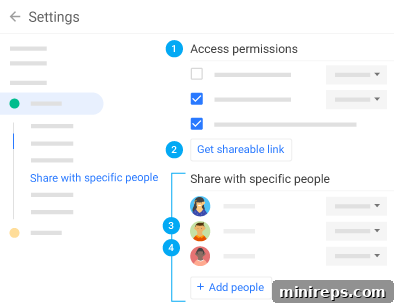
One of Google Calendar’s most powerful features for teams is its flexible calendar sharing capabilities. This functionality moves beyond individual scheduling, transforming it into a dynamic tool for collective organization and team alignment. By allowing you to share your calendar with colleagues, family, and friends, it simplifies the process of finding mutually convenient times for meetings, events, or even personal engagements, fostering better work-life balance.
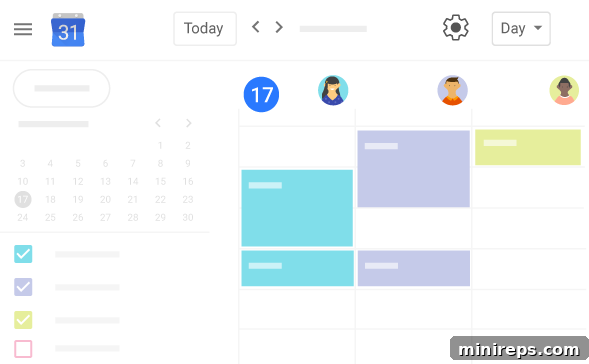
Furthermore, the ability to view other people’s calendars (with appropriate permissions) offers a transparent overview of team availability. This is invaluable for managers scheduling team meetings or project leads coordinating tasks. Beyond individual calendars, you can create dedicated shared calendars to track group activities. Imagine a project calendar outlining all key milestones and deadlines, or a team vacation calendar that prevents scheduling conflicts during critical periods. This level of shared visibility eliminates guesswork and streamlines coordination across the entire organization.
- **Flexible Sharing Options:** Choose whether to share your calendar publicly (e.g., for public events or office hours) or restrict access only to members within your organization. This granular control ensures sensitive information remains private while promoting necessary transparency.
- **Public HTML Links:** For broader reach, you can generate an HTML link that allows anyone, even those without a Google account, to view your calendar in a web browser. This is perfect for sharing public event schedules or departmental availability.
- **Customizable Access Permissions:** When sharing with specific individuals, you have complete control over their access level. You can decide how much they can see (e.g., “see only free/busy,” “see all event details”) and whether they can also make changes, such as adding, editing, or deleting events. This feature is particularly useful for delegating scheduling tasks to assistants or empowering project teams to manage their own schedules collaboratively.
These sharing features collectively empower teams to operate with greater agility, improved communication, and a shared understanding of everyone’s commitments, leading to more productive and harmonious working relationships.
Google Apps: A Symphony of Seamless Integration
The true power of Google Calendar lies in its deep and intelligent integration with the entire Google Workspace ecosystem. This interconnectedness transforms disparate tasks into a unified, fluid workflow, enhancing productivity and minimizing distractions. Rather than switching between multiple applications, your team can manage their entire workday from within a centralized environment.
- **Instant Video Conferencing with Google Meet:** With a single click, you can add a Google Meet video conferencing link to any calendar event. This eliminates the need for separate meeting invites and ensures that all attendees have immediate access to the virtual meeting room. Whether it’s a quick check-in or a full-scale presentation, starting a meeting is effortless.
- **Integrated Notes with Google Keep:** Use Keep to take quick notes during a meeting or jot down ideas related to an event. These notes can be linked directly to your calendar entries, ensuring that all relevant context and follow-up points are stored together, easily accessible whenever you review your schedule.
- **Task Management with Google Tasks:** Stay on top of your responsibilities by integrating Google Tasks. You can create to-do lists directly from your calendar events, assign due dates, and mark tasks as complete. This ensures that action items from meetings are immediately translated into actionable tasks, improving accountability and project progression.
- **Stay on Track with Smart Reminders:** Beyond standard notifications, Google Calendar leverages smart reminders that can be customized to your preferences. These reminders are intelligent, helping you prepare for events, follow up on tasks, and ensure nothing falls through the cracks.
- **Email Integration with Gmail:** Meeting invitations are automatically sent via Gmail, allowing attendees to RSVP directly from their inbox. Calendar updates and changes are also communicated seamlessly, keeping everyone informed in real-time.
- **Document Sharing with Google Drive:** Attach relevant documents, presentations, or spreadsheets from Google Drive directly to your calendar events. This ensures that all necessary materials are immediately available to attendees before, during, and after a meeting, fostering better preparation and more productive discussions.
This seamless integration creates a powerful, cohesive environment where information flows freely between applications, empowering your team to work smarter, not harder. It’s a holistic approach to productivity, designed for the modern, connected workforce.
Simplify Meeting Coordination with Smart Features
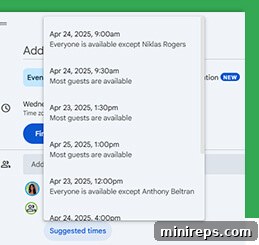
| Coordinating schedules for a busy team can often be a major bottleneck. Google Calendar tackles this challenge head-on with intelligent features designed to save you time and reduce frustration. When you’re trying to schedule a meeting with multiple attendees, the Suggested Times feature becomes an invaluable asset. It intelligently analyzes the calendars of all invited participants, spotting overlaps and proposing the best available slots that work for everyone. This eliminates the endless back-and-forth emails and ensures that even the busiest teams can find a time that maximizes attendance and efficiency. |
This feature is particularly beneficial for distributed teams or those operating across different time zones, as it automatically accounts for these variables, presenting optimal meeting slots without manual calculation. It empowers meeting organizers to make informed decisions quickly, leading to faster scheduling and fewer conflicts.
Streamlined Meeting Room Booking
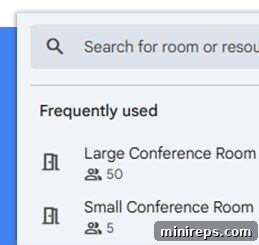
| Beyond coordinating people, Google Calendar also simplifies resource management, specifically for physical meeting spaces. The Room Calendars feature integrates seamlessly with your existing calendar, allowing you to view the real-time availability of conference rooms, huddle spaces, or any shared resources within your office. This functionality prevents common office frustrations like double-bookings and last-minute scrambles for an open room. With a clear overview, you can instantly reserve the perfect space for your team, ensuring that your meetings start on time and in the right environment. |
Room Calendars are essential for optimizing office space utilization and promoting efficiency in hybrid work models. They provide a clear, centralized system for managing shared physical resources, enhancing the overall meeting experience for all team members.
Personalize Your Scheduling Experience
Google Calendar offers extensive customization options, allowing each team member to tailor their view and notification preferences to best suit their individual working style and needs. This personalization ensures that the calendar truly works for you, enhancing productivity rather than adding clutter.
You have full control over how you receive event notifications, ensuring you’re always informed without being overwhelmed:
- **Off:** For events where you don’t need reminders, you can simply turn notifications off.
- **Desktop notifications:** Receive subtle pop-up alerts on your computer, ideal for staying focused while working.
- **Alerts:** Get more prominent pop-up alerts or email notifications for critical meetings or deadlines.
- **Event-Specific Notifications:** Set unique reminder times (e.g., 10 minutes before, 1 day before) for individual events, tailoring alerts to the importance or complexity of each item.
Beyond notifications, Google Calendar provides flexible viewing options to help you visualize your schedule in the most effective way:
- **Flexible Calendar Views:** Easily switch between day, week, month, or year views to get a detailed or high-level overview of your commitments.
- **Schedule View:** A condensed list format that focuses on upcoming events, perfect for quick glances at your immediate agenda.
- **Toggle Weekends:** Hide or show weekends to streamline your work calendar, focusing only on your working days.
- **Hide/Show Declined Events:** Keep your calendar tidy by choosing whether to display events you’ve declined, ensuring your view reflects only your actual commitments.
- **Color-coding:** Assign different colors to various calendars or event types (e.g., green for project meetings, blue for personal appointments) for instant visual organization.
- **Time Zones:** Easily manage and view events across multiple time zones, crucial for global teams and travel planning.
- **Working Hours:** Define your working hours to allow colleagues to see when you’re typically available, preventing after-hours scheduling.
By customizing these aspects, Google Calendar adapts to your unique workflow, making it an indispensable tool for personal and team productivity.
Your Schedule, Accessible Anywhere, Anytime
In today’s dynamic work environment, flexibility and accessibility are paramount. Google Calendar ensures that your team’s schedule is always within reach, whether you’re at your desk, on the go, or working remotely. This universal accessibility empowers individuals and teams to stay connected and productive from any device, enhancing agility and responsiveness.
You can effortlessly view and edit your schedule from your desktop, laptop, tablet, or phone. Google provides optimized mobile applications for both Android and iOS devices, offering a rich, intuitive experience designed specifically for smaller screens. These apps allow you to create new events, respond to invitations, check team availability, and manage your day with the full functionality available on a desktop. Push notifications ensure you receive timely alerts no matter where you are.
For users who prefer to stick with their device’s native calendar, Google Calendar offers seamless synchronization capabilities. This means your Google Calendar events can appear in your phone’s built-in calendar app, providing a unified view without needing to open a separate application. This level of integration supports a variety of user preferences and workflows, ensuring that everyone can manage their time in the way that suits them best. Whether you’re commuting, traveling for business, or simply stepping away from your desk, your schedule remains current and fully manageable, providing peace of mind and continuous productivity.
Conclusion: Empower Your Team with Google Calendar
Google Calendar is far more than a simple date-keeping tool; it’s a comprehensive platform for enhancing team collaboration, boosting productivity, and streamlining operations within any business. Its intuitive interface, coupled with powerful features like intelligent event creation, seamless integration with other Google Workspace apps, advanced sharing options, and AI-powered assistance via Gemini, makes it an indispensable asset for modern teams.
By providing clear visibility into schedules, simplifying meeting coordination, enabling efficient resource booking, and offering robust customization, Google Calendar empowers your team to work smarter and more cohesively. It reduces administrative overhead, minimizes scheduling conflicts, and ensures that every team member is aligned and informed, whether they are in the office or working remotely.
Investing in Google Calendar as part of your Google Workspace strategy means investing in a future where your team spends less time on logistics and more time on innovation and achieving tangible results. It’s the ultimate tool for mastering time and unlocking your team’s full potential.
Google Calendar is a vital component of
Google Workspace is a powerful suite of productivity and collaboration tools that helps individuals, teams, and businesses get more done with fewer distractions. Experience the synergy of integrated applications designed to elevate your work processes.