


Are you a domain clerk, an intellectual property lawyer, a paralegal, or a brand manager tasked with overseeing crucial digital assets? In today’s interconnected world, a fundamental understanding of domain management terminology and processes is no longer just for IT specialists. Professionals from various fields are increasingly finding themselves at the intersection of business strategy and technical execution, making the mastery of “tech talk” an indispensable skill. This comprehensive guide is designed to equip you with the essential knowledge and confidence needed to navigate the complexities of domain names, respond swiftly to client and colleague requests, and effectively safeguard your organization’s online presence. Discover the meaning behind terms like DNS, 301 redirects, and TXT records, and empower yourself to manage domains with expertise and precision.
Unlock Domain Mastery: Join Our Exclusive Tech Talk Live Webinar
Elevate your understanding of domain management with our insightful “Tech Talk Live Webinar.” This engaging session features industry veterans Kimberly Darwin, Sr. Corporate Services Executive, and Cory Sorrentino, Domain Services Specialist. They bring years of practical experience and deep technical knowledge, translating complex concepts into easily digestible information. Their combined expertise provides a unique perspective, ensuring that participants gain actionable insights they can immediately apply in their professional roles.
Who Will Benefit Most from This Webinar?
This essential tech talk webinar is specifically tailored for professionals who regularly interact with domain names but may not possess a deep technical background. This includes a broad spectrum of roles:
- Intellectual Property Professionals: Crucial for protecting digital brand assets and managing online portfolios.
- Legal Practitioners and Lawyers: Vital for understanding the technicalities behind intellectual property litigation, domain disputes, and client mandates related to website changes.
- Non-IT Related Domain Managers: Individuals responsible for domain portfolios in organizations without direct IT oversight.
- Marketing and Brand Management Teams: Essential for ensuring brand consistency, managing campaign landing pages, and understanding website performance from a technical standpoint.
- Law Clerks and Paralegals: Often tasked with implementing changes on behalf of clients, requiring a clear grasp of technical requests.
- Third-Party Portfolio Trustees: Those assisting clients with the intricate management of leased or sold domain names over extended periods.
If your responsibilities touch upon domain names, even indirectly, this webinar offers invaluable insights to enhance your proficiency and confidence.
Exclusive Tech Talk PDF Download
Deepen your expertise with even more essential tech talk definitions! Don’t miss out on our comprehensive “Tech Talk for Non-Tech Professionals” whitepaper. This valuable resource complements the webinar, providing detailed explanations and practical tips that empower you to master domain management with ease.

Why is This Information Indispensable for Your Role?
While the internet offers a wealth of information, simply “Googling” technical terms isn’t always sufficient, especially when you’re managing critical client assets. The primary and most compelling reason to understand these concepts is to dramatically improve client communication and service efficiency. When a client requests a technical change, such as updating nameservers, they are often asking you to perform a fundamental action that impacts their online presence – making their site live or taking it offline. Your role as the intermediary is paramount, as you are frequently the only one with access to the domain account. This responsibility carries significant weight, as errors can lead to costly downtime, reputational damage, or even legal repercussions.
A solid grasp of basic tech talk empowers you to translate complex technical jargon into clear, concise explanations for your clients, fostering trust and transparency. Moreover, it enables you to execute tasks like website migrations or DNS record adjustments with minimal to zero downtime, ensuring a seamless user experience. By understanding the underlying mechanics, you can anticipate potential issues, troubleshoot effectively, and communicate realistic timelines for changes, transforming you from a mere executor of tasks into a trusted advisor who proactively safeguards your client’s digital assets.
Decoding Domain Anatomy: A Tech Talk Forum You Can Actually Understand
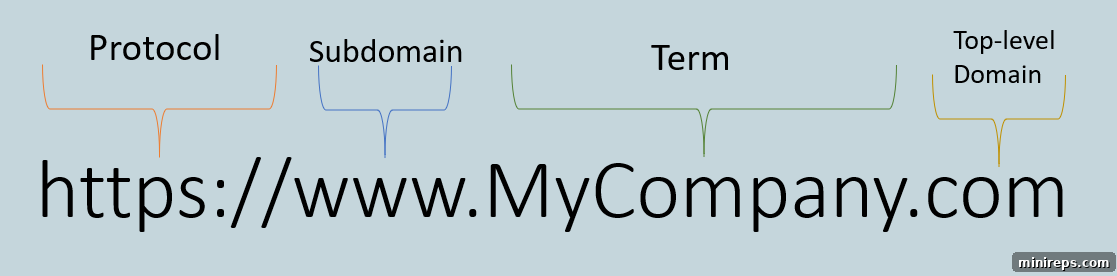
Let’s demystify the structure of a domain name, breaking it down into easily understandable components. Understanding these parts is the first step toward confident domain management.
The Protocol: HTTP vs. HTTPS
At the very beginning of a web address, you’ll encounter either HTTP or HTTPS. This prefix is known as the protocol. The “S” in HTTPS is crucial; it stands for “Secure.” When you see HTTPS, it signifies that your connection to the website is encrypted, meaning any data exchanged (like login credentials or credit card information) is protected from eavesdropping. Browsers prominently display a padlock icon for HTTPS sites, indicating a secure connection. If you encounter a site without the “S” (just HTTP), a significant red flag should immediately come to mind. It means the website is not encrypted, and you should exercise extreme caution before entering any sensitive personal information. Google also favors HTTPS sites in search rankings, making it a critical factor for both security and search engine optimization (SEO).
The Subdomain: Your Website’s Branches
Moving to the right, the next component is the subdomain. The most universally recognized subdomain is “www” (World Wide Web). You’ve likely typed domain names both with and without “www” in your browser. If configured correctly, both variations should lead you to the same website. However, subdomains offer far more utility than just “www.” They act as extensions of your main domain, allowing you to create distinct sections for different purposes, such as blog.yourbrand.com for a blog, shop.yourbrand.com for an e-commerce store, or mail.yourbrand.com for an email client. Proper setup of subdomains is critical for website organization and user experience; an incorrectly configured subdomain can lead to frustrating “page not found” errors.
The Domain Name: Your Unique Brand Identifier
Following the subdomain (or if there isn’t one, immediately after the protocol) is the actual domain name, often referred to as the “term.” This is your brand name, your company’s name, or any unique identifier you choose for your online presence. It’s the core of your digital identity, making it instantly recognizable to your audience. This part of the domain is what you register and own, representing your unique space on the internet.
The Top-Level Domain (TLD): The Internet’s Categories
Finally, to the right of your brand name, after the last dot, is the Top-Level Domain (TLD). These are the familiar suffixes like .com, .net, .org, or country code domains such as .io, .co.uk, or .de. The TLD always occupies the position furthest to the right. The choice of TLD can influence your brand’s global reach, industry association, and perceived authority. While .com remains the most popular and recognized, a vast array of new generic TLDs (gTLDs) like .app, .tech, or .store now offer more specific branding opportunities.
Second-Level Domains (SLDs): Regional Specificity and Regulations
In some cases, particularly with country code TLDs (ccTLDs), you might encounter second-level domains (SLDs). Examples include www.domain.co.nz, www.domain.net.br, and www.domain.com.au. Here, “co,” “net,” or “com” function as SLDs, sitting just before the ccTLD. While they generally operate similarly to TLDs in terms of functionality, they often come with specific registration requirements or intended uses. For instance, “.net.br” is specifically reserved for internet service providers in Brazil. Understanding the distinction between TLDs and SLDs is a valuable piece of “tech talk” knowledge, ensuring you comply with registry rules and acquire the correct domain structure for your clients’ needs.
Diving Deeper into Subdomains
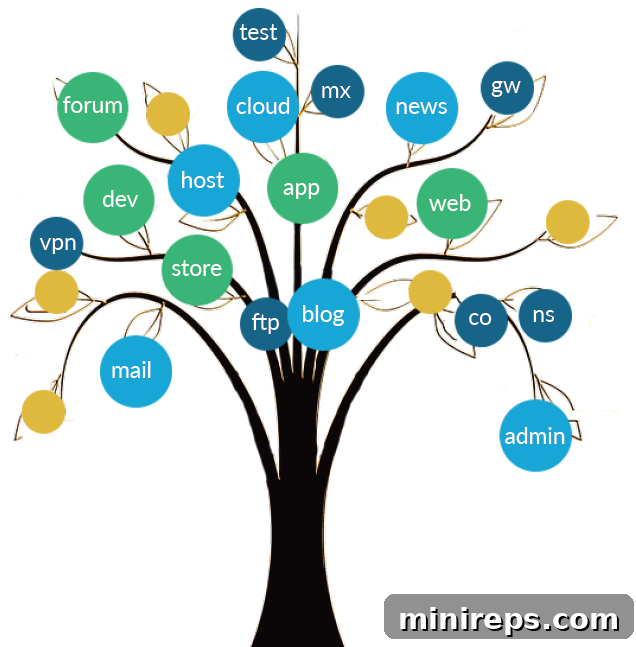
To further illustrate the concept of subdomains, consider the powerful metaphor of a tree. Your primary domain name, such as yourbrand.com, represents the sturdy trunk of the tree. From this central trunk, countless branches can extend in various directions, each representing a subdomain. Just as a tree can have an unlimited number of branches, you can create an unlimited number of subdomains for each domain you own, subject only to your hosting provider’s limitations.
Think of familiar examples: you’ve undoubtedly encountered www.shop.domain.com for an e-commerce platform, www.blog.domain.net for a content hub, or webmail.domain.org for an email client. These subdomains are not random; they are strategically implemented to map your users to distinct parts or services of your overall online ecosystem. This organizational strategy helps in segmenting content, managing different applications, or even localizing services for specific regions, all while maintaining a connection to your primary brand identity. Subdomains provide incredible flexibility for structuring large or complex websites and are a fundamental tool in comprehensive domain management.
Essential Tech Talk Definitions: Navigating the Domain Name System (DNS)
Now, let’s turn our attention to the backbone of the internet: the Domain Name System (DNS). Often likened to the internet’s phonebook, DNS is responsible for translating human-readable domain names (like yourbrand.com) into machine-readable IP addresses (like 192.0.2.1) that computers use to locate websites and services. Without DNS, navigating the internet would be a frustrating exercise in memorizing long strings of numbers. DNS encompasses several critical components, including nameservers, A records, MX records, and TXT records – each playing a vital role in directing traffic and ensuring your online services function correctly. Among these, nameserver changes are perhaps the most frequently encountered requests in domain management.
Nameservers: The Gatekeepers of Your Domain’s Home
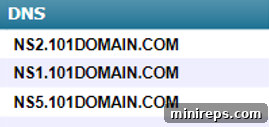
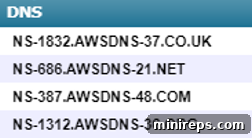
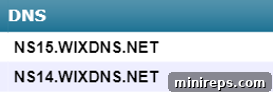
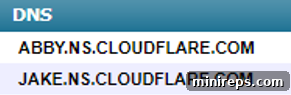
Nameservers are essentially specialized servers that hold the authoritative DNS files for a domain. In “tech talk,” they act as the primary address that directs a visitor’s browser to the server where your website’s files are actually stored. When you point your domain to a set of nameservers, you are effectively delegating the entire DNS management of that domain to the entity providing those nameservers (e.g., your web host). Nameservers are always implemented in multiples, typically a minimum of two, and often three or four. This redundancy is a crucial design feature: if one nameserver experiences an outage or issue, the backup nameservers can seamlessly take over, ensuring your website remains accessible and minimizes downtime. It’s a fundamental aspect of maintaining continuous online presence and reliability. Below are some typical examples of third-party nameservers you might need to configure within your domain account, such as those provided by popular hosting or cloud services.
A Records: Directing Your Domain to a Specific Location
Unlike nameservers, which delegate overall DNS management, an A record (Address record) serves a more granular purpose: it specifically maps a domain name or a subdomain to an IP address. When you configure an A record, you are telling the DNS system to send traffic for a particular hostname (e.g., www.yourbrand.com or just yourbrand.com) to a precise server identified by its IP address. This means you retain DNS management at your domain registrar (like 101domain), but specific parts of your domain are pointed elsewhere. For example, if your website is hosted on a platform like Wix, Weebly, or a dedicated server, they will often provide you with an IP address and instruct you to create an A record pointing to it. With your newfound “tech talk” understanding, you’ll confidently enter that IP address into your domain account, ensuring your website resolves correctly.
The A record always points towards an IP address. You will still use 101domain’s DNS but point somewhere else. The URL you are aiming to could be anywhere, with Wix or Weebly or something like that. In this case, the third-party platform will give you (or your client) an A record and ask you to point the A record to this. With a newfound understanding of tech talk you’ll know to type in that IP address within your 101domain account.

Let’s Talk Tech Some More: Crucial DNS Records for Functionality
MX Records: The Backbone of Your Email Communications
MX records, or Mail Exchanger records, are unequivocally critical when you or your client intends to use email services associated with a domain. Email is not just a convenience; it’s a fundamental pillar for nearly every business’s communication strategy, making a professional email address (e.g., [email protected]) indispensable. MX records tell other mail servers where to send emails for your domain. If your DNS is being managed by your domain provider, your email service provider will furnish you with specific MX settings that need to be configured. An incorrect MX record means emails sent to your domain will either bounce, be delayed, or worse, never arrive, leading to significant communication breakdowns. Ensuring these records are accurately set up is paramount for business continuity.
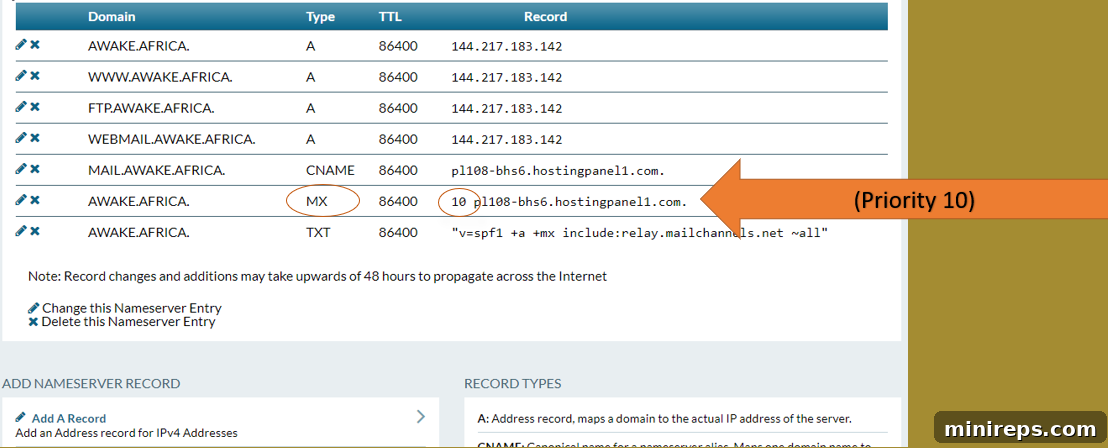
When configuring MX records, the key fields to pay attention to are the “Type” (which will be MX), the “MX Hostname” (the address of the mail server), and the “Record Priority.” The priority, in “tech talk,” dictates the order in which mail servers should attempt to deliver email. A lower number indicates a higher priority. You might receive multiple lines of MX records, each with a different priority (e.g., 0, 10, 20, 30), establishing a fallback system for email delivery. You don’t need to understand the intricate details of each server address; your email provider will supply this information. Your task is to diligently enter all provided MX record lines into your domain’s DNS settings, ensuring complete and reliable email functionality for your client.
CNAME Records: Mapping One Name to Another
A Canonical Name record, or CNAME, is a type of DNS record that maps an alias name to a true, canonical domain name. In simpler terms, where an A record points a domain or subdomain to an IP address, a CNAME record points one URL to another URL. For example, you might use a CNAME record to point blog.yourbrand.com to the URL of your third-party blogging platform, or www.yourbrand.com to yourbrand.com. The CNAME record itself doesn’t contain an IP address; it acts as a redirect at the DNS level. Your client or their service provider will furnish you with the necessary CNAME values in a similar format to other record types. It’s crucial for specific web services, content delivery networks (CDNs), or when managing multiple services under a single domain structure.
TXT Records: Versatile Text for Verification and Security
TXT records (Text records) are incredibly versatile and serve a multitude of purposes beyond simply directing traffic. They allow domain administrators to store human-readable text information that can be accessed by external services. One common use is for domain ownership verification: when setting up an SSL certificate, integrating with Google services (like Google Workspace or Google Search Console), or configuring other third-party services, you might be asked to add a specific TXT record to prove that you control the domain. This allows the service to verify your access without requiring you to share sensitive login credentials.
Another increasingly vital application of TXT records is for email authentication, specifically through SPF (Sender Policy Framework) and DKIM (DomainKeys Identified Mail) records. The SPF record, sometimes jokingly referred to as the “sunscreen record” in non-official “tech talk,” defines which mail servers are authorized to send email on behalf of your domain. With the pervasive threat of email spoofing and phishing attacks today, SPF records are becoming a non-negotiable security measure. By publishing an SPF record, you help recipient mail servers identify legitimate emails from your domain and reject fraudulent ones, significantly improving email deliverability and protecting your brand’s reputation. Your client’s email provider will supply the specific SPF record content for you to add to your domain’s DNS settings.

Understanding Domain Forwarding: Seamless Redirection for Users
Domain forwarding, also known as domain redirection, is one of the simplest yet most effective tools in domain management. It’s the process of pointing one domain name to another, automatically redirecting visitors from the initial URL to a different destination URL. This is incredibly useful for consolidating online presence, correcting common typos, or managing multiple brand variations. For instance, if a user types www.friesian.club into their address bar, they might be automatically redirected to www.friesianconnection.com. This ensures that even if users land on a secondary domain, they are seamlessly guided to your primary online destination.
Setting up domain forwarding is typically straightforward within your domain account. The most common type of forwarding is a 301 redirect, which, in “tech talk,” signifies a “permanent” move. This is crucial for SEO, as a 301 redirect passes most of the link equity (or “SEO juice”) from the old URL to the new one, preventing loss of search engine rankings. Domain forwarding is frequently employed for various strategic purposes: capturing traffic from common misspellings or typos of your main domain, directing visitors from country-specific domains (e.g., .de, .co.uk) back to your central .com site, or consolidating older, defunct domains to current, active ones. It’s an efficient way to ensure that regardless of how a visitor initially reaches your brand, they always end up at your intended main website, enhancing user experience and maintaining brand consistency.
Navigating DNS Propagation and Common Website Resolution Issues
One of the most frequent scenarios that non-technical professionals face is when a client reports, “my site’s not working” shortly after you’ve made a DNS change. Understanding DNS propagation and common troubleshooting steps is crucial for effectively addressing these concerns.
Troubleshooting DNS Settings
The very first step in diagnosing a website resolution issue is to meticulously verify the DNS settings you’ve entered. This includes confirming that the nameservers provided by the host are correct, and that any A records, CNAME records, or other DNS configurations requested by the hosting provider are accurately configured for the domain. Even a single digit, letter, or punctuation mark entered incorrectly will prevent the domain from resolving properly. If you discover an inaccuracy, you must revert to the hosting provider to obtain the precise, correct settings, then re-configure the domain. Typically, updating these settings accurately will resolve the issue.
The Challenge of DNS Propagation
Even with correct settings, there’s a critical factor to consider: DNS propagation. This refers to the time it takes for DNS changes to be updated across the internet’s global network of DNS servers. Because DNS information is heavily cached by internet service providers (ISPs) and even individual browsers, these changes aren’t instantaneous. Propagation can take anywhere from a few minutes to a full 24 hours, and occasionally even longer, especially for changes involving country code top-level domains (ccTLDs) where local registries might operate on slower update cycles. It is vital to manage client expectations by clearly communicating that while changes are submitted instantly, it will take some time for these updates to become visible to all users worldwide.
The Critical Role of SSL Certificates
A second, extremely common issue we observe, which often isn’t directly related to DNS records themselves, is the absence of an SSL certificate configured for the website. As we discussed earlier in our “tech talk” about protocols, the “S” in HTTPS denotes a secure connection. If a website still uses HTTP, it means no SSL certificate is installed or properly configured. Modern web browsers have become incredibly proactive in alerting users to insecure connections. They will typically display a prominent “Not Secure” warning, giving the user the option to proceed with caution or close the window. This not only erodes user trust but also negatively impacts SEO, as search engines prioritize secure websites. Ensuring an SSL certificate is always installed and active on a website is paramount for security, user confidence, and maintaining search engine visibility.
When Should You Engage Technical Support?
While a foundational understanding of “tech talk” empowers you to handle many domain-related tasks, there are specific instances when escalating to technical support is necessary and prudent. Knowing when to reach out ensures faster resolution and leverages specialized expertise.
Identifying Server-Side Issues
If a website displays an error code (e.g., 500 Internal Server Error, 503 Service Unavailable), this almost invariably points to an issue with the server where the domain is hosted, rather than a problem with the domain’s DNS settings themselves. In such cases, your immediate course of action should be to contact your hosting provider. Clearly articulate the error code and the observed issue. The hosting provider’s technical team will then diagnose and resolve the server-side problem. As the liaison, you will be instrumental in conveying this information to your client and relaying the host’s updates, which is precisely where your grasp of “tech talk” becomes invaluable.
Managing Client Expectations Regarding Propagation
As mentioned, DNS propagation takes time. While most changes become visible within a few hours, it can extend up to a full day. This delay is influenced by factors like the cache settings in individual users’ browsers and the caching mechanisms within the global DNS system. It is absolutely essential to proactively set realistic expectations with your clients regarding these timelines. Inform them that while the changes have been submitted, it will take some time for the updated site to be universally accessible. Clear communication prevents frustration and builds trust.
Special Considerations for Country Code Domains
When making changes to country code top-level domains (ccTLDs), propagation times can sometimes be significantly longer. Many ccTLD registries are managed by smaller, regional organizations, some of which may still rely on manual processes or less frequently updated systems. This can occasionally extend propagation beyond the typical 24-hour window, potentially up to 48 hours in rare cases. If you find that a domain change has not propagated after 24 hours, it is always advisable to contact your domain registrar or hosting provider. They can verify that the submission was processed correctly on their end and ascertain if the delay is with the registry itself, providing you with critical updates to relay to your client.