


In today’s competitive digital landscape, capturing and retaining customer attention is paramount for business growth. Among the myriad of marketing strategies available, email marketing consistently stands out as one of the most effective and cost-efficient channels. It provides a direct line of communication with your audience, allowing you to inform them about new products and services, share exciting discounts, announce important updates, and build lasting relationships. The beauty of email marketing lies in its simplicity and accessibility: all you truly need is an engaged email list and a reliable platform to send your messages to a broad audience.
When businesses embark on their email marketing journey, the natural inclination is often to gravitate towards industry giants like Mailchimp, a name synonymous with email campaign management. However, the digital marketing sphere is constantly evolving, and new players frequently emerge with innovative solutions. A significant development in this space is the recent introduction of advanced email marketing tools within Gmail, now seamlessly integrated with most editions of Google Workspace. This integration offers a compelling alternative, especially for businesses already deeply embedded in the Google ecosystem.
This comprehensive guide aims to provide an in-depth comparison between the well-established features of Mailchimp and the newly enhanced email marketing capabilities within Gmail. By meticulously examining their respective functionalities, personalization options, technical specifications, and pricing structures, we intend to equip you with the insights necessary to make an informed decision and select the email marketing service that best aligns with your business’s unique needs and strategic objectives.
Unveiling Gmail’s New Email Marketing Tools: A Game Changer for Google Workspace Users
For many small to medium-sized businesses and even larger enterprises that rely heavily on Google Workspace for their daily operations, the news of enhanced email marketing capabilities directly within Gmail might come as a pleasant surprise. This development simplifies workflows and potentially eliminates the need for separate third-party platforms, streamlining marketing efforts and reducing overhead.
Understanding Multi-Send Mode: How It Works
Gmail’s new approach to mass email communication is centered around its innovative “Multi-Send Mode.” This feature is designed to bridge the gap between individual email correspondence and large-scale marketing campaigns, offering a user-friendly way to send personalized messages to a substantial audience without the complexities often associated with traditional email marketing platforms.
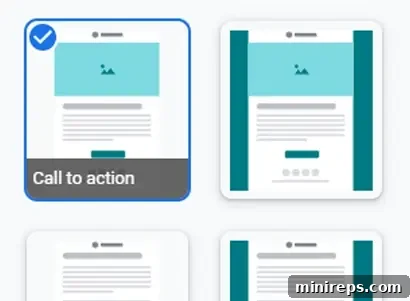
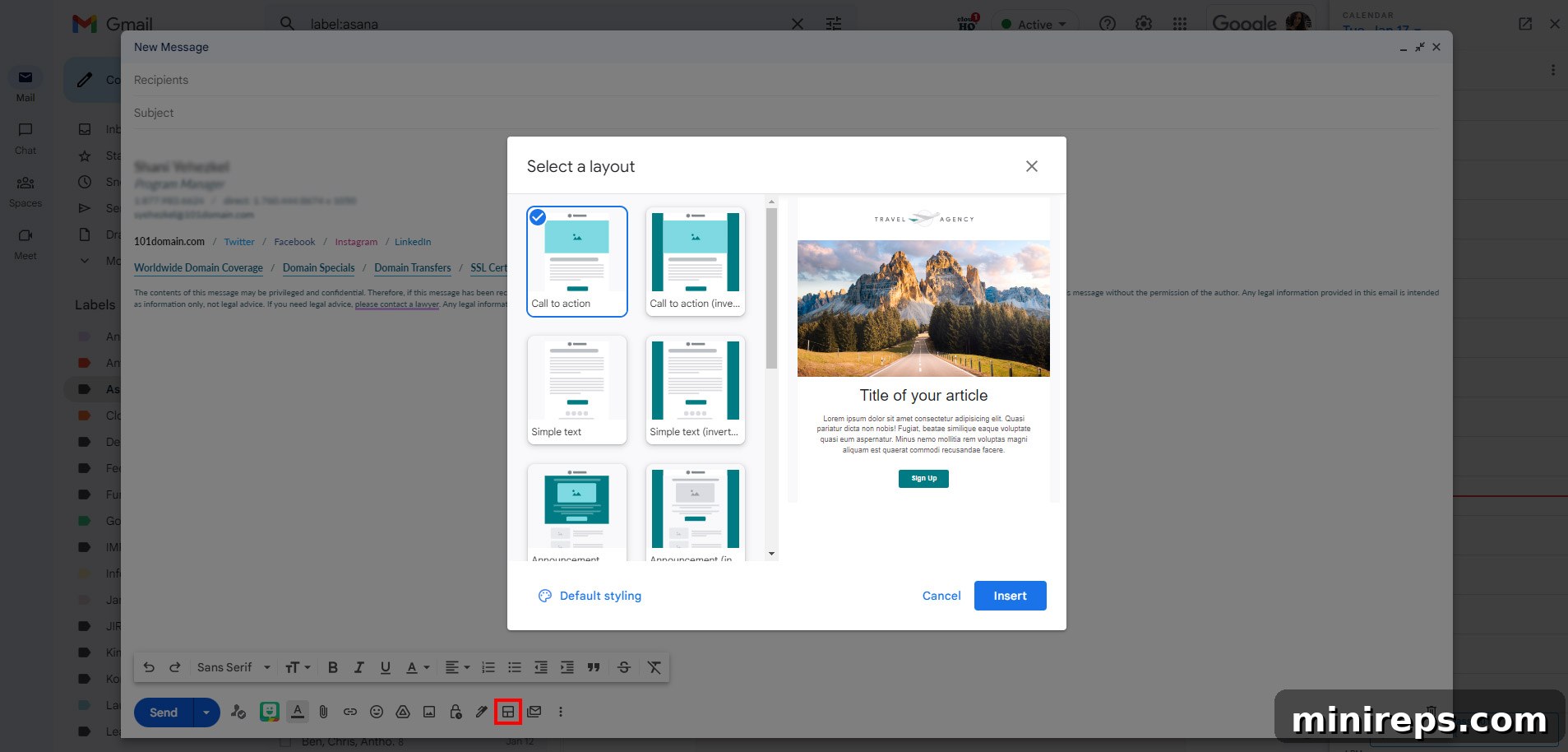
The first step involves crafting your message. Gmail offers a selection of pre-designed, professional email templates that you can easily customize to reflect your brand’s identity. Alternatively, for those with specific design requirements, you have the flexibility to use your own custom email content, giving you full control over the visual presentation and messaging.
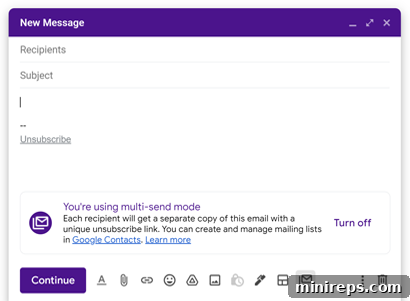
Once your email is ready, the magic begins. Simply activate Multi-Send Mode. This crucial step transforms your regular email into a mass communication tool, enabling you to effortlessly send your message to up to 1,500 contacts at once. A key advantage here is the elimination of the need for the “BCC” (Blind Carbon Copy) field, which often feels impersonal and can sometimes lead to emails being flagged as spam.
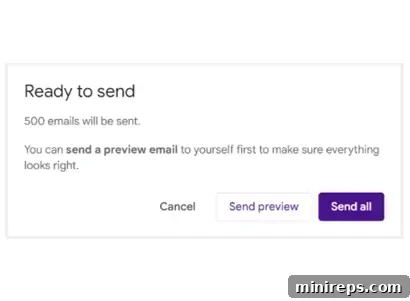
With Multi-Send Mode active, each of your contacts receives an individual, separate email. This is a significant improvement over BCC, as it ensures privacy and creates a more personalized experience for the recipient. Crucially, your contacts will not see who else received the email, maintaining confidentiality and enhancing the professional appearance of your communication.
This streamlined process allows businesses to leverage their existing Gmail interface for professional marketing outreach, making it incredibly convenient for those already using Google Workspace for their daily tasks. It simplifies campaign management, reduces the learning curve associated with new software, and integrates seamlessly with your existing contact lists.
Feature Showdown: Gmail Email Marketing vs. Mailchimp
To truly understand which platform is best suited for your business, a detailed feature-by-feature comparison is essential. Let’s dive into the core functionalities that define a robust email marketing solution.
Email Templates: Design and Customization
For many business owners, time is a precious commodity, and the role of “graphic designer” often falls outside their core competencies. This is precisely why the availability of professionally designed, customizable email templates is a critical factor when choosing an email marketing tool. Good templates empower you to create visually appealing campaigns quickly, allowing you to focus on crafting compelling messages rather than struggling with design elements.
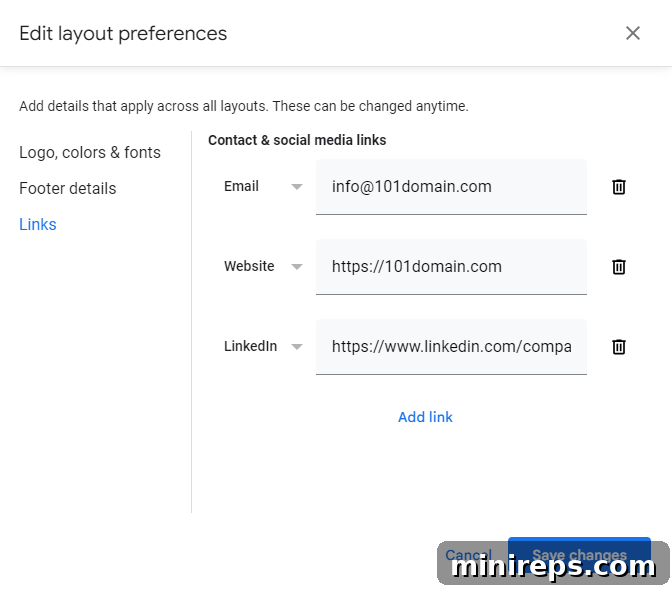
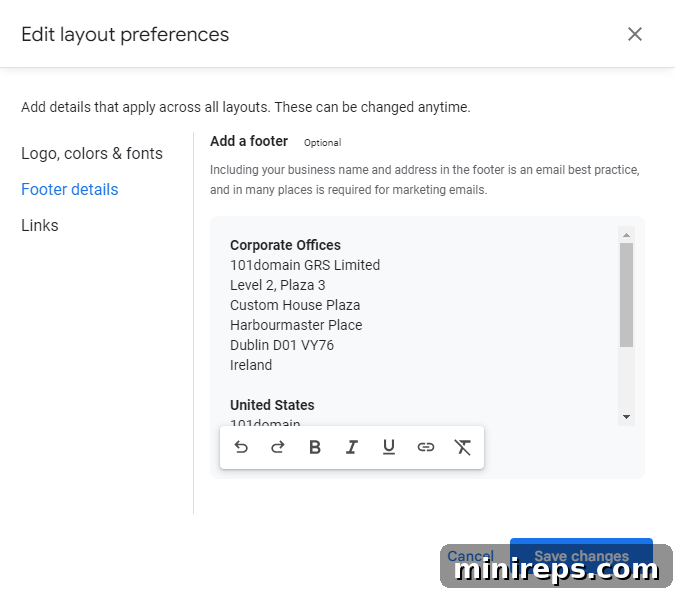
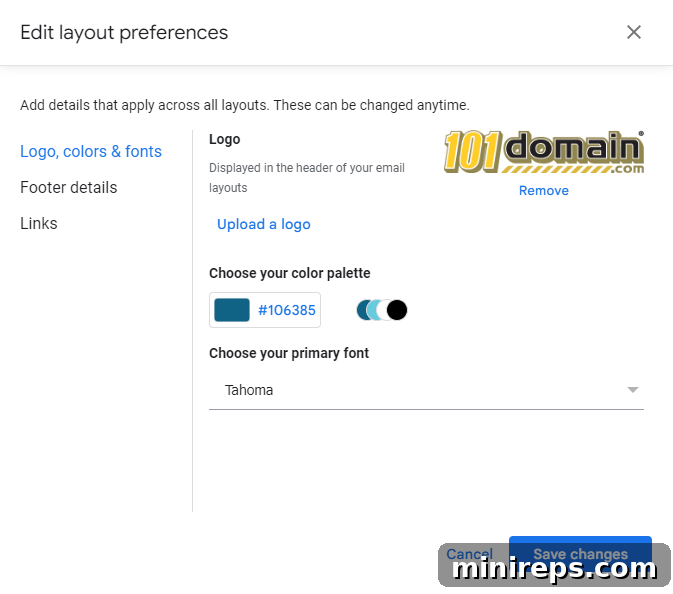
Gmail’s new email marketing features come equipped with a starter set of 12 distinct email templates. These templates are intelligently designed, featuring placeholder text, image blocks, call-to-action buttons, and link sections. While the selection is modest compared to some dedicated platforms, the focus is on ease of use and quick deployment. Customization within Gmail is straightforward and brand-centric. You can effortlessly upload your company logo, select a primary brand color to ensure visual consistency, and choose from 10 different font options to match your brand’s typography. Furthermore, Gmail allows you to easily add a customizable footer, which is crucial for including essential information like your business name and physical address—a legal requirement for commercial emails in many jurisdictions. You can also integrate custom links to your email address, website, and various social media profiles, enhancing your digital presence and directing recipients to other brand touchpoints.
Mailchimp, as a dedicated email marketing platform, boasts a significantly larger library of customizable email templates, numbering in the hundreds. This extensive collection caters to a vast array of industries, campaign types, and design preferences. Its robust drag-and-drop editor allows for unparalleled customization, giving users the power to rearrange layouts, add various content blocks, and integrate advanced options such as dividers, surveys, custom code snippets, app integrations, and product showcases (especially useful for e-commerce businesses). Furthermore, Mailchimp distinguishes itself with an AI-creative assistant, a powerful tool designed to help users fine-tune every aesthetic detail of their email templates, ensuring brand consistency and optimizing for engagement. This level of granular control makes Mailchimp ideal for marketers who require sophisticated design capabilities and robust content management.
Personalization: Engaging Your Audience Individually
In the crowded inbox of today, generic emails often go unread. The most successful email marketing campaigns are those that resonate deeply with the individual recipient. Personalization is the key to achieving this, fostering a sense of direct communication and making your audience feel valued. Personalization strategies can range from simple name inclusion to sophisticated dynamic content delivery and audience segmentation.
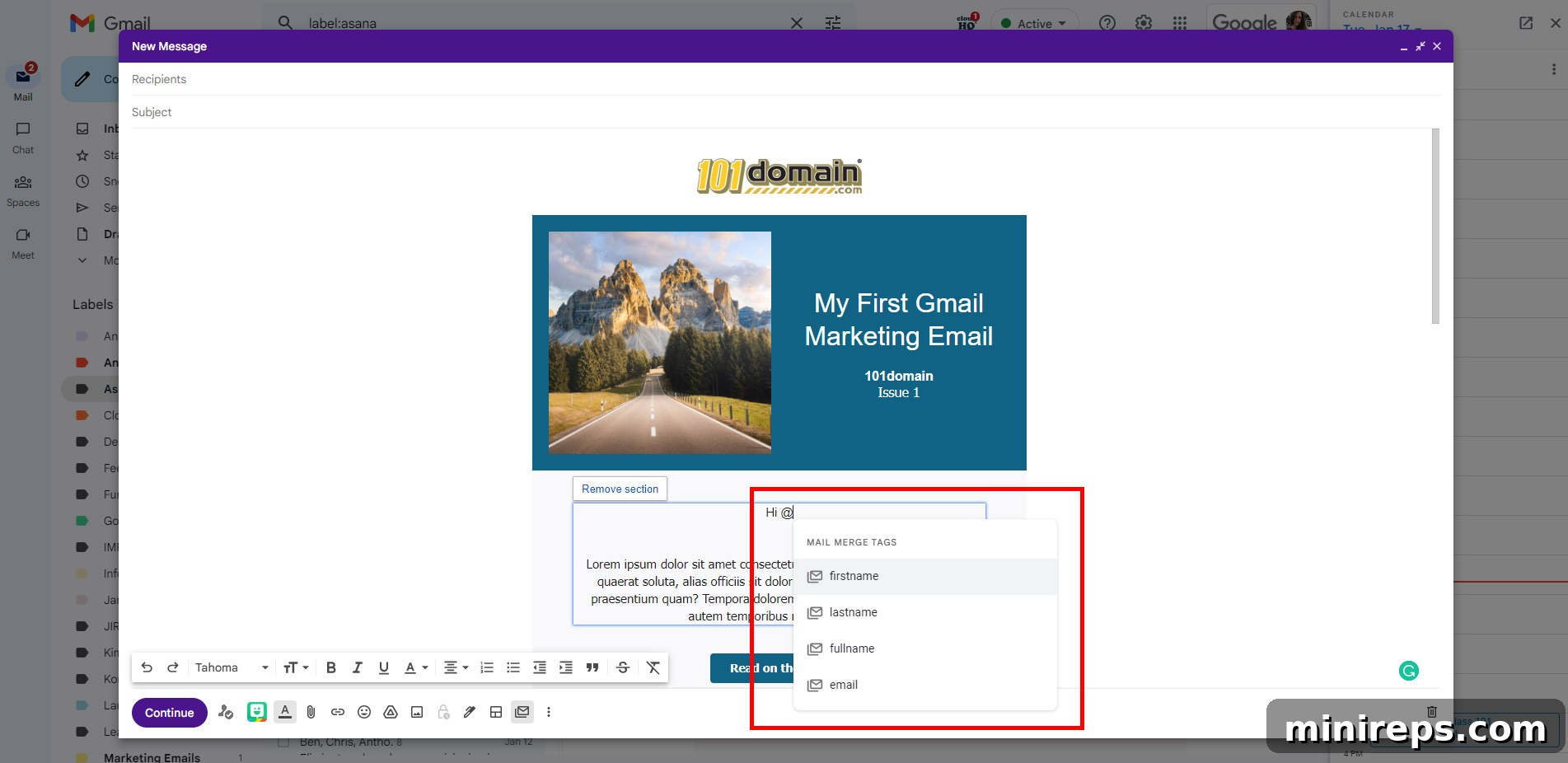
Gmail’s new email marketing tools, integrated with Multi-Send Mode, offer essential personalization capabilities through the use of merge tags. These dynamic tags allow you to insert specific recipient data directly into your email content or subject lines, automatically transforming generic greetings into personalized ones. The merge tags currently supported by Gmail include: @firstname for the recipient’s first name, @lastname for their last name, @fullname for their complete name, and @email for their email address. Gmail intelligently pulls this information from your Google Contacts, ensuring that each recipient receives a unique copy of the email where, for example, "Hello @firstname" becomes "Hello John".
A thoughtful feature in Gmail’s personalization suite is the ability to set default values for these merge tags. This ensures that your emails remain fluid and professional even when certain contact details are missing from your Google Contacts. For instance, if a recipient’s first name isn’t available, you can set a default value so that "Hi @firstname" gracefully defaults to a friendly "Hi friend" or "Hello valued customer," preventing awkward blanks and maintaining a consistent tone.
Mailchimp, with its focus on advanced marketing functionalities, provides a far more extensive array of personalization options. Beyond basic merge tags (which it also supports), Mailchimp allows for sophisticated dynamic content. This means you can display specific text blocks, images, or even entire sections of your email only to recipients who meet predefined conditions, such as their purchase history, engagement level, or demographic data. Mailchimp’s robust segmentation tools enable you to divide your audience into highly specific groups based on shared characteristics, behaviors, or interests, allowing you to tailor your messages with extreme precision. Furthermore, Mailchimp offers advanced scheduling features that can send personalized emails based on your contacts’ local time zones, ensuring optimal delivery times for maximum open rates and engagement globally. This depth of personalization makes Mailchimp an ideal choice for marketers executing highly targeted and complex campaigns.
Unsubscribe Mechanisms: Compliance and User Experience
While no marketer wants to see a subscriber leave their list, providing a clear and easy unsubscribe option is not only a legal requirement in many regions (such as under GDPR and CAN-SPAM Act) but also a crucial aspect of maintaining a healthy, engaged email list. When a subscribed contact decides to opt out of future email marketing communications, it’s known as an unsubscribe. Respecting this choice is vital for your sender reputation and compliance.
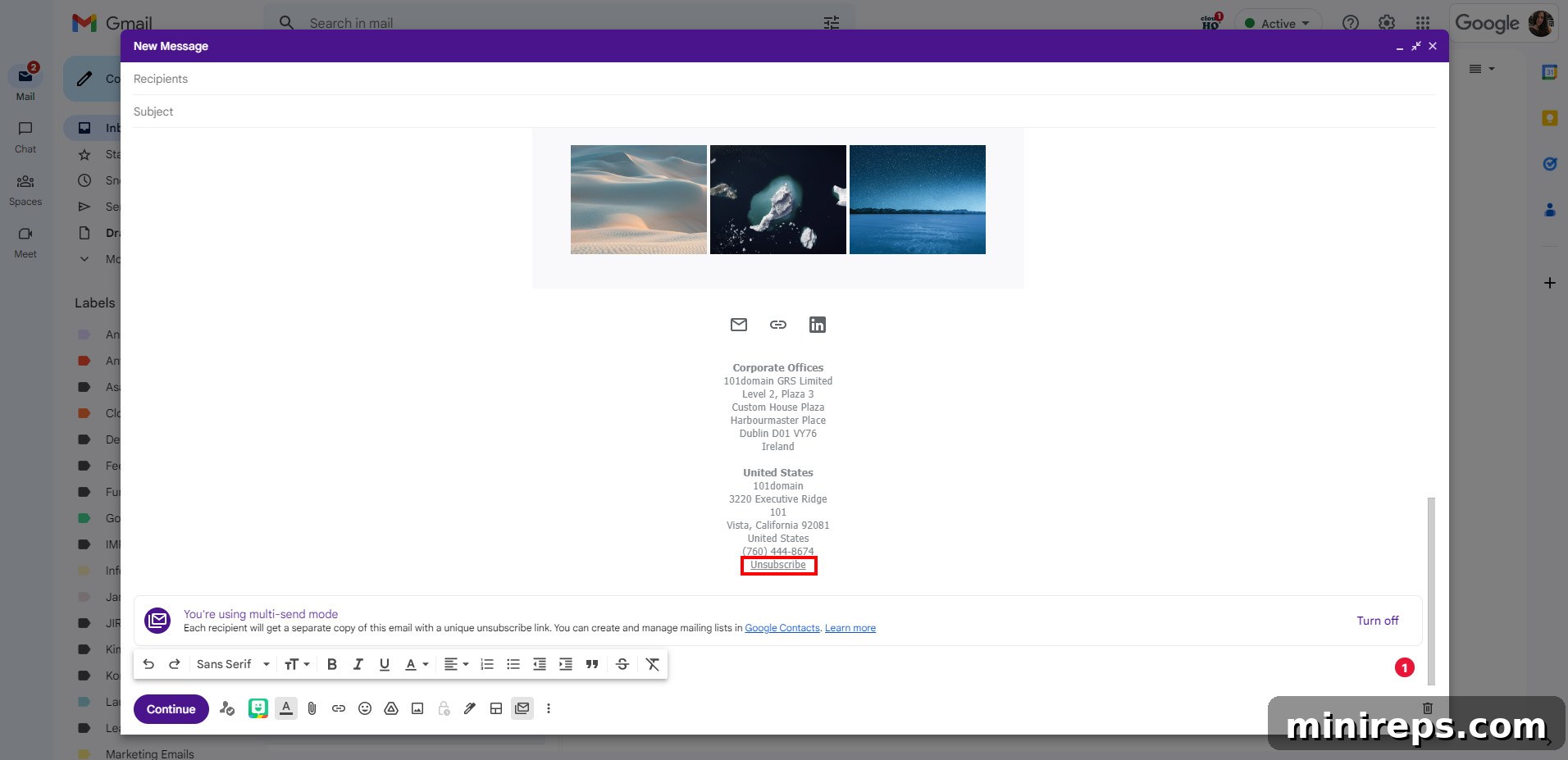
Gmail’s Multi-Send Mode automatically incorporates an unsubscribe mechanism designed for simplicity and compliance. When you activate Multi-Send, a unique unsubscribe link is automatically added to the bottom of every email sent. This ensures that every recipient has a straightforward way to opt out. A significant advantage of Gmail’s system is its automatic exclusion feature: anyone who unsubscribes is automatically removed from future multi-send emails, preventing accidental re-sends and ensuring your list remains clean and compliant. Gmail also keeps you informed; you will receive an email notification each time a contact unsubscribes, providing real-time feedback on your audience’s preferences. Before sending a multi-send email, a confirmation box will display, showing you the total number of contacts who have previously unsubscribed and will therefore not receive the current email, offering an extra layer of transparency.
Mailchimp, as a professional email service provider, is legally mandated to include an unsubscribe link in every email campaign sent through its platform. While Mailchimp automatically adds an unsubscribe link to the footer of your emails if you don’t manually include one, it also offers greater control and customization. You can explicitly add your own unsubscribe link using the *|UNSUB|* merge tag or integrate custom code for a bespoke solution. When a contact clicks an unsubscribe link in a Mailchimp email, they are not only unsubscribed from future communications but are also typically directed to an “unsubscribe success page.” This page serves multiple purposes: it reassures the user that their request has been processed, and crucially, it often allows them to provide feedback on why they chose to unsubscribe. Mailchimp allows extensive editing of this unsubscribe form and success page, giving businesses valuable insights into audience sentiment. For a final touch (or perhaps a playful guilt trip), Mailchimp even offers the option to send an automated “goodbye email” to those parting ways with your mailing list, although this feature should be used judiciously.
RELATED ARTICLE: Why You Should Not Flag A Marketing Email As Spam – Understanding the importance of proper email hygiene and respecting user choices.
Technical Specifications: Understanding Limitations and Scalability
Beyond features, the underlying technical specifications and limitations of an email marketing platform play a significant role in determining its suitability for different business models and growth trajectories. The fundamental difference between Gmail’s email marketing tools and Mailchimp lies in their core approach to contact management and sending limits.
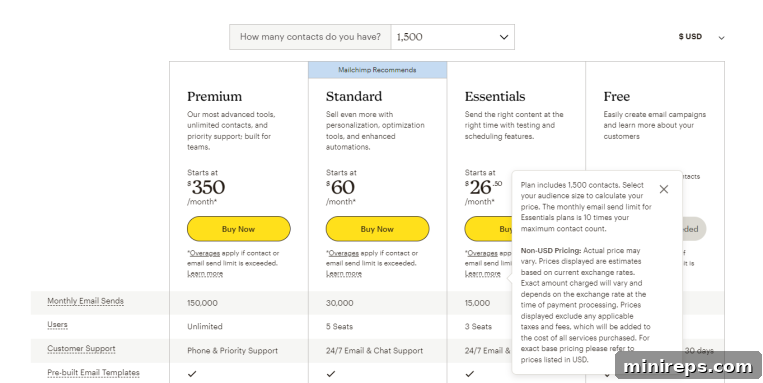
Mailchimp’s infrastructure and pricing models are built primarily around the number of total contacts you maintain in your audience lists. This means that your plan, and consequently, the number of emails you are allowed to send, are directly proportional to the size of your contact database. The more contacts you have, the higher your monthly subscription fee will be. This structure can be a critical consideration for businesses with large lists, even if they don’t email all contacts with high frequency. The cost is often tied to the storage of contacts, not just the act of sending emails to them. For example, if you have 10,000 contacts but only email 1,000 of them regularly, you still pay for all 10,000 contacts being stored on the platform. This model necessitates careful list hygiene and potentially segmenting inactive contacts to manage costs effectively.
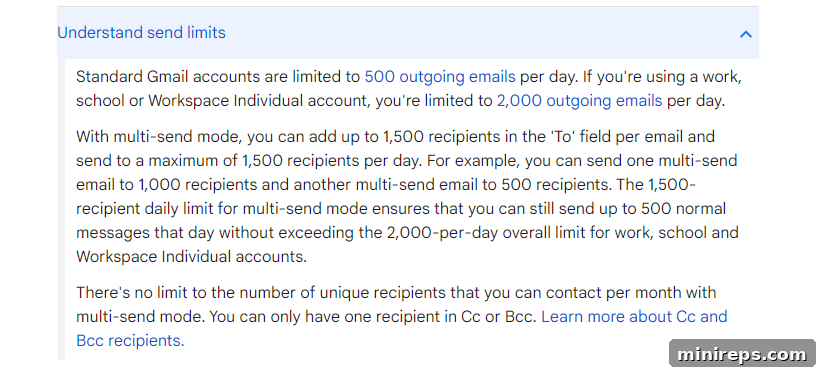
Gmail’s new email marketing tools operate on a different principle. They do not impose any limitations based on your total number of stored Google Contacts, offering immense flexibility for businesses with extensive networks. Instead, Gmail’s limitations are placed on the number of unique contacts you can message per individual multi-send email and per day. Specifically, you can send a multi-send email to up to 1,500 unique contacts at once. The daily sending limit for multi-send emails is also 1,500 unique contacts. However, a significant advantage for businesses is that there is currently no monthly cap on how many unique contacts you can email. This means that if your list is larger than 1,500, you can segment it and send to different groups on different days within the month, eventually reaching your entire audience without incurring additional costs for contact storage. This model is particularly appealing for organizations that have a large contact base but send campaigns in batches or don’t require simultaneous outreach to everyone.
For the purpose of illustrating pricing comparisons, we will proceed with the assumption of managing a list of 1,500 contacts, as this number helps bridge the gap between both platforms’ capabilities and limitations for basic outreach.
Pricing Comparison: Gmail Email Marketing vs. Mailchimp
Comparing the pricing models of Gmail’s email marketing features and Mailchimp requires a nuanced understanding, as their cost structures are fundamentally different. The “free” aspect of email marketing within Google Workspace is a major draw, but its true cost-effectiveness depends on your existing subscriptions and specific needs.
Mailchimp operates on a contact-based pricing model, offering different tiers depending on the size of your audience and the number of emails you wish to send. It does provide a generous free plan, which supports up to 500 contacts and allows for 2,500 monthly email sends. This free tier is an excellent starting point for very small businesses or individuals just beginning their email marketing efforts. However, once your contact list grows beyond 500, or if you need to send more emails, you’ll need to upgrade to a paid plan. For instance, if you have 500 contacts and need to send 5,000 emails per month, Mailchimp’s lowest-paid plan might cost around $13 per month (prices can vary and are subject to change). It’s crucial to remember that as your contact list expands, the monthly fee escalates, sometimes quite dramatically, regardless of how frequently you email every contact on your list. This can become a significant expenditure for businesses experiencing rapid growth in their audience size.
In contrast, Gmail’s new email marketing tools do not have a separate pricing structure because they are included as a feature within most Google Workspace editions (excluding the Business Starter and Essential plans). This means that if your business is already subscribed to a qualifying Google Workspace plan, you gain access to these email marketing capabilities at no additional direct cost. The lowest-paid Google Workspace plan that typically includes these new marketing tools might cost around $12 per month per user (again, prices can vary based on region and specific plan). This effectively positions Gmail’s offering as a “free” add-on if you are already leveraging Google Workspace for other business functions like custom email addresses, cloud storage, and productivity apps (Docs, Sheets, Slides, Calendar, Meet, etc.). Moreover, new users can often take advantage of a one-month free trial at authorized resellers like 101domain.com, allowing them to test the full suite of Google Workspace features, including email marketing, before committing financially. This integrated approach offers exceptional value, consolidating multiple business tools under a single subscription.
Final Thoughts: Choosing Your Ideal Email Marketing Platform
The choice between Gmail’s new email marketing tools and Mailchimp ultimately hinges on your specific business requirements, budget, and existing technological ecosystem. Both platforms offer distinct advantages and cater to different user profiles.
Mailchimp remains an incredibly powerful and versatile tool, purpose-built for comprehensive email marketing. If your business demands advanced features such as extensive template libraries, sophisticated drag-and-drop design editors, in-depth audience segmentation, A/B testing, marketing automation workflows, or AI-powered creative assistance, then Mailchimp is undoubtedly the superior choice. Its robust functionalities are designed to empower seasoned marketers and growing businesses with complex campaign needs. Furthermore, Mailchimp’s forever-free plan is an excellent entry point for micro-businesses or startups with very small lists, allowing them to test the waters without financial commitment. However, it’s essential to be mindful of its contact-based pricing model. As your email list expands, the cost per month will jump exponentially, and you’ll typically need to upgrade to a paid plan to remove Mailchimp branding from the bottom of your emails and unlock more advanced features.
Gmail’s newly introduced email marketing capabilities, while currently more limited in features compared to a dedicated platform like Mailchimp, represent a significant step forward for businesses integrated into the Google Workspace ecosystem. This platform is an ideal solution for beginners venturing into email marketing, offering a user-friendly and familiar interface that minimizes the learning curve and prevents overwhelm. Its seamless integration with Google Contacts and the convenience of sending campaigns directly from your Gmail inbox are major draws. While the template selection and personalization options are more basic, we anticipate Google will continue to refine and expand these tools over time, adding more sophisticated features as the platform matures. For businesses prioritizing simplicity, cost-effectiveness, and integration with their existing Google Workspace tools, Gmail’s offering presents an incredibly compelling value proposition.
Crucially, if you are already paying for a qualifying Google Workspace edition (excluding Business Starter and Essential plans), the email marketing features in Gmail are included at no extra charge. This means you avoid investing in an additional third-party tool specifically for email marketing, consolidating your expenses and simplifying your software stack. Even if you don’t currently have Google Workspace but are interested in leveraging Gmail’s marketing capabilities, a Google Workspace subscription provides access not only to these tools but also to a comprehensive suite of business applications—all for one predictable price. This all-in-one approach delivers exceptional value, especially for businesses looking to centralize their communication, collaboration, and marketing efforts.
Unlock More with Google Workspace: Your Integrated Business Hub
Beyond powerful email marketing, Google Workspace offers a complete suite of cloud-based productivity and collaboration tools designed to enhance every aspect of your business. Get a professional, custom email address (e.g., [email protected]) alongside your essential applications. This includes your go-to communication and productivity apps like Gmail, Calendar for scheduling, Meet for video conferencing, Chat for team communication, Drive for secure cloud storage, Docs for word processing, Sheets for spreadsheets, Slides for presentations, Forms for surveys, and many more integrated solutions, all working together seamlessly.
