


Elevate Team Collaboration with Google Chat: Your Essential Communication Hub
Every Google Workspace plan includes powerful tools for productivity and connectivity, and at its core for real-time interaction is Google Chat.

Revolutionizing Team Communication: Why Chat is Essential
In today’s dynamic work environment, effective communication and seamless collaboration are paramount for business success. Teams are increasingly distributed, operating from diverse locations and time zones, making traditional communication methods like email and phone calls often slow and inefficient. While video meetings offer face-to-face interaction, they aren’t always suitable for quick updates or ongoing discussions. This is where instant messaging, specifically Google Chat, steps in as the new, faster, and inherently better way for teams to communicate and collaborate.
Google Chat, an integral part of the comprehensive Google Workspace suite, is designed to foster fluid and efficient collaboration whether your team is working remotely, in a hybrid model, or co-located in an office. It transcends simple direct messages, offering a robust platform for everything from one-on-one conversations to complex group project discussions. By centralizing communication, Google Chat helps minimize distractions, streamline workflows, and ensure that every team member stays connected and informed, empowering businesses to achieve their goals with greater agility.
Unifying Your Communications: All Messages in One Place
One of the most significant advantages of Google Chat is its exceptional integration within the Google Workspace ecosystem. Say goodbye to juggling multiple applications to keep track of your team’s conversations. Google Chat allows you to access all your messages conveniently from a single, unified interface, whether you prefer to use it in a web browser, through its dedicated mobile app, or directly within your Gmail inbox.
This seamless integration means your email, calendar, documents, and chat communications are all interconnected. This not only saves valuable time by eliminating the need to constantly switch between applications but also significantly reduces context switching, a common source of decreased productivity. By having a holistic view of your work communications, from formal emails to instant messages and shared project updates, teams can maintain better organization, ensure no critical information is overlooked, and keep projects moving forward efficiently. This centralized approach makes Google Chat an indispensable tool for maintaining clarity and focus in your daily workflow.
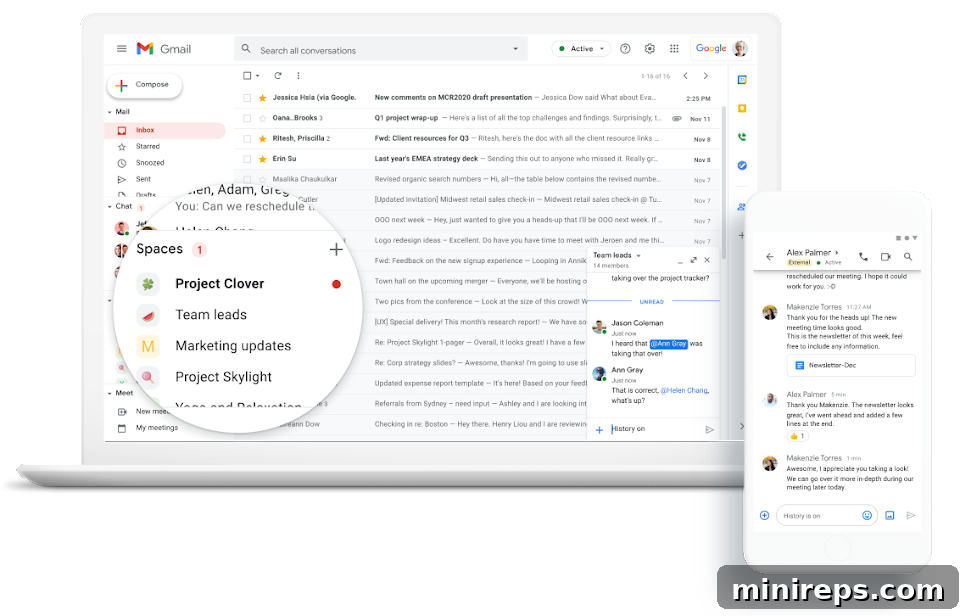
Structured and Private Conversations: Rooms and Direct Messages
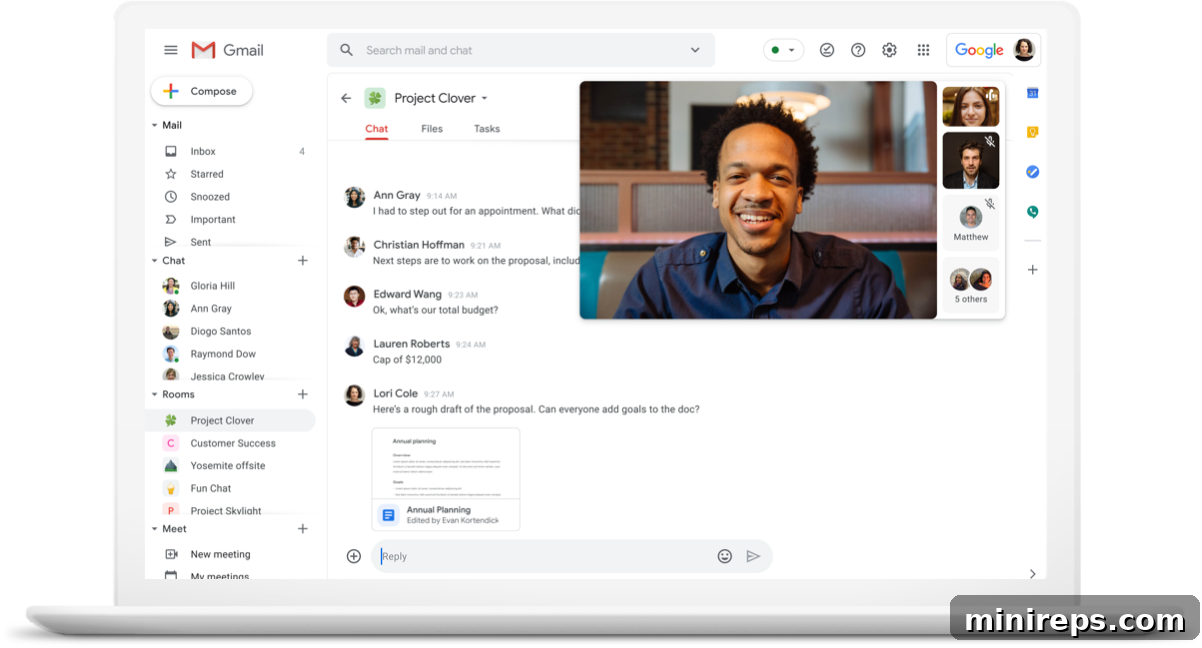
Google Chat offers two primary modes of communication to cater to different team needs: “Rooms” for group collaboration and “People” for private, one-on-one interactions. This thoughtful design ensures that discussions remain organized and focused, whether you’re brainstorming with a large group or having a confidential chat.
Dedicated Rooms for Group Collaboration: Group conversations within Google Chat are aptly named “Rooms.” These virtual spaces are incredibly versatile, allowing any team member to easily create dedicated environments for specific purposes. Imagine a room for a new marketing campaign, another for a software development sprint, or a channel solely for sharing company announcements. Rooms help keep projects organized, facilitate brainstorming, and ensure all relevant information pertaining to a specific topic is centralized.
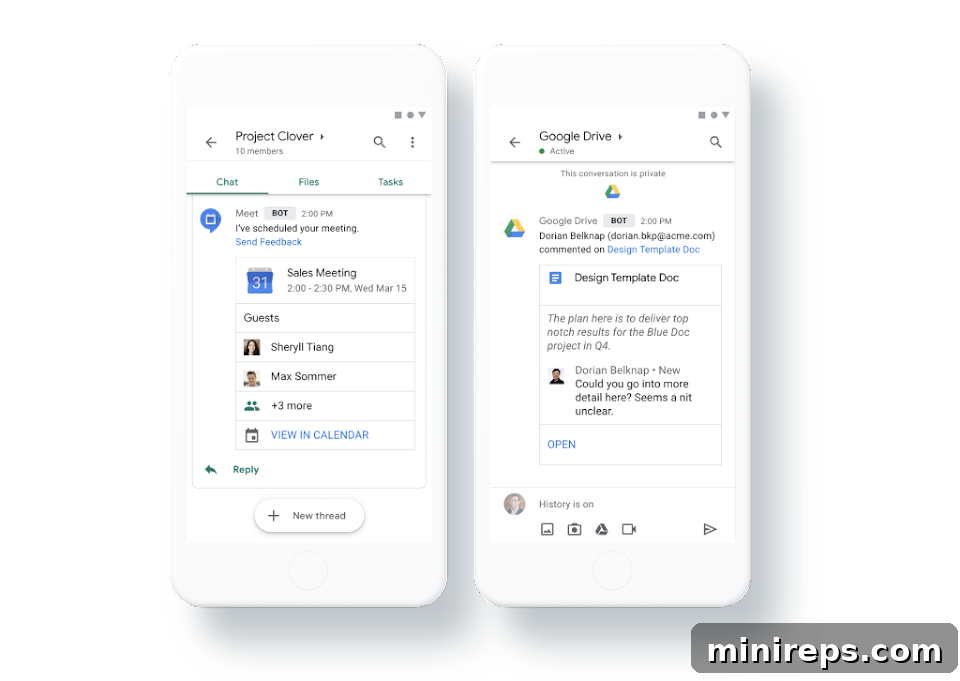
Within these Rooms, collaboration thrives. Teams can engage in threaded conversations, making it simple to follow specific discussion points without getting lost in a flood of messages. You can seamlessly share files, assign tasks, and even initiate video conferences directly from the Room, ensuring everyone stays perfectly aligned on project goals and progress. The ability to bring together chat, files, and tasks in one place significantly enhances team productivity and transparency.
Private Messages for Direct Communication: Complementing the group-oriented Rooms, the “People” section in Google Chat is dedicated to private, direct messages. This feature allows you to start a one-on-one chat with any contact within your Google Workspace account. Whether you need to ask a quick question, share sensitive information privately, or simply check in with a colleague, direct messages provide a secure and immediate channel. The ability to quickly transition between group discussions and private conversations makes Google Chat a flexible and powerful tool for all your team’s communication needs.
Seamless Transition: Turning a Chat into a Video Meeting
While text-based chat is excellent for quick exchanges and ongoing updates, there are moments when a more interactive form of communication becomes essential. Complex issues, urgent discussions, brainstorming sessions, or situations requiring visual aids often demand the richness of a face-to-face interaction. Recognizing this, Google Chat is intelligently integrated with Google Meet, allowing teams to effortlessly switch from typing to talking.
This integration is remarkably user-friendly and designed for maximum efficiency. When a text conversation reaches a point where a video call would be more productive, all you need to do is click a single button within your Google Chat conversation box. This action instantly generates a link to a Google Meet video conference, which anyone involved in the chat can join with a simple click. There’s no need to open a separate application, create a new meeting, or share complicated links. This seamless transition ensures that your team can move from discussion to decision-making with minimal friction, fostering quicker resolutions and a deeper level of understanding. It’s a testament to Google Workspace’s commitment to providing tools that adapt to your team’s evolving communication needs.
Intelligent Search: Finding Information Faster Than Ever
In a world overflowing with information, the ability to quickly retrieve specific data, past discussions, or shared files is crucial for maintaining productivity. Google Chat harnesses the power of Google’s renowned AI search capabilities to ensure that no piece of information is ever truly lost. Forget endless scrolling through chat histories; with Google Chat, finding what you need is fast, intuitive, and highly efficient.
A prominent search bar located on the top menu of Google Chat serves as your gateway to instant information retrieval. You can initiate a search within the specific room or direct message conversation you’re currently in, or broaden your scope to search across “All rooms and direct messages” for a comprehensive sweep. What sets Google Chat’s search apart is its advanced filtering options. You can refine your search results by specific criteria such as @mentions (to find messages where you were tagged), images, videos, links, and various file types. This precision helps you pinpoint exactly what you’re looking for, even in the most extensive chat histories.
Once your search yields results, they are displayed conveniently above the search bar. With a single click on “Go to thread,” you can jump directly to the original conversation, viewing the information within its full context. This intelligent search functionality not only saves considerable time and reduces frustration but also ensures that valuable knowledge and discussions are always accessible, contributing significantly to organizational efficiency.
For businesses with more extensive needs, Google Workspace Business Standard and Enterprise clients benefit from even more advanced search capabilities, allowing them to uncover content across all their integrated Google Workspace accounts and applications, providing a truly powerful information retrieval system.
Flexible Documentation: Controlling Your Chat History
The management of chat history is a critical feature for any business, impacting everything from compliance and project accountability to data privacy and knowledge retention. Google Chat provides powerful and flexible controls over your discussion documentation, allowing you to tailor retention settings to your specific organizational needs, all without incurring additional costs.
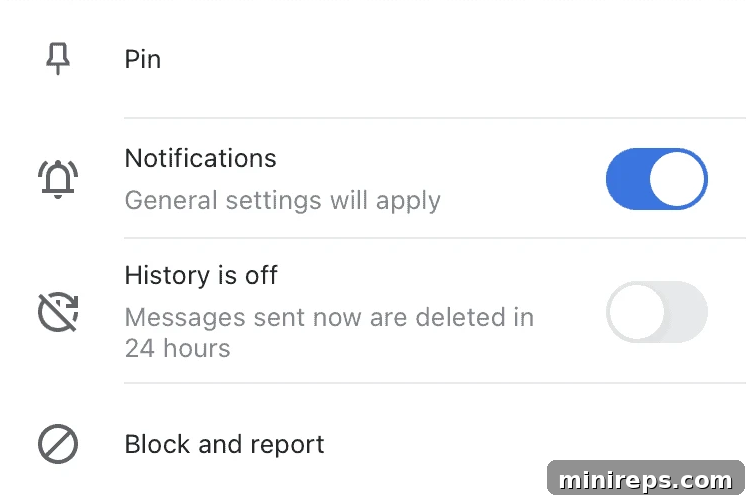
By default, Google Chat is set to keep your chat history recorded, ensuring that all conversations are saved for future reference. This is invaluable for tracking project decisions, recalling past discussions, onboarding new team members with historical context, and adhering to internal and external regulatory requirements. This continuous record acts as a living document of your team’s collaborative journey, making it easier to audit progress and revisit key information.
However, Google Chat also offers the flexibility to disable history for specific conversations or rooms. If you choose to set the “History Off” toggle, messages within that particular chat will be automatically deleted after 24 hours. This feature is particularly useful for discussions that are ephemeral in nature, involve sensitive short-term information, or for teams that prefer a clean slate after a day’s work. This level of control empowers businesses to manage their data responsibly, balancing the need for comprehensive records with privacy considerations and internal policies. Whether you need an enduring archive or temporary communication, Google Chat adapts to support your company’s safety and productivity protocols.
Beyond its core functionalities, Google Chat is built for scalability and global reach. It robustly supports external users, fostering collaboration with clients, partners, and vendors seamlessly. With support for 28 languages, it ensures diverse teams can communicate effectively in their native tongues. Furthermore, its capacity for up to 8,000 members per Room demonstrates its readiness to accommodate even the largest and fastest-growing teams. Google Chat is not just a messaging app; it’s a comprehensive platform designed to empower modern, dynamic, and distributed workforces.
Google Chat is a powerful component of
Google Workspace is an integrated suite of intelligent productivity and collaboration tools that helps individuals, teams, and businesses achieve more with fewer distractions. Experience the synergy of connected applications and elevate your team’s potential.