

In the fiercely competitive digital landscape, one name consistently rises to the top: Google. Renowned for its dominance as the world’s leading search engine and the ubiquity of Gmail, Google is now extending its influence into every facet of business operations with Google Workspace. This comprehensive suite of productivity and collaboration tools is rapidly becoming the indispensable choice for organizations globally, proving itself as a formidable competitor across numerous industries. From streamlining internal communications to enhancing project execution and client engagement, Google Workspace offers an integrated ecosystem designed to boost efficiency and foster innovation. This article delves into the key sectors where Google Workspace is not just competing but decisively taking the lead, offering an all-in-one solution that redefines modern work.
Google Workspace: Revolutionizing Business Productivity Across Industries
1. Video Meetings: Elevating Virtual Collaboration with Google Meet
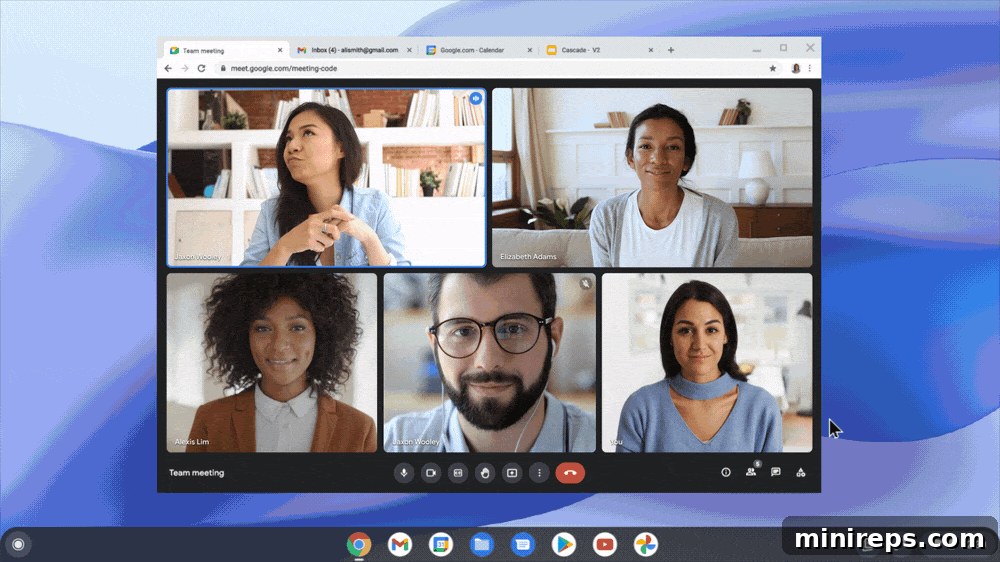
The global shift towards remote and hybrid work models has cemented video meetings as a cornerstone of daily business operations. Two years post-pandemic, these virtual interactions remain the most effective way for geographically dispersed teams, partners, and clients to connect face-to-face, surpassing the limitations of phone calls and emails. While platforms like Zoom initially captured public attention for “work from home,” Google Meet has steadily emerged as the superior video conferencing solution for businesses, offering a robust, secure, and highly integrated experience.
Google Meet, an integral part of the Google Workspace suite, provides exceptional value at a fraction of the cost of many standalone video conferencing tools. Its extensive feature set is meticulously designed to enhance meeting productivity and engagement. Users benefit from high-definition video and crystal-clear audio, seamless screen sharing, interactive whiteboards, and real-time polling to gather instant feedback. Advanced functionalities like live captioning ensure accessibility, while customizable backgrounds and noise cancellation create a professional meeting environment free from distractions. Additional features such as hand raising for organized discussions, breakout rooms for smaller group collaboration, and integrated Q&A sessions further enrich the meeting experience. These capabilities, combined with the inherent security measures embedded within the Google ecosystem, make Meet an unrivaled platform for fostering effective and secure virtual communication, driving unparalleled collaboration for modern work teams.
RELATED ARTICLE: Google Meet vs. Zoom: Google Workspace is Better for Business
2. Cloud Storage: Empowering Collaboration with Google Drive
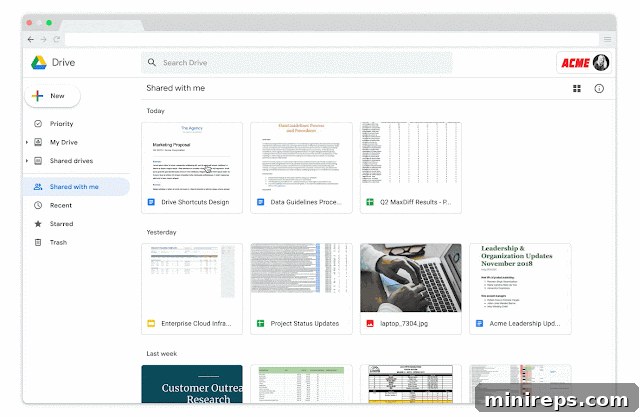
The transition to cloud-based operations marks a pivotal moment for any modern business, fundamentally transforming how work is conducted. Google Drive has been a primary accelerator in this evolution, acting as a catalyst for unprecedented levels of collaboration and productivity within organizations that embrace Google Workspace. Drive has completely reimagined the processes of saving, sharing, sending, and jointly working on files, making the traditional methods of file management seem archaic. The days of losing unsaved progress or struggling with version control are thankfully behind us, thanks to Drive’s intelligent design.
When you compare features, Google Drive consistently outperforms competitors like Dropbox and Box. Its generous storage capacity, robust security, and seamless integration with other Workspace applications set it apart. Key features such as Shared Drives facilitate effortless team collaboration, ensuring all members have access to the most current versions of documents. The Drive for desktop application offers convenient synchronization, allowing users to access and edit files directly from their computers while keeping everything updated in the cloud. Furthermore, Google Drive benefits from being a core component of the broader Google Workspace, inheriting Google’s industry-leading security infrastructure. This provides businesses with peace of mind, knowing their critical data is protected by advanced encryption and robust data governance policies, making it the definitive choice for secure and efficient cloud storage.
RELATED ARTICLE: Teams that Shared Drive Together, Work Better Together
3. Email Marketing: Supercharging Campaigns with Integrated Gmail Features
Google’s relentless commitment to innovation means that the Google Workspace blog frequently announces new feature updates, a testament to the platform’s continuous evolution. Recently, Google unveiled groundbreaking email marketing features within Gmail that are set to disrupt the landscape, giving established services like MailChimp a significant run for their money. This integration transforms Gmail from a mere communication tool into a powerful, all-encompassing marketing platform, perfectly aligning with Google Workspace’s vision of providing comprehensive business solutions.
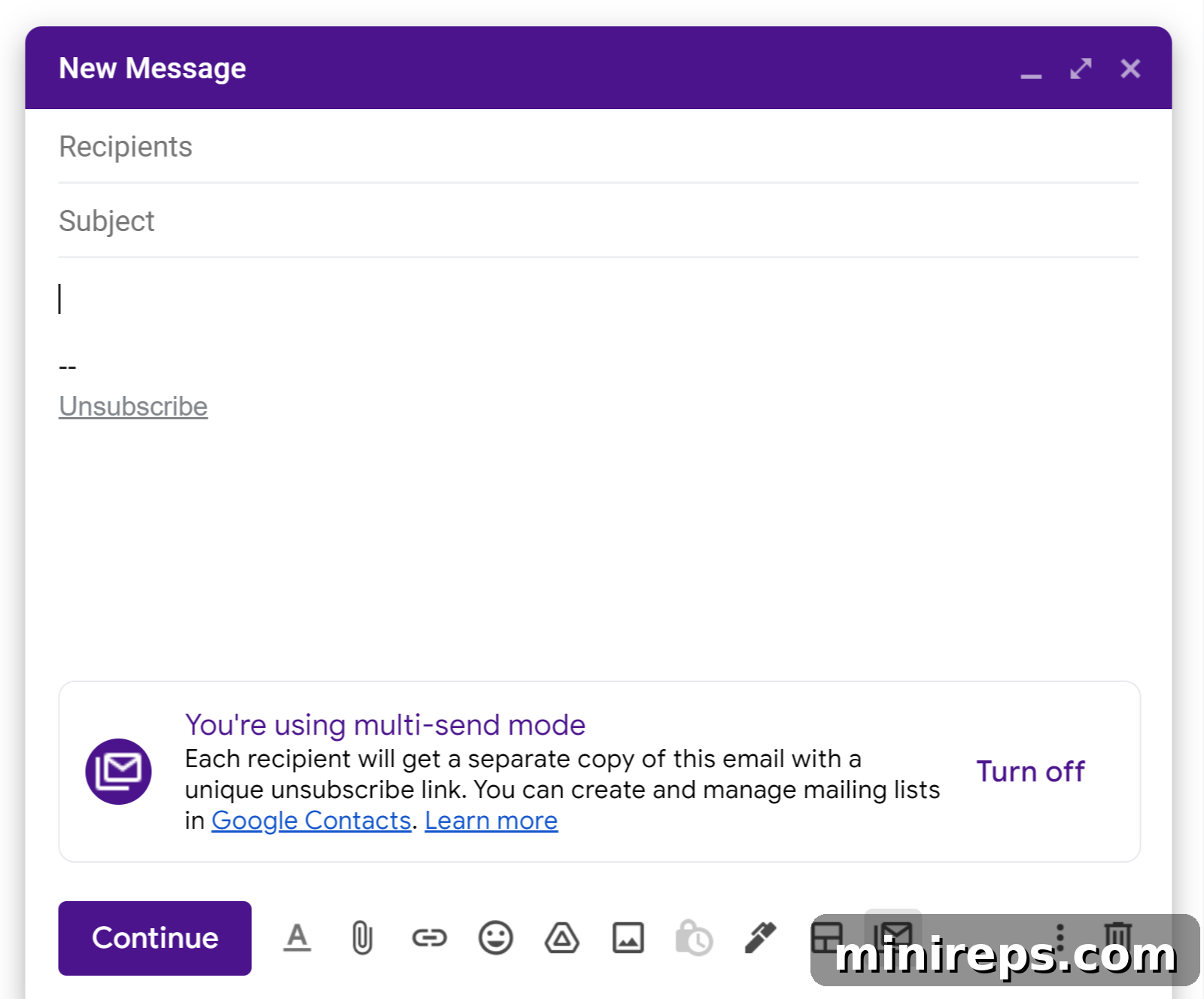
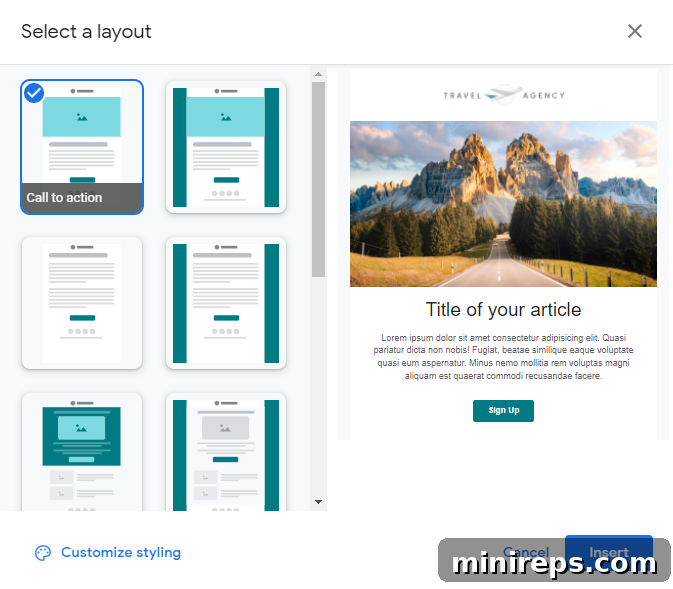
Gmail is already the preferred inbox for over half of all internet users, a distinction earned through its intelligent design and powerful functionalities. Perks like smart replies, grammar suggestions, nudges, and state-of-the-art Google security against spam, spoofing, and phishing have long made it an invaluable asset for individuals and businesses alike. Now, Gmail enhances its capabilities by allowing users to send mass emails without the cumbersome process of BCCing recipients. Crucially, these multi-send emails automatically include an unsubscribe link unique to each recipient, ensuring compliance and good sender reputation. Any recipient who unsubscribes is automatically excluded from future multi-send campaigns, simplifying list management. Furthermore, Google Workspace users can access and customize a selection of professional email templates, personalizing them with their brand colors, logos, images, text, links, and call-to-action buttons. This rich functionality empowers businesses to create impactful marketing campaigns directly from their familiar Gmail interface, further solidifying Google Workspace as an all-in-one solution for diverse business needs.
RELATED ARTICLE: We Moved to Gmail—Here’s What We Learned
4. Messaging: Driving Instant Communication with Google Chat
In today’s fast-paced business environment, an effective messaging system is pivotal for fostering collaboration, boosting productivity, and cultivating a vibrant company culture. Instant messaging has become the modern equivalent of “stopping by someone’s desk,” enabling quick answers, dynamic team brainstorming, and efficient project progression. It reduces email clutter and provides a direct, immediate channel for communication that keeps teams agile and responsive.
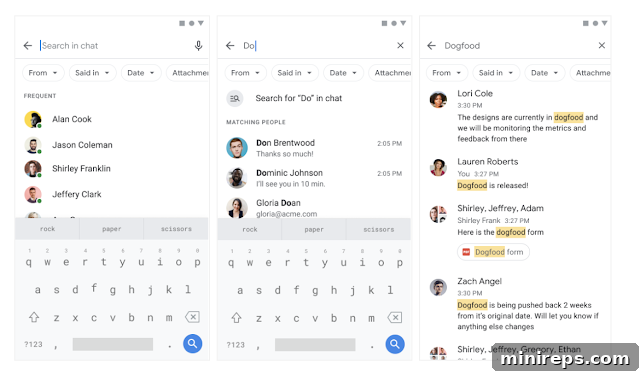
While Slack has long been a frontrunner in the chat service arena, Google Chat is rapidly gaining ground, offering a compelling alternative bundled within Google Workspace. Google Chat facilitates seamless one-on-one conversations, enables the creation of dedicated spaces (channels) for topic-based discussions or specific projects, and supports threaded replies to maintain clarity in busy discussions. Its integration with Google’s powerful search capabilities makes it incredibly easy to find past conversations, shared files, and critical information, ensuring nothing gets lost in the digital shuffle. Furthermore, Chat integrates effortlessly with other Workspace apps like Google Meet and Drive, allowing users to jump into video calls or share documents without leaving the chat interface. The significant advantage lies in its inclusion within Google Workspace, eliminating the need for separate subscriptions to standalone chat services. This consolidates tools, simplifies management, and ultimately provides a more cost-effective and integrated communication solution for businesses seeking to enhance team connectivity and streamline workflows.
5. Appointment Scheduling: Streamlining Client Interactions with Google Calendar
For businesses providing services or professionals regularly meeting with clients, efficient scheduling is paramount. Historically, this often involved juggling multiple platforms or engaging in tedious back-and-forth emails to find suitable meeting times. While dedicated scheduling programs like Calendly have been popular, offering convenient ways for clients to book appointments, Google Calendar is now poised to redefine this space by integrating a powerful scheduling feature directly into its core offering, consolidating yet another business function under the Google Workspace umbrella.
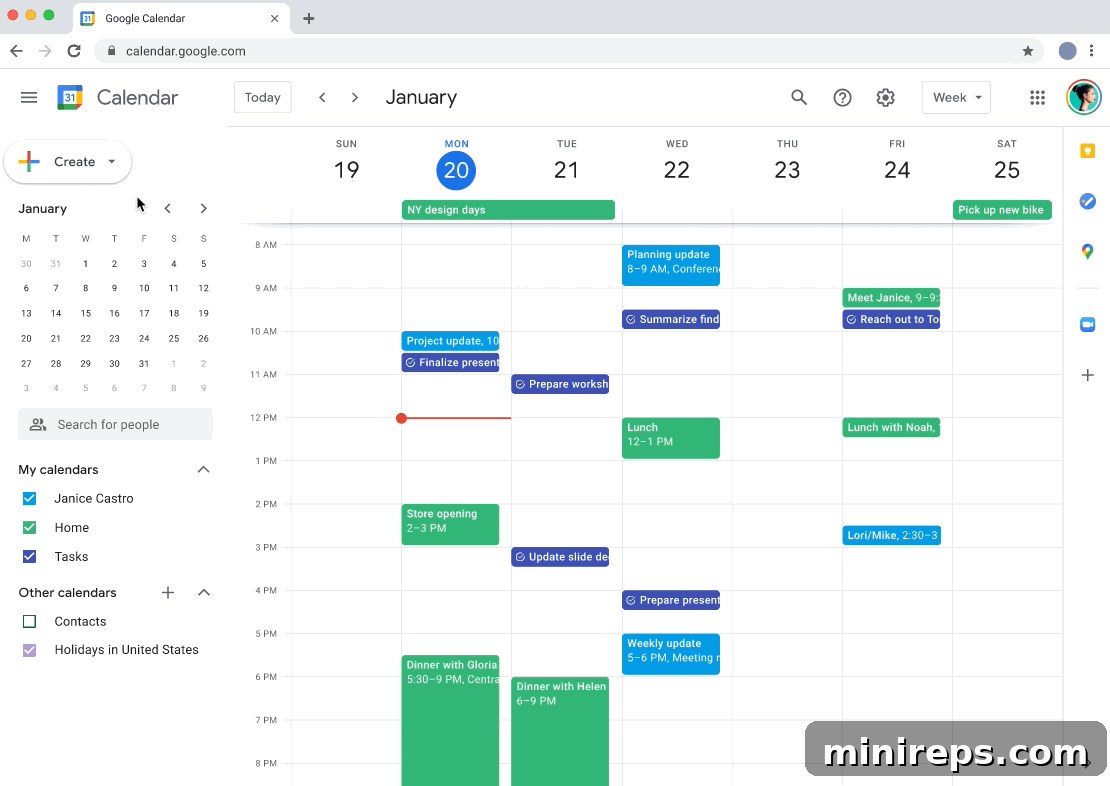
Everyone’s favorite calendar, Google Calendar, now boasts an advanced appointment scheduling feature included as part of Google Workspace subscriptions. This innovative tool allows users to effortlessly share their availability through a personalized booking page, accessible to anyone, regardless of whether they have a Google account. The feature offers extensive customization options, enabling businesses to ask specific questions during the booking process, offer various types of appointments (e.g., discovery calls, consultations), and define how they meet with clients, whether through Google Meet or in-person. Automated reminder emails can be configured to send before appointments, reducing no-shows and improving overall client engagement. This seamless integration with an already widely used calendar system streamlines the scheduling process, saves invaluable time for both businesses and their clients, and positions Google Workspace as the definitive, all-in-one platform for managing professional interactions and maximizing productivity.
RELATED ARTICLE: Can Google Calendar Appointment Scheduling Compete with Calendly?
6. Surveys & Crowdsourcing: Gaining Insights with Google Forms
Collecting feedback, conducting market research, or gathering data from employees and customers is a fundamental requirement for any thriving business. Many have turned to dedicated survey tools like SurveyMonkey due to their user-friendly interfaces for creating quick, free surveys. However, the true cost often emerges when businesses require professional surveys with custom branding, advanced features, or comprehensive data analysis, pushing them towards expensive premium plans.
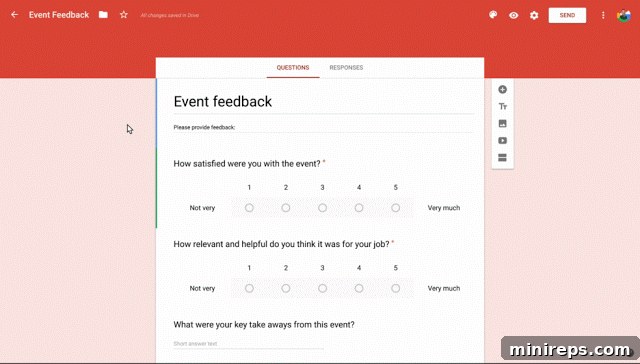
Google Forms offers a compelling, low-cost, and incredibly powerful alternative. Staying true to the comprehensive nature of the suite, Google Forms is, predictably, included as a core application within Google Workspace. This means for one unified subscription, businesses can create highly professional and customizable surveys, quizzes, and registration forms. Users have the flexibility to personalize forms with their company’s themes, logos, fonts, and images, ensuring a consistent brand experience. Google Forms simplifies data management by automatically generating a linked Google Sheet to track and store all responses in real-time, making data analysis straightforward and efficient. Furthermore, email notifications can be configured to alert users whenever a new response is submitted, ensuring timely follow-up. Whether for customer feedback, employee engagement, event registrations, or academic assessments, Google Forms provides an accessible, robust, and integrated solution for all data collection and crowdsourcing needs, eliminating the need for additional, costly subscriptions.
7. Project Management: The Integrated Power of Google Workspace
The core objective of project management is to ensure teams remain focused, organized, and on task, driving projects to successful completion. At its heart, effective project management hinges on seamless communication and robust collaboration. Rather than relying on a singular, standalone project management platform like Asana or Monday, the entire Google Workspace suite functions as a powerful, integrated project management ecosystem. This holistic approach empowers teams to accomplish tasks with fewer distractions and greater efficiency, leveraging tools they already use daily.
Within Google Workspace, various applications synergistically contribute to comprehensive project management. Google Drive serves as the central repository for all project documentation and assets, ensuring secure storage and version control. Google Docs, Sheets, and Slides facilitate collaborative document creation, task tracking, and reporting, all in real-time. Google Chat and Google Meet provide instant communication and structured video conferences, keeping team members connected and informed. Google Calendar is essential for setting milestones, managing deadlines, and scheduling critical meetings, while Google Forms can be used for collecting feedback or conducting internal surveys related to project progress. This integrated framework minimizes context switching, enhances transparency across teams, and promotes a cohesive environment where every tool works in harmony to support project goals. By replacing multiple subscriptions with a single, continually evolving Google Workspace account, businesses can realize significant savings in both time and money, optimizing their project workflows and fostering unparalleled team cohesion.
Final Takeaway: The Unifying Power of Google Workspace
Google Workspace stands out as more than just a collection of applications; it’s a meticulously designed ecosystem that addresses nearly every business need, fostering an environment of efficiency, collaboration, and innovation. From revolutionizing video meetings and secure cloud storage to streamlining email marketing, instant messaging, appointment scheduling, data collection, and holistic project management, Google Workspace offers a singular, integrated solution. Its strength lies in the seamless interplay between its various tools, ensuring that businesses can operate with reduced complexity, lower costs, and enhanced productivity.
We are so confident in the transformative power of Google Workspace that we’ve partnered with Google to offer you a free one-month trial. This is your opportunity to experience firsthand how this comprehensive suite can streamline your operations, consolidate your digital tools, and elevate your team’s performance. We are certain that, like 101domain and countless other successful businesses, you will recognize the undeniable value in cutting ties with fragmented services and disparate logins, choosing instead to centralize your entire workflow in one powerful, secure, and integrated platform: Google Workspace. Embrace the future of work today and unlock your business’s full potential.