


Crafting a truly impactful presentation has always demanded significant time and effort, especially when starting from a blank canvas. The process often involves meticulous research, design decisions, and content refinement. However, this challenge is rapidly becoming a relic of the past, thanks to the revolutionary integration of Gemini within Google Slides. This powerful artificial intelligence is transforming the way we approach presentation development, enabling users to elevate a nascent idea into a meticulously polished slide deck in a fraction of the time previously required. In this comprehensive exploration, we will delve deep into the newest Gemini-enabled features in Google Slides, uncovering how they not only ignite creativity and streamline collaboration but also empower you to confidently present your finest work, making every presentation a resounding success.
Unleash Your Potential: How Gemini Elevates Google Slides
The introduction of Gemini AI ushers in an entirely new era of creativity and efficiency for presentation building within Google Slides. Imagine having an expert graphic designer, a brilliant copywriter, and a dedicated assistant all working in synergy at your side, helping you transform abstract concepts into vivid, compelling visuals and narratives. Gemini simplifies complex tasks, accelerates content creation, and refines design elements, effectively bringing your unique vision to life with unprecedented ease. Here are just some of the remarkable ways Gemini in Google Slides empowers you to produce exceptional work:
- Generate Dynamic Content: Effortlessly create compelling text and bespoke visual elements directly from simple, intuitive prompts, overcoming creative blocks and accelerating initial drafts.
- Intelligent Design Suggestions: Receive smart recommendations for slide layouts, engaging headlines, and various design elements, all intelligently tailored to the specific topic and tone of your presentation.
- Instant Content Summarization: Quickly distill lengthy documents, detailed transcripts, or complex talking points into concise, impactful slides, ensuring clarity and focus for your audience.
- Seamless Image Editing: Modify image backgrounds with generative AI to perfectly align visuals with your core message, branding guidelines, or the specific needs of your audience.
- Effortless Personalization: Tailor slides instantly for diverse clients, specific industries, or unique use cases, making every presentation feel customized and highly relevant without extensive manual redesign.
- Rich Multimedia Enhancement: Elevate engagement by seamlessly integrating personal video messages, professional voiceovers, and dynamic animations directly into your slides.
- Convert to Shareable Video: Transform your entire slide deck into a polished, professional video format, perfect for asynchronous sharing, training modules, or wider distribution, accessible whenever and wherever it’s needed.
Let’s dive deeper and explore some of these incredibly powerful features in action, demonstrating how Gemini fundamentally changes the landscape of presentation creation.
Generate Compelling Text and Custom Visuals with Ease
Do you often find yourself struggling to translate initial ideas into concrete content and eye-catching visuals? With Gemini integrated into Google Slides, those moments of hesitation are eliminated. You can jumpstart your entire presentation development process by generating engaging text and unique images directly from a simple prompt. Whether your goal is to outline the core points of a complex project, convert sprawling bullet lists into captivating narrative content, or produce custom visual assets that powerfully reinforce your message, Gemini serves as your personal creative engine. It helps you transform raw ideas into impeccably polished slides in mere seconds, saving countless hours and fostering a more fluid creative workflow.
Example Prompt:
Generate a title slide for a year-end business review with a professional, data-driven look, emphasizing growth and future prospects.
This capability is revolutionary for anyone facing tight deadlines or seeking to overcome creative blocks. Instead of sifting through stock photo libraries or spending hours wordsmithing, Gemini provides immediate, relevant suggestions that you can then refine and adapt. It acts as an invaluable assistant, providing a solid foundation from which to build your masterpiece, allowing you to focus on the strategic messaging rather than the minutiae of creation.
Intelligent Layouts, Headlines, and Design Elements at Your Fingertips
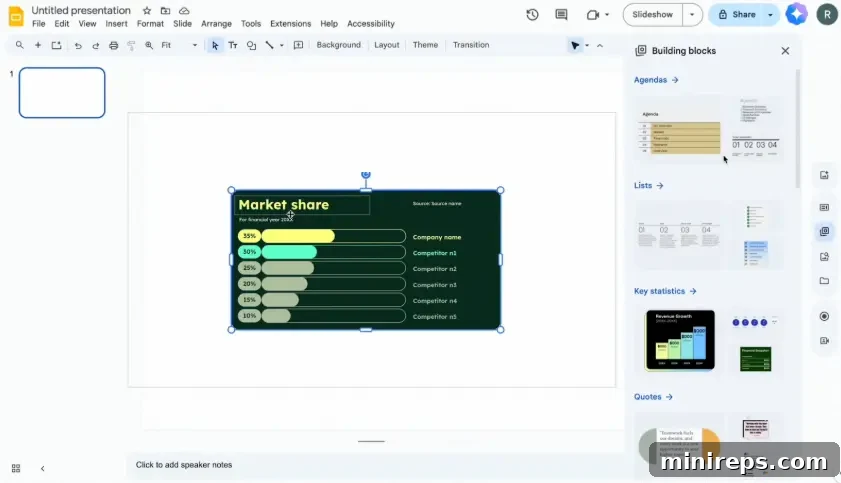
For many, the most daunting part of creating a presentation is knowing where to begin with the design. Google Slides addresses this challenge with its completely redesigned right-side panel, which now conveniently consolidates all your essential tools into a single, accessible location. With Gemini’s generative AI capabilities seamlessly built in, alongside easy access to a vast library of templates, images, and various design elements, you can effortlessly transform initial concepts into sophisticated, cohesive presentations. This integrated approach ensures that every slide is not only visually appealing but also perfectly tailored to your specific topic and audience, all without the need to switch between different applications or external resources.
What the New Design Panel Includes:
- Modern Templates: Access a curated selection of contemporary designs and professional layouts that provide an instant head start for any presentation, ensuring a polished look from the outset.
- AI Image Generation: Simply describe the visual you envision, and Gemini will leverage its advanced AI to create a unique, high-quality image that perfectly matches your requirements, offering limitless creative possibilities.
- Extensive Stock Images & Stickers: Gain immediate access to millions of high-resolution stock images, dynamic GIFs, and expressive stickers, enabling you to add visual interest and personality to your slides.
- Preformatted Building Blocks: Accelerate content creation by dropping in preformatted content sections such as customizable agendas, impactful statistics displays, compelling quotes, and structured timelines, ensuring consistency and efficiency.
- Speaker Spotlight Integration: Directly embed your live video feed into your slides, creating a more engaging and personal connection with your audience, whether in a virtual meeting or a recorded presentation.
- Seamless Slide Recordings: Easily record and share your presentations at your own pace, providing flexibility for asynchronous communication, training, or review processes, without the need for external recording software.
Gemini in Google Slides is engineered to significantly reduce the time and cognitive load associated with design. By placing all the necessary design tools and boundless creative inspiration directly within the sidebar, it empowers users to achieve professional-grade results with unprecedented speed and simplicity.
Summarize Content for Concise, Impactful Slides
In today’s fast-paced world, the ability to convey information clearly and concisely is paramount. Gemini’s advanced summarization capabilities are a game-changer, helping you effortlessly distill extensive documents, detailed transcripts, or verbose talking points into highly effective and succinct slide content. Whether you’re tasked with summarizing the key takeaways from a lengthy meeting, extracting crucial insights from a complex research paper, or condensing a comprehensive training session into digestible modules, Gemini makes it remarkably easy to get straight to the point, ensuring your audience grasps the essential information without feeling overwhelmed by excessive detail. This feature is invaluable for saving time and maintaining audience engagement, allowing you to focus on delivering your message with maximum impact.
Example Prompt:
Summarize this customer feedback document, highlighting the top 3 recurring pain points and proposing potential solutions.
The power of AI-driven summarization means that you no longer need to manually sift through pages of text. Gemini quickly identifies the core arguments, critical data, and most important themes, presenting them in a format optimized for presentation slides. This ensures that every slide is purposeful, direct, and contributes effectively to your overall narrative.
Edit Image Backgrounds to Perfectly Fit Your Message
One of the most visually impressive and practically powerful updates to Google Slides is the innovative ability to edit and expand images directly within the application using generative AI. With Gemini at your command, you can effortlessly customize image backgrounds, ensuring that your visuals perfectly align with your narrative, brand identity, or the specific emotional tone you wish to convey. This feature eliminates the need for expensive, complex external image editing software and streamlines your workflow significantly.
Do you need a fresh, engaging visual for an upcoming product demonstration? Or perhaps you want to subtly adjust a professional headshot to better match the sophisticated tone of a client presentation? Now, achieving these precise visual adjustments is as simple and intuitive as typing a clear prompt into Gemini. There’s absolutely no need to switch between different applications or wrestle with intricate editing tools. Gemini handles the heavy lifting, allowing you to maintain your creative flow within Slides.
The process is incredibly straightforward: Simply select the image you wish to modify, click the “Generate an image” icon conveniently located in the side panel, choose the “Edit” option, then select “Replace background,” and finally, describe the new background you envision. Gemini’s AI will then intelligently generate options based on your prompt, offering seamless integration and stunning results.
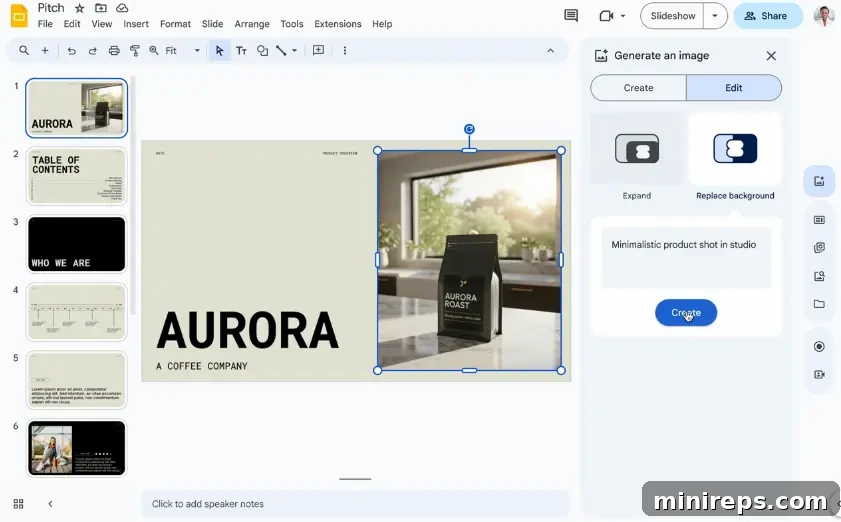
Beyond background replacement, Gemini also introduces the remarkable capability to expand images beyond their original dimensions without any noticeable distortion or loss of quality. This is an invaluable tool for when you need to reframe a photograph to better fit a slide layout, extend a graphic to create a panoramic effect, or simply scale up an image for maximum visual impact without pixelation. This generative fill technology ensures that your visuals always look professional and perfectly suited to their context, providing unparalleled flexibility in your design process.
Personalize Slides for Clients and Case-Specific Use
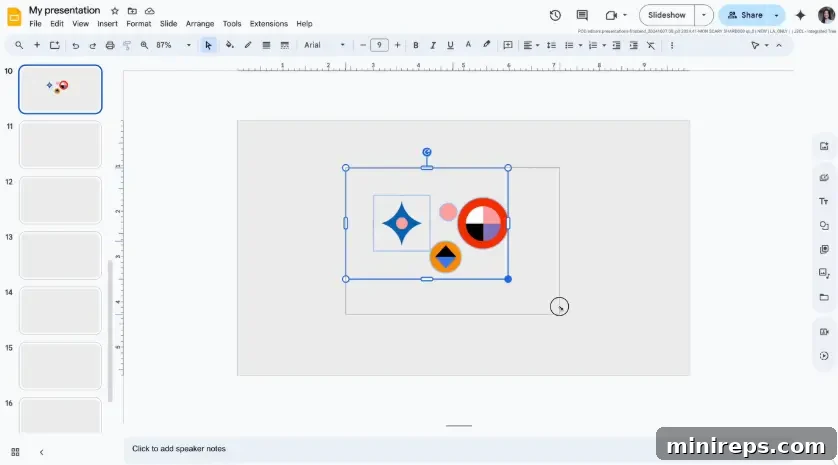
The ability to deliver a presentation that feels directly addressed to a specific audience is a hallmark of compelling communication. With Gemini in Google Slides, you can now effortlessly tailor your presentations by intelligently changing both text and visual elements to precisely match your client’s industry, geographical location, unique goals, or specific challenges. Gemini can fundamentally transform a generic case study or a standard sales pitch into something that resonates deeply, feeling truly customized and highly relevant to its intended recipient. This groundbreaking capability allows you to efficiently reuse existing work, adapting it with minimal effort for different contexts without expending valuable time on a laborious manual redesign process. It significantly enhances the impact of your message and strengthens your connection with the audience, demonstrating a thoughtful and personalized approach.
Example Prompt:
Adapt this slide to feature a banking client headquartered in Chicago, emphasizing their commitment to local community development and digital innovation.
This personalization goes beyond simple find-and-replace. Gemini understands context, suggesting changes to imagery, terminology, and even data points to ensure the entire slide speaks directly to the target audience. This is crucial for sales teams, marketing professionals, and educators who need to deliver impactful, relevant content to diverse groups quickly and efficiently.
Enhance with Video Messages, Voiceover, and Animation for Dynamic Storytelling
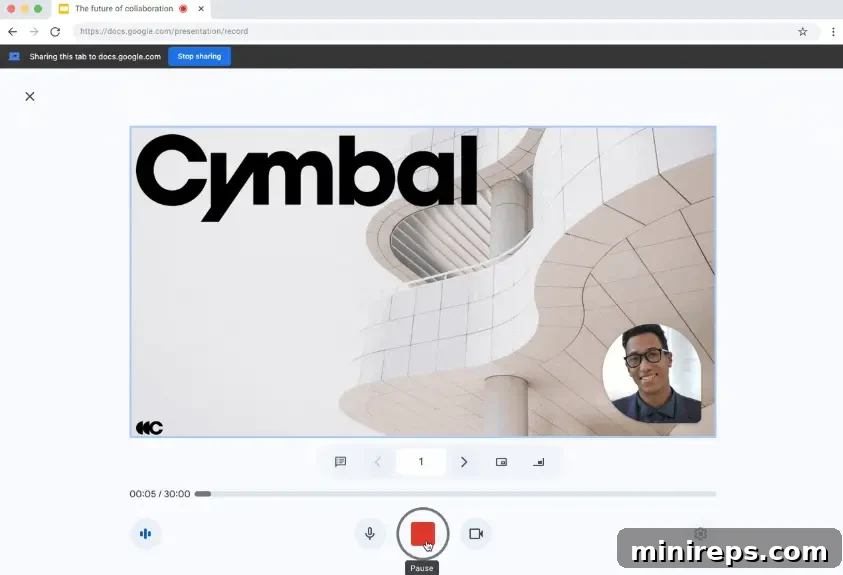
In an increasingly visual and interactive world, static presentations can often fall short of capturing and maintaining audience attention. Google Slides has evolved to meet this challenge by fully supporting recorded presentations, enabling you to easily record yourself delivering your message and integrate it directly into your slide deck. This feature is a game-changer for enhancing engagement and personalization, making your presentations more dynamic and memorable. This capability is exceptionally well-suited for a variety of applications:
- Engaging Webinars: Transform standard webinars into highly interactive experiences by adding your personal video commentary alongside your slides.
- Comprehensive Employee Onboarding & Training: Create self-paced, visually rich training modules where new hires can see and hear instructions directly from trainers, improving comprehension and retention.
- Effective Sales Walkthroughs: Guide potential clients through product demonstrations or service explanations with your voice and presence, making pitches more persuasive and personal.
By adding vibrant color, authenticity, and a personal touch to your presentation with integrated video recordings spotlighted throughout, you create a more human connection. This enhances audience engagement, clarifies complex information, and allows for asynchronous consumption, providing flexibility for both presenters and viewers.
Convert Your Deck into Shareable Video with Google Vids
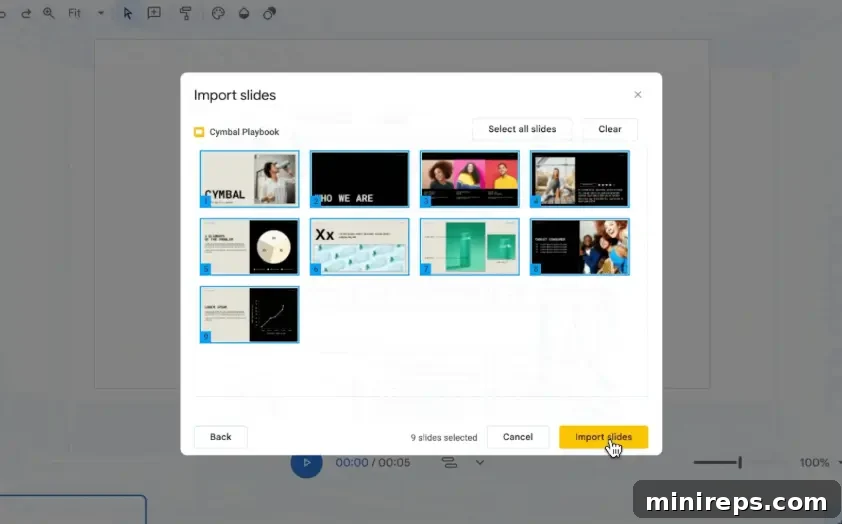
Beyond live and recorded presentations within Slides, Google has taken content repurposing to the next level. You can now seamlessly convert your meticulously crafted slide decks into polished, highly shareable video formats using the innovative Google Vids platform. This integration is a powerful tool for extending the reach and lifespan of your content, transforming static presentations into dynamic video narratives. With the new and intuitive “Import Slides” feature in Google Vids, you gain access to an array of transformative capabilities:
- Scene Selection: Easily select specific slides from your presentation that you wish to transform into distinct video scenes, providing granular control over your video’s flow.
- Automated Visual Effects: Google Vids can automatically generate sophisticated animations and engaging visual effects, adding a professional sheen to your video without requiring manual effort.
- AI-Generated Voiceover: Enhance your video with high-quality, AI-generated voiceovers, providing clear narration that can be customized for tone and style, making your content more accessible and engaging.
- AI Video Clips from Text: Leverage text-to-scene capabilities to generate relevant AI video clips that complement your content, adding dynamic visuals even when you don’t have existing footage.
This integration is absolutely perfect for creating compelling training materials, repurposing internal decks for broader external audiences, or producing engaging marketing content from existing resources. It democratizes video creation, allowing anyone to produce professional-grade videos from their presentations, significantly expanding the utility and impact of your work.
Smarter, Smoother Collaboration for Team Presentations
Google understands that many powerful presentations are the result of collaborative effort. They have meticulously considered and incorporated numerous fine details that can make or break a team presentation, integrating them directly into Google Slides to foster a more seamless and productive collaborative environment. Together, these innovative features significantly enhance the experience of remote presenting, making it feel more integrated, efficient, and truly collaborative, regardless of geographical distance.
Dynamic Live Pointers
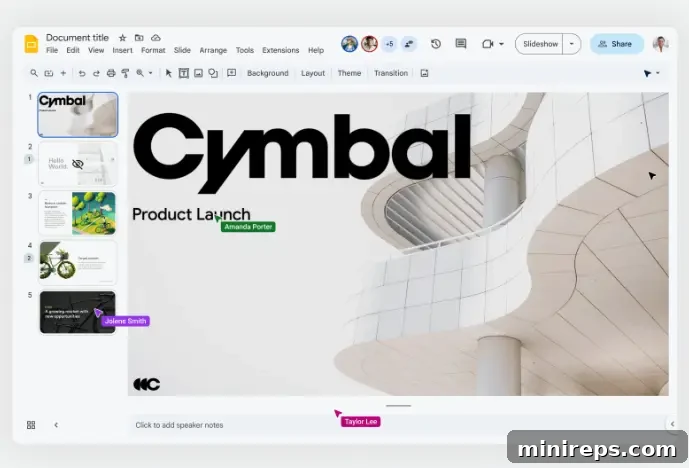
The “Live Pointers” feature revolutionizes remote collaboration by allowing you to instantly see precisely where your collaborators are directing their attention on the slides. Whether a teammate is highlighting a crucial piece of text, drawing focus to a specific visual element, or actively conducting a live interactive session, their pointer is visible in real-time. This dynamic visual feedback dramatically enhances understanding and coordination, making remote collaboration feel remarkably similar to working together in the same physical room, eliminating misunderstandings and improving collective focus during team reviews or live presentations.
Seamless Co-presenting in Google Meet
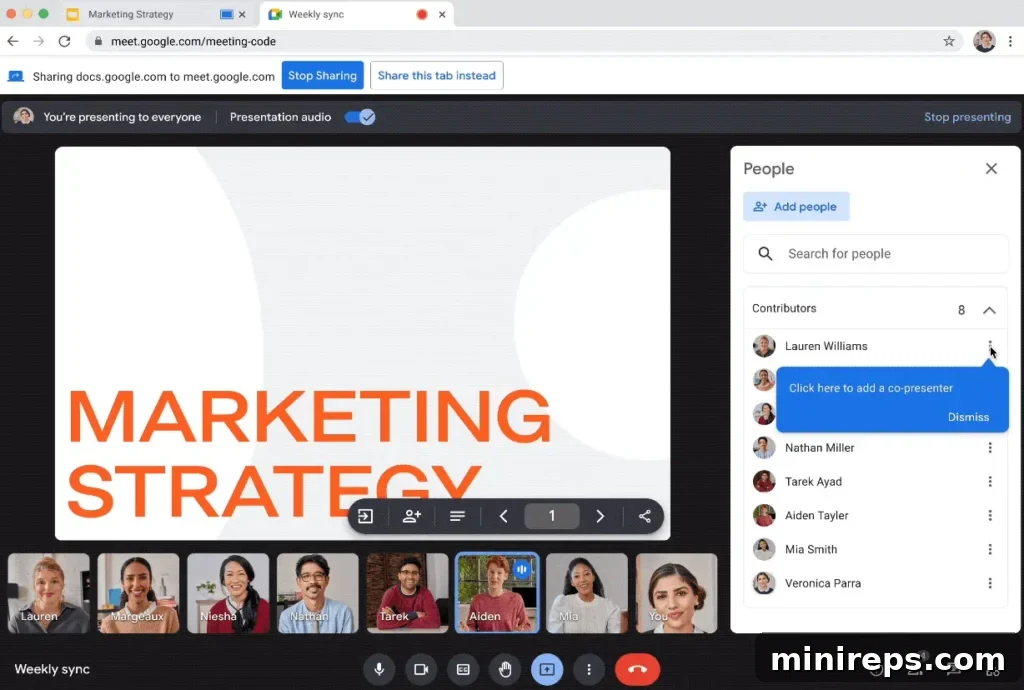
When delivering a presentation as part of a team, Google Slides in Google Meet simplifies the process by enabling seamless co-presentation. You can easily assign a co-presenter who gains full control to navigate through slides, manage media playback, and fully participate in the delivery. This intelligent feature completely eliminates the previously awkward handoffs, interruptions, or the often-heard “next slide, please” moments that can disrupt the flow and professionalism of a collaborative presentation. It ensures a smooth, integrated experience where multiple presenters can contribute dynamically and efficiently, maintaining audience engagement throughout.
Gemini Makes Slide Creation Feel Effortless and Empowering
While the act of presenting might still evoke a few nervous butterflies, the process of building your accompanying slide deck certainly doesn’t have to be a source of stress or anxiety anymore. Gemini in Google Slides transcends mere speed; it empowers you to think bigger, innovate more freely, and realize creative visions that previously seemed out of reach. From the initial spark of content generation and the meticulous customization of visual elements to the compelling art of video storytelling, you will discover yourself constructing sophisticated decks with noticeably less effort and a vastly amplified sense of creativity. Gemini handles the heavy lifting, allowing your brilliant ideas to take center stage.
Whether your objective is to construct a persuasive pitch deck to secure new business, to develop engaging training materials for your dedicated team, or to share critical product updates with stakeholders, you bring the core ideas, and Gemini will provide the intelligent tools and support to bring them vividly to life. This synergy between human creativity and AI efficiency heralds a new era for presentations, where quality and innovation are accessible to everyone.
Next up in this insightful series, we will embark on a deep dive into the practical applications and transformative benefits of using Gemini within Google Forms. Stay tuned for another exploration into making your digital workflows smarter and more efficient!
Gemini is a powerful component of the comprehensive
Google Workspace is an integrated suite of cloud-native productivity and collaboration tools meticulously designed to help individuals, teams, and entire businesses achieve more with fewer distractions. Experience the seamless synergy and enhanced productivity yourself—start your journey with Google Workspace for free today!