


In today’s fast-paced digital landscape, cloud storage has become an indispensable tool for businesses of all sizes. As organizations increasingly embrace remote work and hybrid models, the ability to securely store, share, and collaborate on files from anywhere is no longer a luxury but a necessity. Among the myriad of options available, Google Drive and Dropbox stand out as two of the most popular and robust solutions. While Dropbox may often be the first name that comes to mind for file synchronization and sharing, Google Drive, a cornerstone of the vast Google ecosystem, offers a comprehensive suite of tools integrated with its cloud storage. This article delves into a detailed comparison of these two powerhouses, helping you determine which cloud storage solution is the ideal fit for your company’s unique needs, especially in an era demanding flexibility and robust digital infrastructure.
Google Drive vs. Dropbox: A Comprehensive Business Comparison
Navigating the features of Google Drive and Dropbox can be complex, as both offer a strong set of capabilities designed for modern business operations. To provide a clear overview, let’s look at their core offerings and how they stack up against each other in critical areas.
Google Drive for Business
- Free Version Available: Generous 15 GB initial storage for individuals.
- Flexible Plans: Caters to various business needs with Business Standard, Business Plus, and Enterprise plans.
- Scalable Storage: Starts with 30 GB per user in basic business plans, with virtually unlimited options available in Enterprise Plus.
- Ubiquitous Access: Access files from any device, anywhere with an internet connection.
- Seamless Syncing: Keep files updated across all connected devices automatically.
- Offline Capabilities: Work on documents, spreadsheets, and presentations even without an internet connection.
- Robust Sharing: Easily create shared folders and secure links with granular permissions.
- Detailed Viewer Info: Track who has viewed or accessed shared content.
- Interactive Previews & Comments: Review and provide feedback directly on web-based file previews.
- Remote Device Management: Ability to remotely wipe data from lost or stolen devices for enhanced security.
- Extensive File Recovery: Unlimited file recovery and version history, ensuring no data is ever truly lost.
- File Locking: Prevent accidental overwrites by locking files during active editing.
- Comprehensive Viewer History: See a full audit trail of document access and modifications.
- Advanced Shared Link Controls: Set expiration dates, password protection, and specific access roles for shared links.
- Powerful Full-Text Search: Quickly locate files based on content, not just file names.
Dropbox for Business
- Free Version Available: Provides 2 GB of storage to start.
- Tailored Plans: Offers Professional, Standard, and Advanced plans for businesses.
- Ample Storage: Professional plans begin with 2 TB of storage, scaling up to 15 TB or more.
- Anywhere Access: Retrieve and manage files from any device, wherever you are.
- Cross-Device Sync: Maintains consistent file versions across all synchronized devices.
- Offline Functionality: Access and modify selected files without an active internet connection.
- Collaborative Sharing: Share folders and links with customizable access permissions.
- Activity Tracking: View information on who has accessed or interacted with files.
- Web Previews & Feedback: Preview various file types online and add comments.
- Remote Wipe Feature: Securely erase data from lost or stolen devices.
- Standard File Recovery: File recovery and version history typically extend up to 30 days, with longer options on advanced plans.
- Selective Sync: Conserve local storage by choosing which files to sync to your device.
- Transfer Large Files: Specialized tools for sending very large files securely.
Storage Capacities and Scalability: Meeting Your Business Demands
When it comes to cloud storage, capacity is often a primary concern for businesses. Both Google Drive and Dropbox offer tiered storage options, but their approaches and initial offerings differ significantly. Dropbox’s free plan starts with a modest 2 GB, which can quickly be outgrown by even small businesses. Its paid plans, however, scale impressively, with the Professional plan offering a substantial 2 TB, and business plans providing 5 TB or even more pooled storage for teams. This makes Dropbox a strong contender for companies primarily needing vast amounts of raw storage for large files like media, CAD designs, or extensive archives.
Google Drive, on the other hand, provides a more generous 15 GB for its free personal accounts, shared across Google Drive, Gmail, and Google Photos. For businesses, Google Drive is intrinsically linked to Google Workspace (formerly G Suite), a comprehensive suite of productivity tools. Business Standard plans typically start with 2 TB of pooled cloud storage per user, while the Enterprise Plus Google Workspace plan offers virtually unlimited storage. This ‘unlimited’ capacity is a game-changer for large organizations with massive data needs, ensuring they never have to worry about running out of space. The crucial distinction here is that Google Drive’s storage is part of a larger ecosystem that includes Google Meet, Gmail, Docs, Sheets, Slides, and more. This means all your files, photos, and documents created within or uploaded to Workspace applications count towards your storage, offering a deeply integrated experience where storage is just one facet of a complete digital workspace.
Collaboration: The Cornerstone of Modern Teamwork
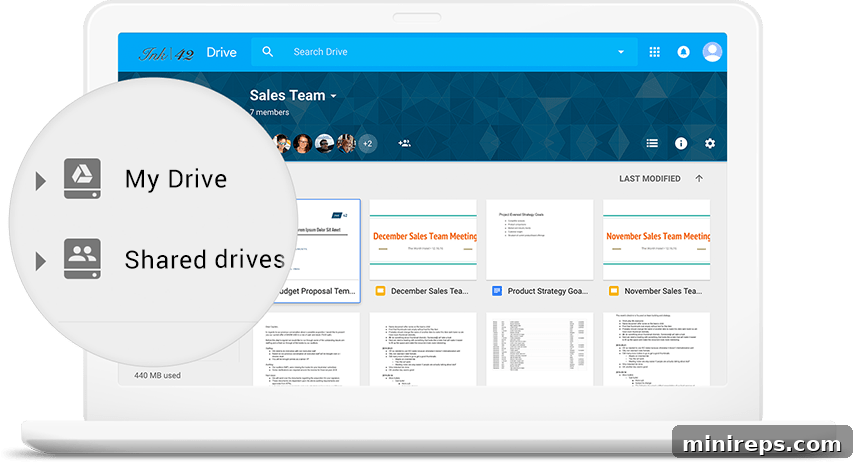
In today’s interconnected business world, effective collaboration is paramount. Cloud storage solutions like Google Drive and Dropbox are designed to facilitate this, moving beyond the cumbersome process of emailing attachments or saving files locally. Both platforms excel at enabling file sharing, allowing teams to seamlessly share massive files and entire folders, significantly improving organizational collaboration and workflow efficiency. For medium to large-sized businesses, or those that frequently engage with external consultants and clients, robust features such as comprehensive viewer history, which allows users to track previous versions of documents, and advanced link sharing controls are invaluable for both productivity and security.
However, a significant differentiator emerges when discussing real-time collaboration. While Dropbox offers excellent automatic syncing that keeps files updated across devices, it doesn’t quite match the dynamic, simultaneous co-editing capabilities inherent in Google Drive. The true strength of Google Workspace applications lies in the ability for multiple users to work on shared documents, spreadsheets, and presentations concurrently. Users can see edits and changes being made by collaborators in real-time, fostering a highly interactive and efficient workflow. This feature is particularly beneficial for organizations with remote employees or distributed teams who frequently need to collaborate on shared projects, facilitating immediate feedback and collective progress without the need for constant saving and version management. This real-time collaboration dramatically reduces friction and accelerates project completion, making Google Drive a preferred choice for teams prioritizing interactive teamwork within their documents.
Security and Data Protection: Trusting Your Cloud Provider
For any business migrating to the cloud, security is often the paramount concern. The prospect of entrusting mission-critical company data to a third-party server can be daunting, underscoring the absolute necessity of choosing a cloud storage provider you can implicitly trust. Both Google Drive and Dropbox are leaders in this regard, offering industry-standard encryption protocols (like AES 256-bit for data at rest and TLS/SSL for data in transit) and a suite of robust security features. These include remote device wipe, which allows administrators to erase company data from lost or stolen devices, comprehensive file recovery capabilities, and extensive version history to revert to previous file states, mitigating the risk of accidental deletions or malicious attacks. When combined with other critical cybersecurity strategies, such as multi-factor authentication (MFA) and regular security audits, companies can significantly reduce their threat surface and protect their invaluable digital assets.
While both platforms are secure, there are nuances in their security offerings. Dropbox provides excellent account activity monitoring, allowing administrators to track linked devices, active web sessions, and third-party applications accessing their accounts. If any suspicious activity is detected, access to shared files and folders can be revoked instantly. However, a key distinction emerges when comparing Google Drive’s security features. Premium security functions such as file locking, which prevents simultaneous edits and accidental overwrites, and advanced shared link controls (e.g., setting expiration dates, password protection, restricting downloads) are often available only in higher-tier Dropbox Professional or Business plans. In contrast, Google Drive provides these same essential security features across all its plans, including its free personal offering and all Google Workspace business plans. This democratized access to advanced security is a significant advantage. As a global leader in technology and security, Google applies the same stringent security measures and infrastructure to its Google Workspace products that it uses for its own internal data, including advanced threat detection, data loss prevention (DLP), and compliance certifications (like ISO 27001, SOC 2, HIPAA, and GDPR readiness), offering businesses unparalleled peace of mind.
Productivity & Ecosystem Integration: Expanding Your Capabilities
Beyond core storage and sharing, the true value of a cloud solution often lies in its ability to integrate with and enhance a business’s broader productivity ecosystem. Both Google Drive and Dropbox offer compelling options for extending functionality, albeit with different philosophies.
Google Drive Ecosystem
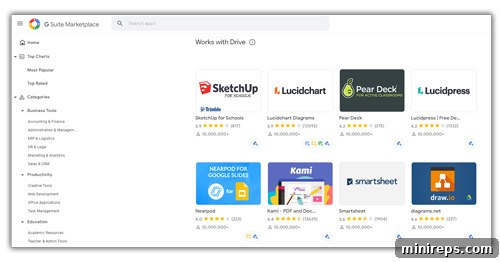
With a Google Workspace account, businesses gain access to the extensive Google Marketplace. This digital storefront features a vast array of third-party applications specifically designed to integrate with and enhance your Workspace experience. From powerful Administrative Tools to Customer Relationship Management (CRM) systems, advanced Task Management solutions, and specialized communication platforms, the Marketplace provides a wealth of options. Crucially, it includes a dedicated section for apps that integrate directly with Google Drive, allowing users to extend its capabilities for specific workflows, document management, project collaboration, and data analytics without ever leaving the Google ecosystem. This deep integration streamlines operations and provides a unified platform for all business needs.
Dropbox Integrations
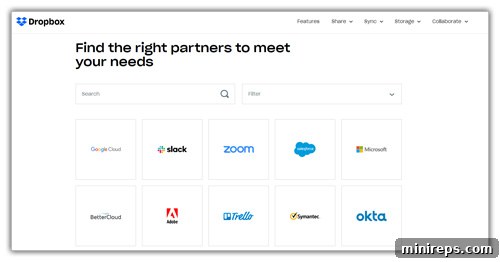
Dropbox adopts a more open approach to integration, focusing on seamlessly connecting with a wide spectrum of third-party partners. It prides itself on easy connectivity to popular business tools such as Trello for project management, Slack for team communication, and Okta for identity management. With over 184 reported technology partner integrations, Dropbox ensures that businesses can maximize the utility of their cloud storage across virtually every aspect of their operations, from sophisticated project management suites to advanced IT security platforms. This broad compatibility makes Dropbox an excellent choice for businesses that already have an established toolkit of preferred applications and want a cloud storage solution that can effortlessly plug into their existing workflows without forcing a change in their core applications.
User Experience, Performance, and Support
Beyond features, the day-to-day experience of using a cloud storage solution significantly impacts productivity. Both Google Drive and Dropbox offer intuitive interfaces, but their design philosophies differ slightly. Google Drive’s interface is tightly integrated with the entire Google Workspace, offering a consistent look and feel if you’re already accustomed to Gmail, Docs, and Calendar. This unified experience can be a strong advantage for businesses looking for an all-in-one platform. Dropbox, on the other hand, maintains a clean, file-centric interface that prioritizes straightforward file management and syncing, making it incredibly easy to use for its primary function.
Performance-wise, both platforms boast reliable upload and download speeds, though real-world performance can vary based on internet connection and file size. Both also offer robust desktop applications for seamless background syncing and convenient file access directly from your computer’s file explorer. For mobile users, dedicated apps for iOS and Android ensure access and functionality on the go. When it comes to customer support, both providers offer extensive knowledge bases, community forums, and email/chat support for paid plans, with phone support typically reserved for higher-tier business and enterprise subscriptions. Evaluating your team’s existing familiarity with either ecosystem can also play a role in easing the transition and adoption.
Pricing Structures and Value Proposition
Understanding the cost-effectiveness of each solution is crucial for businesses. Both Google Drive and Dropbox offer free tiers, but their utility for businesses is limited due to restricted storage and features. For serious business use, upgrading to a paid plan is essential.
Dropbox’s pricing starts with individual Professional plans offering a generous 3 TB of storage, suitable for freelancers and small teams with high storage demands. Business plans (Standard and Advanced) provide pooled storage starting from 5 TB for multiple users, scaling up to truly unlimited storage for larger enterprises. Dropbox’s value proposition often centers around its primary focus on powerful file syncing and sharing, deep integration with a vast array of third-party applications, and often a higher baseline storage offering per user compared to Google’s initial tiers.
Google Drive’s pricing is integrated into Google Workspace subscriptions. Plans like Business Starter, Business Standard, and Business Plus offer increasing levels of storage (from 30 GB to 5 TB per user) and a richer set of features, including advanced security controls and access to the full suite of Workspace applications (Gmail, Calendar, Meet, Docs, Sheets, Slides, etc.). The Enterprise plans provide the most robust features, including potentially unlimited storage and advanced data loss prevention. Google Drive’s value proposition is its comprehensive, all-in-one platform that combines powerful collaboration tools, enterprise-grade security, and a full suite of productivity applications under a single subscription. For businesses already using or planning to adopt Google’s ecosystem, the integrated nature of Google Drive within Workspace offers exceptional value and streamlined operations, potentially reducing the need for multiple subscriptions to various productivity tools.
Our Takeaway: Making the Right Choice for Your Business
Ultimately, the decision of which cloud storage solution is right for your business hinges entirely on your organization’s specific needs, existing infrastructure, and long-term strategic goals. There’s no one-size-fits-all answer, as both Google Drive and Dropbox offer compelling advantages.
If your business primarily seeks a robust, dedicated file synchronization and sharing platform that integrates seamlessly with a wide range of existing third-party applications (including Microsoft Office) and you prioritize raw storage capacity, then Dropbox could be an excellent fit. Its straightforward approach to file management and extensive integration capabilities make it a strong contender for companies with diverse software ecosystems.
However, if your organization is looking for an affordable, comprehensive, and all-inclusive platform to run a significant portion of your business operations – from communication and collaboration to document creation and project management – then Google Drive, as part of Google Workspace, stands out. It’s a secure and reliable cloud storage solution trusted by enterprises worldwide, offering unparalleled real-time collaboration, a deep ecosystem of integrated apps, and consistent, enterprise-grade security features across all plans.
As an organization that proudly utilizes Google Workspace (formerly G Suite), the team at 101domain can personally attest to its efficacy. During the transition to remote work, we experienced virtually no disruption to our operations, and a significant part of that seamless shift is directly attributed to our extensive use of Google Workspace. Its integrated tools allowed our teams to stay focused, organized, and connected, ensuring continuous productivity and collaboration even when geographically dispersed. For businesses prioritizing an integrated productivity suite with powerful collaboration and robust security, Google Workspace, with Google Drive at its core, represents a superior investment.