


In the ever-evolving landscape of online security, cybercriminals are relentlessly devising sophisticated methods to exploit unsuspecting internet users. One of the most insidious and visually deceptive threats emerging today is the homograph attack, a cunning form of domain spoofing that leverages the global nature of the internet to create nearly undetectable traps. This advanced phishing technique preys on the average user’s lack of awareness regarding the vast and varied domain name system, extending far beyond the familiar .com addresses.
While over half of the internet’s websites still reside under the traditional .com top-level domain, the digital world is also comprised of a multitude of new generic top-level domains (gTLDs), country code top-level domains (ccTLDs), and crucially, Internationalized Domain Names (IDNs). IDNs allow domain names to be registered using characters from non-Latin scripts, such as Arabic, Cyrillic, Chinese, and many others, making the internet accessible to a broader global audience. While a fantastic innovation for inclusivity, this diversity also presents a ripe opportunity for malicious actors to conduct highly effective phishing campaigns.
Homograph attacks capitalize on this by registering IDNs that visually mimic the URLs of popular and trusted brands. The core of the deception lies in replacing standard Latin characters (like ‘a’, ‘e’, ‘o’) with foreign script characters that look strikingly similar to the untrained eye. For instance, a Cyrillic ‘a’ (а) can be almost indistinguishable from a Latin ‘a’ (a) when rendered in a browser. This visual identicalness creates a powerful illusion, leading users to believe they are on a legitimate website when, in fact, they have been redirected to a fraudulent site designed to steal credentials, spread malware, or conduct other illicit activities.
The danger of these attacks was vividly exposed by security researcher Xudong Zheng. He demonstrated how an attacker could register a domain name that appears identical to “apple.com” by subtly replacing a Latin character with its Cyrillic homograph. The implications are profound: without specialized knowledge or careful scrutiny, the average user has virtually no chance of distinguishing between the legitimate and the malicious URL, even when looking directly at the browser’s address bar. This makes homograph attacks a formidable challenge for both individual users and organizations striving to protect their digital assets and customer trust.
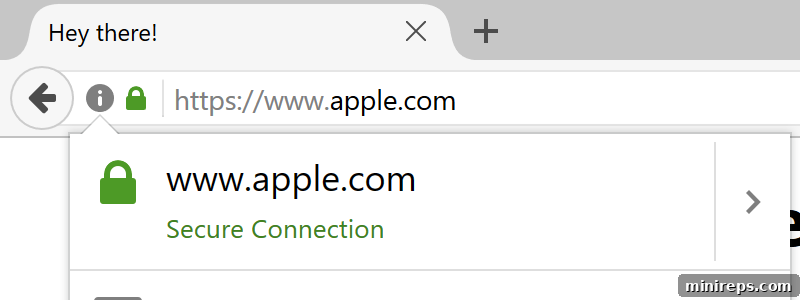
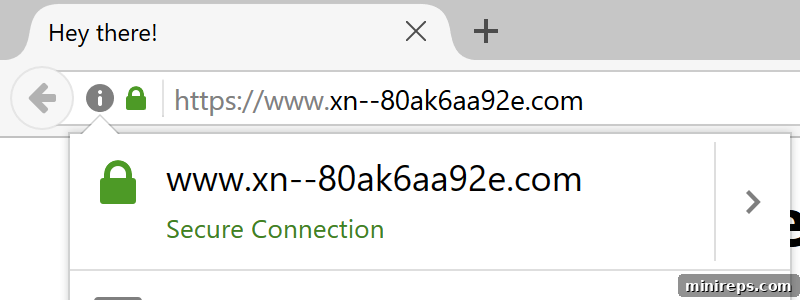
The images above powerfully illustrate this vulnerability. The first image displays what appears to be “apple.com,” but in reality, it contains a Cyrillic ‘a’, making it a malicious domain. The second image reveals the Punycode equivalent, a special encoding that represents IDNs using only ASCII characters (e.g., `xn--pple-4xa.com`). While browsers typically convert this Punycode into the visually appealing script characters, some security-conscious browsers or browser extensions might display the Punycode to alert users to a potential threat. However, relying solely on users to spot such nuances is an inadequate defense strategy against such a sophisticated form of domain spoofing and phishing.
The consequences of falling victim to a homograph attack can be severe, ranging from stolen login credentials for banking or email accounts, to the installation of ransomware or other malware, and even financial fraud. For businesses, a successful homograph attack against their brand can lead to significant reputational damage, loss of customer trust, financial losses from fraud, and potential legal liabilities. Given the profound risks, understanding and actively defending against these threats is paramount for both individuals and organizations alike.
1. Be Proactive with Defensive Domain Registrations and Brand Protection
For any organization, especially those with established online brands, a robust defensive registration strategy is an indispensable component of cybersecurity. This goes beyond merely registering your primary .com domain. It involves proactively securing domain names that could potentially be used for cybersquatting, typosquatting, combosquatting, and, critically, homograph attacks. This means registering variations of your brand name across different gTLDs, ccTLDs, and importantly, obtaining IDN variants that could be used for visual spoofing.
While it might seem that only large corporate brands are prime targets, businesses of all sizes can fall victim. The cost of proactive registration pales in comparison to the financial and reputational damage incurred from a successful phishing campaign. Expanding domain blocking portfolios to specifically include IDN script spoofing is a crucial preventative measure. These services help brands block registration of visually similar domain names across various character sets before they can be exploited by attackers.
Furthermore, organizations should implement ongoing domain monitoring services. These services actively scan the internet for newly registered domains that incorporate their brand name or visually similar characters, flagging potential threats early. While legal procedures like the Uniform Domain-Name Dispute-Resolution Policy (UDRP) exist to help brands recover abusive domain names, these processes are often lengthy, costly, and reactive. A single phishing attack can quickly erode customer trust and tarnish a brand’s hard-earned reputation, making proactive prevention undeniably superior to post-incident recovery.
2. Stay Informed About the Latest Cybersquatting and Phishing Trends
Awareness is your first line of defense. Understanding the various tactics cybercriminals employ to impersonate legitimate websites is crucial for both individuals protecting personal information and businesses safeguarding their brand image. The landscape of domain abuse is constantly evolving, with new techniques emerging to circumvent existing security measures.
Let’s delve deeper into the specific types of domain-related threats:
- Cybersquatting: This broadly refers to the act of registering, trafficking in, or using a domain name with the bad-faith intent of profiting from the goodwill of another’s trademark. Cybersquatters might register popular brand names hoping to sell them back to the trademark owner at an inflated price, or to divert traffic for advertising revenue, or even to defame a brand.
- Typosquatting (or URL Hijacking): A highly prevalent form of cybersquatting, typosquatting involves registering domain names that are common misspellings or typographical errors of established brand URLs. Attackers capitalize on users accidentally typing “fasebook.com” instead of “facebook.com,” or “gooogle.com” instead of “google.com.” These sites often look identical to the legitimate ones and are designed to steal login credentials, install malware, or serve deceptive ads.
- Combosquatting: This tactic involves registering domain names that combine a popular trademark with an additional word or phrase, often one that suggests urgency, a call to action, or a security alert. Examples include “bankofamerica-login-update.com” or “paypal-security-alert.net.” The goal is to make the URL seem legitimate in a phishing email, tricking users into believing they need to take immediate action, such as updating their account information or verifying their identity, on a fraudulent site.
- Homograph Attacks: As discussed, these are particularly sophisticated phishing attacks that exploit the visual similarities between characters from different alphabets. By replacing Latin characters in a well-known URL with visually identical foreign alphabetical characters (e.g., Cyrillic, Greek), attackers create deceptive domain names that are almost impossible for the human eye to distinguish from the authentic ones. This makes them one of the most dangerous forms of domain spoofing, as traditional typo-spotting techniques become ineffective.
By staying informed about these distinct, yet interconnected, phishing and cybersquatting tactics, users and organizations can better identify potential threats and implement appropriate safeguards.
3. Be Safe and Implement Robust Personal Security Practices
While brands have a responsibility to protect their domains, individual internet users play a crucial role in their own online safety. The insidious nature of homograph attacks and other domain spoofing trends relies heavily on tricking users into believing they are visiting a website they know and trust. Therefore, adopting stringent personal security habits is non-negotiable.
Here are essential steps to protect yourself:
- Never Click Directly on Links from Emails or Untrusted Sources: This is perhaps the most fundamental rule. Phishing emails are the primary delivery mechanism for homograph attacks and other spoofed links. Even if an email appears to be from a legitimate source, resist the urge to click. Instead, always type the website address directly into your browser’s address bar. This ensures you are navigating to the correct, verified destination.
- Hover Over Links to Inspect the URL: Before clicking on any link, whether in an email, social media, or even on a webpage, hover your mouse cursor over it. Most browsers will display the actual destination URL in the bottom-left corner of the window. Scrutinize this URL carefully for any discrepancies, misspellings, or suspicious characters. Be extra wary if the displayed URL doesn’t match the anchor text.
- Look for HTTPS and the Padlock Icon: Always verify that the website uses HTTPS (Hypertext Transfer Protocol Secure), indicated by a padlock icon in your browser’s address bar. While HTTPS doesn’t guarantee a site is legitimate (malicious sites can also acquire SSL certificates), its absence is a strong red flag. For highly sensitive transactions, look for Extended Validation (EV) certificates, which display the organization’s name in green next to the padlock.
- Bookmark Important Websites: For frequently visited and critical websites (like banking, email, or social media), create and use bookmarks. This eliminates the risk of mistyping a URL or clicking a malicious link, as you’re always using a trusted, verified entry point.
- Enable Two-Factor Authentication (2FA) Everywhere Possible: 2FA adds a critical layer of security by requiring a second form of verification (like a code sent to your phone) in addition to your password. Even if a homograph attack successfully steals your login credentials, 2FA can prevent unauthorized access to your accounts.
- Keep All Software Updated: Regularly update your operating system, web browser, antivirus software, and all other applications. Software updates often include security patches that fix vulnerabilities exploited by cybercriminals, including those used in phishing or malware delivery.
- Use Reputable Antivirus and Anti-Malware Software: Install and maintain up-to-date security software on all your devices. These tools can help detect and block malicious websites, identify phishing attempts, and remove malware that might inadvertently be downloaded.
- Trust Your Instincts: If an email seems suspicious, an offer appears too good to be true, or a website simply “feels off” – trust that feeling. Cybercriminals often rely on urgency, fear, or greed to bypass rational thought. It is always better to err on the side of caution and investigate further, rather than become a victim of malware, homograph attacks, or sophisticated phishing scams. Reporting suspicious activity to the relevant authorities or service providers can also help protect others.
The digital world demands constant vigilance. By combining organizational brand protection strategies with informed individual security practices, we can collectively build a more secure online environment and better defend against the cunning tactics of cybercriminals.