
In the vast and competitive digital landscape, a strong online presence is paramount. Savvy website owners and businesses often employ strategic tools to maximize their reach and ensure a seamless user experience. One such powerful, yet often underutilized, tool is **web forwarding**, also known as domain redirection. This essential feature allows you to point one or more domain names to an existing website, ensuring that visitors typing various addresses still land exactly where you want them. Included with the cost of your domain name, web forwarding offers incredible flexibility and significant advantages for branding, marketing, and user retention. You might wonder why you would need multiple domain names for a single website. The reasons are numerous and strategically impactful: common misspellings, alternative domain extensions, memorable abbreviations, or highly relevant keywords are all popular examples of additional domain names that can funnel traffic to your primary online destination, enhancing accessibility and protecting your brand.
Unlocking Potential: Practical Web Forwarding Examples
The real power of web forwarding becomes clear when we look at practical applications. Consider a simple, yet incredibly common, scenario: user typos. How many times have you inadvertently typed “facebok.com” instead of “facebook.com” into your web browser? Think about the immense volume of traffic a domain name like that could receive from individuals simply making a minor mistake.
Leading companies like Facebook proactively address this by implementing domain forwarding for common misspellings. They redirect “facebok.com,” “fasebook.com,” and countless other typo variations directly to their main website, facebook.com. Without this intelligent strategy, their users could inadvertently end up on a broken page, or worse, a competitor’s website, or even a malicious phishing site. Web forwarding ensures a smooth, uninterrupted experience for users, many of whom might not even realize they made a typing error, safeguarding brand reputation and user trust. This proactive approach to managing user input is a cornerstone of effective digital presence.
Beyond typo protection, web forwarding offers innovative solutions for public information campaigns and branding.
For instance, elections officials across various regions effectively utilize web forwarding. They point custom, easy-to-remember domain names like .VOTE domains to their existing, often more complex, elections webpages. This strategy simplifies access to critical information for the public, especially during peak election periods when speed and clarity are essential.
Using a highly relevant domain extension like .VOTE makes the URL intuitive and memorable, driving traffic efficiently to the primary resource. It’s a cost-effective and highly impactful method for increasing public engagement and information dissemination. Studies have consistently shown that a .VOTE domain name can be significantly easier for the public to recall and type than more traditional or generic names, potentially improving public participation and access by a factor of 10 or more. This illustrates how web forwarding isn’t just about error correction; it’s about strategic communication and enhancing user experience.

Other compelling examples include businesses acquiring new brands or products and redirecting their old domain names to the new primary site, ensuring continuity. Similarly, marketing campaigns often benefit from short, catchy domain names that redirect to a specific landing page on a main website, making campaign tracking and public recall much simpler. International businesses might use country-specific domains (e.g., yourbrand.de, yourbrand.co.uk) that all redirect to localized content on a central platform. Web forwarding is an indispensable tool for maintaining a cohesive and accessible online presence in a dynamic digital world.
Exploring Web Forwarding Options: 301 Redirect vs. Cloaking
When implementing web forwarding, it’s crucial to understand the two primary options available, as each serves a distinct purpose and has different implications for your website’s performance and search engine optimization (SEO).
Option 1: HTTP 301 Forwarding (Permanent Redirect)
Forwarding as a 301 redirect is the most widely recommended and utilized form of web forwarding. It signals to both web browsers and search engines that a page or domain has moved permanently to a new location. When a user accesses the original domain name, their browser is immediately directed to the new URL, and crucially, the address in the browser’s location bar changes to reflect the forwarded-to site’s address. This is a key distinction and a significant benefit for SEO.
The “301” in HTTP 301 stands for the HTTP status code that communicates a permanent move. This tells search engines like Google to transfer the majority of the “link equity” or “link juice” from the old URL to the new one. This means that the ranking power, authority, and trust built up by your old domain or page are largely passed on to the new destination. This makes 301 redirects indispensable for tasks such as migrating an entire website to a new domain, consolidating multiple domains into one primary brand, correcting canonicalization issues (e.g., redirecting non-www to www versions of your site), or fixing broken internal and external links. It ensures that your SEO efforts are preserved and that your site’s visibility doesn’t suffer during transitions. This is, by far, the most popular and SEO-friendly option for web forwarding.
Option 2: Cloaking Forwarding (Masking)

Forwarding with masking, often referred to as domain cloaking or framing, operates differently. When you use cloaking, your domain name is forwarded to another URL, but the original domain name remains visible in the browser’s location bar. This technique essentially displays the content of the forwarded-to site within a frame on the original domain, preventing visitors from seeing or knowing the actual, forwarded-to domain name.
While this might seem appealing for certain branding purposes (e.g., maintaining a very short, memorable URL in the browser), it comes with significant drawbacks, particularly concerning SEO. Search engines generally view cloaking unfavorably. It can lead to duplicate content issues because the same content appears under two different URLs (the masked domain and the actual content domain). This can confuse search engine crawlers, potentially diluting your SEO efforts, splitting link equity, or even leading to penalties if interpreted as an attempt to deceive search engines. Furthermore, cloaking can sometimes interfere with analytics tracking, user experience (e.g., inability to bookmark the actual page, issues with responsive design), and sharing on social media. Due to these potential problems, cloaking is generally not recommended for most websites looking to build long-term organic search presence and is best avoided unless you have a very specific, niche technical requirement and fully understand the implications.
Choosing between these two options is critical. For most scenarios involving permanent domain changes, SEO benefits, and clear user experience, HTTP 301 forwarding is the definitive choice. Cloaking should be approached with extreme caution and only after a thorough understanding of its limitations and potential negative impacts on your website’s online visibility and performance.
Step-by-Step Guide: How to Set Up Web Forwarding
Setting up web forwarding for your domain name is a straightforward process, ensuring your visitors always find their way to your primary website. If you have already registered your domain name with us, simply follow these easy steps to configure your domain redirection:
1. The first step is to access your domain management portal. Log in to your 101domain account by navigating to my.101domain.com. Ensure you have your username and password readily available. This central dashboard is where you manage all aspects of your registered domains.
2. Once logged in, locate and select the Domain Names tab from the main navigation menu. This section provides an overview of all the domain names currently registered under your account, allowing you to manage each one individually.

3. From the list of your domain names, select the specific domain for which you intend to add web forwarding. Clicking on the domain name will take you to its individual management page, where various settings and configurations can be adjusted.
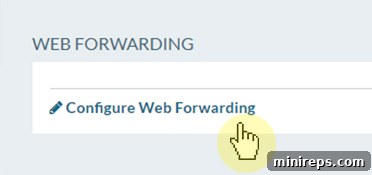
4. On the domain’s management page, scroll down until you find the Web Forwarding section. This dedicated area is where you will initiate the redirection process. Click on Configure Web Forwarding to proceed to the setup options.
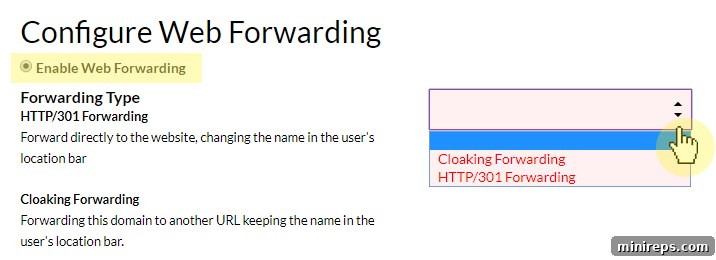
5. Within the Web Forwarding configuration interface, you’ll need to enable the feature. Click the Enable Web Forwarding button. Next, use the provided drop-down arrow to select your desired forwarding type: either Cloaking Forwarding or HTTP/301 Forwarding. As discussed earlier, choose HTTP/301 for permanent redirects and SEO benefits, or Cloaking only for specific, limited use cases where you need the original URL to remain visible.
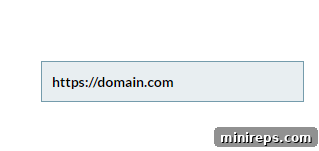
6. In the Redirect URL text box, carefully type the complete URL to which you want your domain name to point. This is the ultimate destination website or page that users will be redirected to. Ensure accuracy, including the ‘https://’ or ‘http://’ prefix (e.g., https://domain.com). A single typo here will result in a broken redirect.
7. Finally, to apply and save all your web forwarding settings, click the Okay or Save button (button text may vary). After saving, it’s highly recommended to test your new forwarding setup by typing your original domain name into a browser to ensure it redirects correctly to the intended destination. Remember that DNS changes can take some time to propagate globally.
Troubleshooting: Why Is My Website Not Redirecting?
Even after carefully setting up web forwarding, you might occasionally encounter situations where your domain isn’t resolving or redirecting as expected. This can be frustrating, but most issues are easily identifiable and correctable. Here are some of the most common reasons why your domain might not be redirecting properly, along with explanations to help you troubleshoot:
- **DNS Propagation Time:** The most frequent reason for a delay in redirection is simply not allowing sufficient time for your domain’s DNS changes to propagate across the entire Internet. When you update DNS settings (like adding web forwarding, which modifies DNS records), these changes need to be updated on servers worldwide. While often quick, in some instances, particularly for new settings or updates, this process may take as long as 24 to 48 hours to fully update globally. Patience is key during this period.
- **Missing Name Servers:** For your domain to function and resolve correctly, it must be associated with active name servers. If you haven’t added or correctly configured name servers for your domain, it essentially doesn’t tell the internet where to look for its information, including forwarding instructions. This means no name servers are attached to your domain name, preventing any redirection from taking effect. Ensure your domain points to the correct name servers provided by your domain registrar or hosting provider.
- **Incorrect Name Server Configuration with Third-Party Registrars:** If you registered your domain name with one Registrar but are trying to manage services (like web forwarding) through another provider (e.g., 101domain for forwarding services), you must explicitly point your domain’s name servers to the service provider you’re using for forwarding. If your name servers are still pointing to your original Registrar, they won’t recognize the forwarding settings configured elsewhere. You can usually do this by logging into your account with the original Registrar and updating your DNS settings to reflect the name servers of the service handling your web forwarding.
- **Typo in Redirect URL:** A simple oversight like a typo in the destination URL you entered during the setup process (e.g., “http//domain.com” instead of “https://domain.com” or a misspelled domain) can break the redirection. Double-check the target URL for absolute accuracy.
- **Browser Caching Issues:** Sometimes, your browser might be caching an old version of your domain’s DNS information, causing it to bypass the new redirect. Try clearing your browser’s cache and cookies, or test the redirection in an incognito/private browsing window or a different browser/device.
- **Domain Expiration:** A surprisingly common issue is an expired domain. If your domain name has lapsed, it will no longer resolve, and any forwarding settings will become inactive. Always ensure your domain registrations are up-to-date.
If you’ve checked all the above points and your website is still not redirecting correctly, please do not hesitate to contact our dedicated support team. We will be happy to assist you in diagnosing the problem and ensuring your web forwarding is set up accurately and efficiently, helping you maintain an uninterrupted online presence.